


faldumande
New Participant
April 6, 2021
Answered

Gradient Editor now not accessible

  • April 6, 2021
  • 2 replies
  • 9652 views

I have Adobe Photoshop CC 20.0.1 and have just struck some issues with the gradient editor not appearing.


So when I select gradient from either the adjustment layer area or clicking Image>Adjustments>Gradient Map, on clicking the dropdown to select a gradient, the editor does NOT open. 
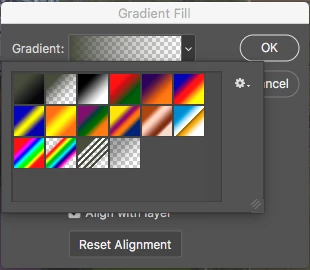
 

How is it possible to reset this tool so it works correctly? It was fine earlier this morning, but now won't bring up the Gradient Editor window at all


cheers
This topic has been closed for replies.
Correct answer jane-e

My apologies, you said Adobe Photoshop CC 20.0.1 (PS 2019) and it came out with the next version.


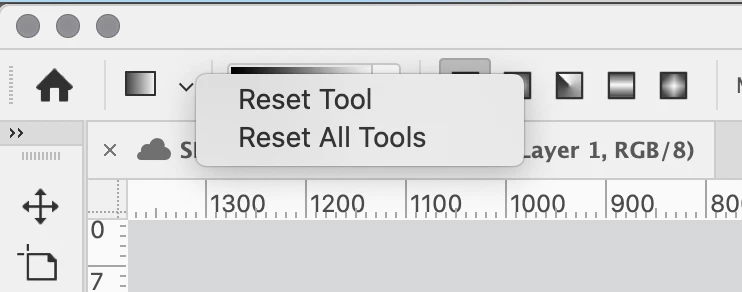
Try resetting the Gradient tool in the options bar. If that doesn't work, you might need to go to Photoshop > Preferences > Reset Preferences on Quit. Backup any customization first.

~ Jane


2 replies

Jeff Arola
Community Expert
April 7, 2021

To get the Gradient Editor click on the area just below where it says Gradient Fill.


jane-e
Community Expert
April 6, 2021

Hi

Go to the Window menu and open the (newish) Gradient panel. Details here:

https://helpx.adobe.com/photoshop/how-to/gradient-tool.html

~ Jane

faldumande
New Participant
April 6, 2021

hi Jane

Thanks so much for your reply, but no such beast appears to exist, at least not in my version on MacOS

Ever encountered the issue at your end?

Cheers

jane-e
jane-eCorrect answer
Community Expert
April 6, 2021

My apologies, you said Adobe Photoshop CC 20.0.1 (PS 2019) and it came out with the next version.


Try resetting the Gradient tool in the options bar. If that doesn't work, you might need to go to Photoshop > Preferences > Reset Preferences on Quit. Backup any customization first.

~ Jane