Exit
  • Global community
    • Language:
      • Deutsch
      • English
      • Español
      • Français
      • Português
  • 日本語コミュニティ
  • 한국 커뮤니티
0

Hairspray Tracy Face

New Here ,
Nov 29, 2018 Nov 29, 2018

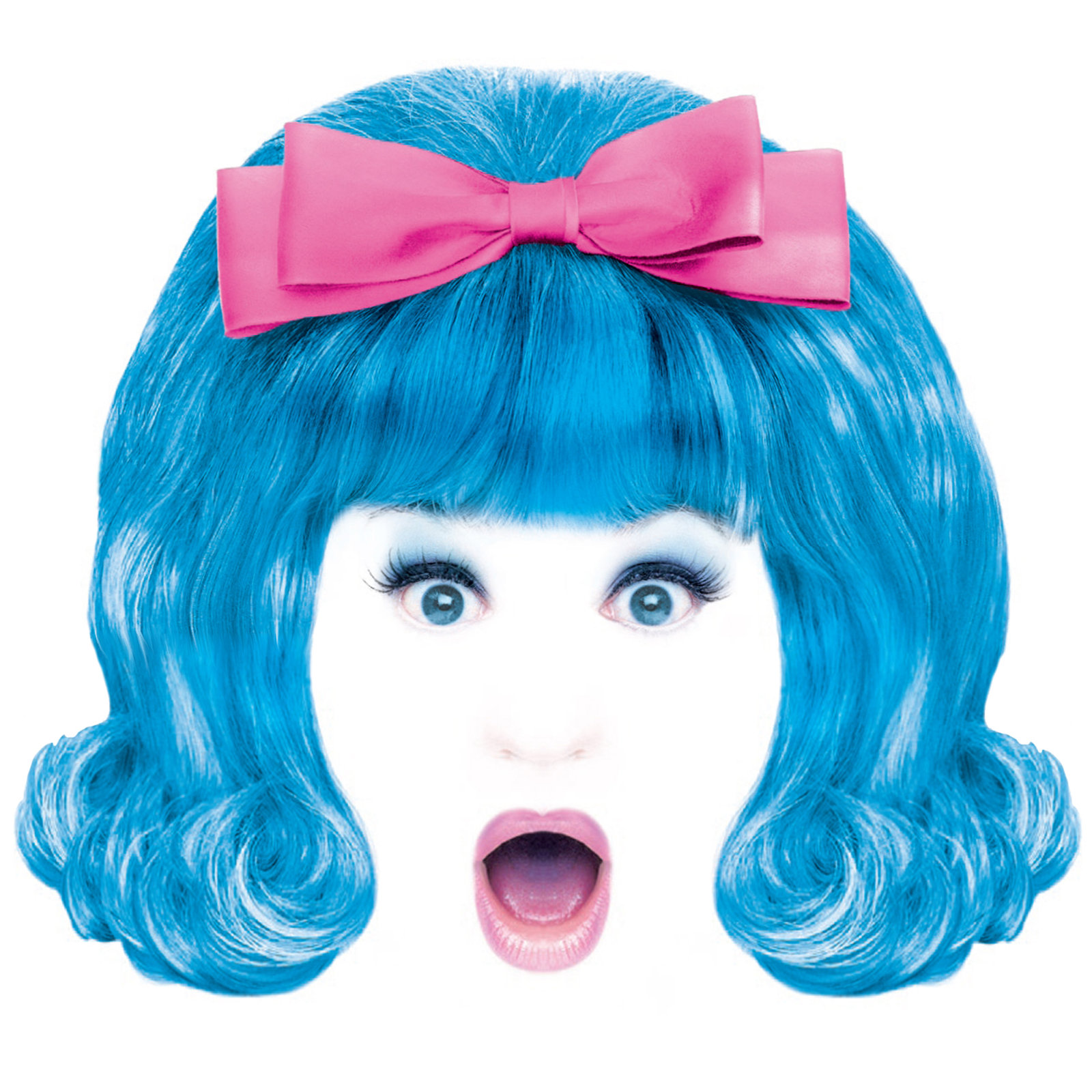
Hi, I'm trying to create my own Tracy face form my own photo modeled after the image I believe used in the original poster. (Image below.)

Could someone please guide me through the possible steps?

hairspray_head.jpg

Thanks!

John

683
Translate
Report
Community guidelines
Be kind and respectful, give credit to the original source of content, and search for duplicates before posting. Learn more
community guidelines

correct answers 1 Correct answer

Community Expert , Dec 31, 2018 Dec 31, 2018

johng50504139

Well I've had a wee go at it, starting with this image I found with Google

Camera RAW > Negative Clarity (about -30).  This smooths everything up, and is a useful trick to flatter a female portrait.

Filter Gallery > Diffuse Glow.  Experiment with the settings, but grain was set to zero.

Also add a layer mask, and paint with black to reveal the eyes and mouth from the Negative Clarity layer.

Diffuse Glow has spoiled the hair, but we are not worried about that.
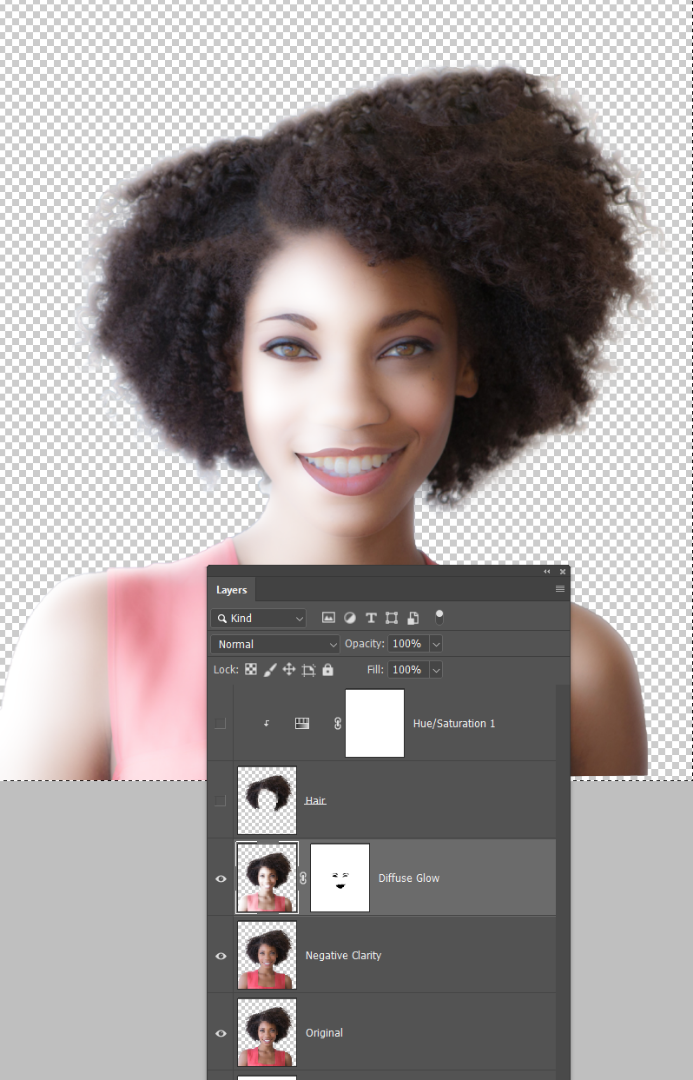
Selected the hair from the

...
Translate
Adobe
Community Expert ,
Dec 31, 2018 Dec 31, 2018

Hi John,

We are so sorry for the delay in getting back to you! Are you still looking for help in creating the image above? If you are, can you upload a screen shot of the image you want to work with and we will help you with the steps to create your image.

Michelle

Translate
Report
Community guidelines
Be kind and respectful, give credit to the original source of content, and search for duplicates before posting. Learn more
community guidelines
Community Expert ,
Dec 31, 2018 Dec 31, 2018

johng50504139

Well I've had a wee go at it, starting with this image I found with Google

Camera RAW > Negative Clarity (about -30).  This smooths everything up, and is a useful trick to flatter a female portrait.

Filter Gallery > Diffuse Glow.  Experiment with the settings, but grain was set to zero.

Also add a layer mask, and paint with black to reveal the eyes and mouth from the Negative Clarity layer.

Diffuse Glow has spoiled the hair, but we are not worried about that.

Selected the hair from the Original layer, and copied to the top of the stack.

Added a Hue/Saturation layer and checked Colorize (red highlight)

Clipped the Hue/Sat layer to the hair layer (green highlight)

There was some spill of the blue, so painted out in the layer mask.

Add your ribbon and a bit of clean up.

Copied  the  dress to the top of the stack (so it does not have the Diffuse Glow Effect)

Decided to mask through to the original eyes and mouth as they were very clean  and sharp.

Translate
Report
Community guidelines
Be kind and respectful, give credit to the original source of content, and search for duplicates before posting. Learn more
community guidelines
Community Expert ,
Dec 31, 2018 Dec 31, 2018

I see you also asked here: How to create a Hairspray Tracy Face | Photoshop Gurus Forum

Is your question answered?

Translate
Report
Community guidelines
Be kind and respectful, give credit to the original source of content, and search for duplicates before posting. Learn more
community guidelines
Community Expert ,
Dec 31, 2018 Dec 31, 2018

jane-e  wrote

I see you also asked here: How to create a Hairspray Tracy Face | Photoshop Gurus Forum

Is your question answered?

They are a funny lot over there.   Ged used to be a Mod on PG, but when the Admin found out he'd shown an interest in this forum, they took his mod rights away.  In my few visits I found them petty, jealous, and while reasonably capable, not close to the skills demonstrated by some of this forum's regular posters.  Ged now gets the considerable benefits that come with an orange badge, and he is a very welcome addition to this forum  —  even if some of his SFTW images are a bit bizarre, and pretty damn scary.   He does live in Ireland though, so fair do's.

Translate
Report
Community guidelines
Be kind and respectful, give credit to the original source of content, and search for duplicates before posting. Learn more
community guidelines
Community Expert ,
Dec 31, 2018 Dec 31, 2018

Their loss; our gain with Ged​! This forum has some amazing posters, and that includes you at the very top, Trevor — for your skill and for your detailed explanations and for your humor!

It’s almost time to get ready for NYE here — we’re a bit behind you.

Translate
Report
Community guidelines
Be kind and respectful, give credit to the original source of content, and search for duplicates before posting. Learn more
community guidelines
New Here ,
Dec 31, 2018 Dec 31, 2018

Thank you. Yes, PG responded right away and helped me get going.

Translate
Report
Community guidelines
Be kind and respectful, give credit to the original source of content, and search for duplicates before posting. Learn more
community guidelines
New Here ,
Dec 31, 2018 Dec 31, 2018
LATEST

Thank you very much.  This would have been very helpful at the time.  As it is, I still learned some things.  Thanks!

Translate
Report
Community guidelines
Be kind and respectful, give credit to the original source of content, and search for duplicates before posting. Learn more
community guidelines