


Participant
April 13, 2024
Question

【Help】Convert a layer group to an artboard
  • April 13, 2024
  • 1 reply
  • 993 views

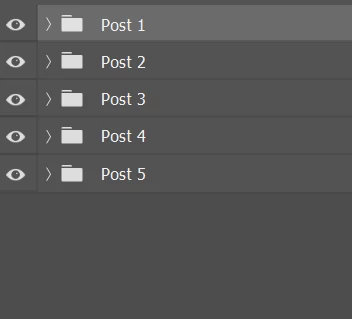
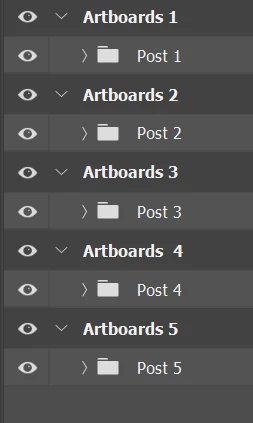
I have a batch of PSD files, some of which contain multiple layer groups as shown in the above image. The number of layer groups in each file is uncertain. I've written a script using ChatGPT and Claude to place each layer group on a canvas, with the canvas size being the same as the original file. However, I can't seem to get it to run successfully. The desired outcome is as shown in the image.
 

// Check if there are any Post layer groups
function hasPostGroups() {
var doc = app.activeDocument;
for (var i = 1; i <= doc.layerSets.length; i++) {
var layerSet = doc.layerSets[i - 1];
if (layerSet.name.indexOf("Post") === 0) {
return true;
}
}
return false;
}

// Create artboards
function createArtboards(num) {
var doc = app.activeDocument;
for (var i = 0; i < num; i++) {
var artboard = doc.artboards.add(doc.artboards[0].artboardRect);
artboard.name = "Artboard " + (i + 1);
}
}

// Move Post layer groups to corresponding artboards
function movePostGroupsToArtboards() {
var doc = app.activeDocument;
var artboardIndex = 0;
for (var i = 1; i <= doc.layerSets.length; i++) {
var layerSet = doc.layerSets[i - 1];
if (layerSet.name.indexOf("Post") === 0) {
var artboard = doc.artboards[artboardIndex];
var artboardRect = artboard.artboardRect;
var bounds = layerSet.bounds;
var offsetX = artboardRect[0] - bounds[0].value;
var offsetY = artboardRect[1] - bounds[1].value;
layerSet.translate(offsetX, offsetY);
artboardIndex++;
}
}
}

// Main function
function main() {
if (!hasPostGroups()) {
alert("There are no Post layer groups in the current document, no further action will be taken.");
return;
}

var numPostGroups = app.activeDocument.layerSets.length;
createArtboards(numPostGroups);
movePostGroupsToArtboards();

alert("Operation completed!");
}

// Execute the main function
main();


This topic has been closed for replies.

1 reply

Stephen Marsh
Community Expert
Community Expert
April 14, 2024

@Liu254468142lhe 


A basic conversion of all root/top-level groups to artboards will simply stack each artboard, one on top of the other*. This script is a bit of a cheat, but it works for me. Extra code could be added to check if the layer group contained "Post" in its name:


/* 
All Root-Top-Level Groups to Artboards.jsx
v1.0 15th April 2024, Stephen Marsh
https://community.adobe.com/t5/photoshop-ecosystem-discussions/help-convert-a-layer-group-to-an-artboard/td-p/14552904
NOTE: This script makes use of features found in later versions of Photoshop. Tested in version 2024 and 2021, errors may occur in earlier versions.
*/

try {

    ///// Pre-loop /////

    // Ensure that a layer is selected before starting the loop
    app.activeDocument.activeLayer = app.activeDocument.activeLayer.layers[0];

    ///// Loop over the root/top-level layer sets /////
    for (var i = 0; i < activeDocument.layerSets.length; i++) {

        activeDocument.activeLayer = activeDocument.layers[i];
        if (isGroup() === true) {
            groupToArtboard();
        }

        function isGroup() {
            // modified from a script by greless with hints from jazz-y!
            // returns true or false
                var r = new ActionReference();
                r.putEnumerated(stringIDToTypeID('layer'), stringIDToTypeID('ordinal'), stringIDToTypeID('targetEnum'));
                var options = executeActionGet(r);
                return options.hasKey(stringIDToTypeID('layerSection')) && !options.hasKey(stringIDToTypeID('framedGroup')) && !options.hasKey(stringIDToTypeID('artboard')); // test for the required key
        }

        function groupToArtboard() {
            // Convert the group to a SO to "safely isolate it" for the artboard conversion
            executeAction(stringIDToTypeID("newPlacedLayer"), undefined, DialogModes.NO);
            // Edit the SO
            executeAction(stringIDToTypeID("placedLayerEditContents"), undefined, DialogModes.NO);
            // Convert the group to an artboard
            var idselect = stringIDToTypeID("select");
            var desc751 = new ActionDescriptor();
            var idnull = stringIDToTypeID("null");
            var ref90 = new ActionReference();
            var idmenuItemClass = stringIDToTypeID("menuItemClass");
            var idmenuItemType = stringIDToTypeID("menuItemType");
            var idartboardFromLayersEvent = stringIDToTypeID("artboardFromLayersEvent");
            ref90.putEnumerated(idmenuItemClass, idmenuItemType, idartboardFromLayersEvent);
            desc751.putReference(idnull, ref90);
            executeAction(idselect, desc751, DialogModes.NO);
            // Close the SO saving changes
            app.activeDocument.close(SaveOptions.SAVECHANGES);
            // Convert the SO to layers
            var idselect = stringIDToTypeID("select");
            var desc816 = new ActionDescriptor();
            var idnull = stringIDToTypeID("null");
            var ref95 = new ActionReference();
            var idmenuItemClass = stringIDToTypeID("menuItemClass");
            var idmenuItemType = stringIDToTypeID("menuItemType");
            var idplacedLayerConvertToLayers = stringIDToTypeID("placedLayerConvertToLayers");
            ref95.putEnumerated(idmenuItemClass, idmenuItemType, idplacedLayerConvertToLayers);
            desc816.putReference(idnull, ref95);
            executeAction(idselect, desc816, DialogModes.NO);

        }
    }

    ///// Post-loop /////

    // Select all layers
    app.runMenuItem(stringIDToTypeID('selectAllLayers'));

    // Unlock the nested artboards
    var s2t = function (s) {
        return app.stringIDToTypeID(s);
    };
    var descriptor = new ActionDescriptor();
    var descriptor2 = new ActionDescriptor();
    var reference = new ActionReference();
    reference.putEnumerated(s2t("layer"), s2t("ordinal"), s2t("targetEnum"));
    descriptor.putReference(s2t("null"), reference);
    descriptor2.putBoolean(s2t("protectNone"), true);
    descriptor.putObject(s2t("layerLocking"), s2t("layerLocking"), descriptor2);
    executeAction(s2t("applyLocking"), descriptor, DialogModes.NO);

    // Deselect all layers
    app.runMenuItem(stringIDToTypeID('selectNoLayers'));

} catch (e) {
    alert("Error!" + "\r" + e + ' ' + e.line);
}


* I find it hard to script the distribution and gap of artboards (horizontally, vertically, in a grid/array etc). I am not aware of any scripts that can auto-arrange and or space out all artboards into such a layout (such a script would be a great tool to have, I have never been able to get the distribute artboards feature to work for this task).

Participant
April 15, 2024

Thank you very much for your reply. After searching for relevant information, I modified the script. Now the script can successfully create multiple artboards and arrange them neatly. However, I am unable to move layer groups like Post 2 to their corresponding artboards.

cTID = function(s) { return app.charIDToTypeID(s); };
sTID = function(s) { return app.stringIDToTypeID(s); };

// Function to get the count of layer groups starting with "Post "
function getPostLayerGroupCount() {
var PostGroupCount = 0;
var layers = app.activeDocument.layers;
for (var i = 0; i < layers.length; i++) {
if (layers[i].typename == "LayerSet" && layers[i].name.indexOf("Post ") === 0) {
PostGroupCount++;
}
}
return PostGroupCount;
}

// Function to get the file size
function getFileSize() {
var width = app.activeDocument.width.value;
var height = app.activeDocument.height.value;
return {width: width, height: height};
}

// Function to create artboards
function createArtboards(PostGroupCount, fileSize) {
var interval = 100; // Interval between artboards
var startX = 0;
var startY = 0;
for (var i = 0; i < PostGroupCount; i++) {
var name = "Artboard " + (i + 1);
var left = startX;
var top = startY;
var right = startX + fileSize.width;
var bottom = startY + fileSize.height;
createArtboard(top, left, bottom, right, name);
startX += fileSize.width + interval; // Update the starting position for the next artboard
}
}

// Function to create a single artboard
function createArtboard(top, left, bottom, right, name) {
var desc1 = new ActionDescriptor();
var ref1 = new ActionReference();
ref1.putClass(sTID("artboardSection"));
desc1.putReference(cTID('null'), ref1);
desc1.putString(cTID('Nm '), name);
var desc2 = new ActionDescriptor();
desc2.putDouble(cTID('Top '), top);
desc2.putDouble(cTID('Left'), left);
desc2.putDouble(cTID('Btom'), bottom);
desc2.putDouble(cTID('Rght'), right);
desc1.putObject(sTID("artboardRect"), sTID("classFloatRect"), desc2);
executeAction(sTID('make'), desc1, DialogModes.NO);
}

// Function to move "Post " layer groups to artboards
function movePostGroupToArtboard(PostIndex, artboardIndex) {
var doc = app.activeDocument;
var PostGroupName = "Post " + PostIndex;
var sourceArtboard = doc.layerSets.getByName("Artboard 1");
var destinationArtboard = doc.layerSets.getByName("Artboard " + artboardIndex);
if (sourceArtboard && destinationArtboard) {
var layers = sourceArtboard.layers;
for (var i = 0; i < layers.length; i++) {
if (layers[i].typename == "LayerSet" && layers[i].name == PostGroupName) {
var PostGroup = layers[i];
PostGroup.move(destinationArtboard, ElementPlacement.INSIDE);
break;
}
}
}
}

// Main function
function main() {
var PostGroupCount = getPostLayerGroupCount();
if (PostGroupCount > 0) {
var fileSize = getFileSize();
createArtboards(PostGroupCount, fileSize);

// Move each "Post " layer group to its respective artboard
for (var i = 2; i <= PostGroupCount + 1; i++) { // Start moving from "Post 2" to "Artboard 2"
movePostGroupToArtboard(i, i);
}
}
}

// Execute the main function
main();
Stephen Marsh
Community Expert
Community Expert
April 15, 2024

@Liu254468142lhe – Unfortunately the script doesn't run for me, nothing happens.