


Participant
February 20, 2022
Answered

Help with Vector Lines>?

  • February 20, 2022
  • 1 reply
  • 197 views

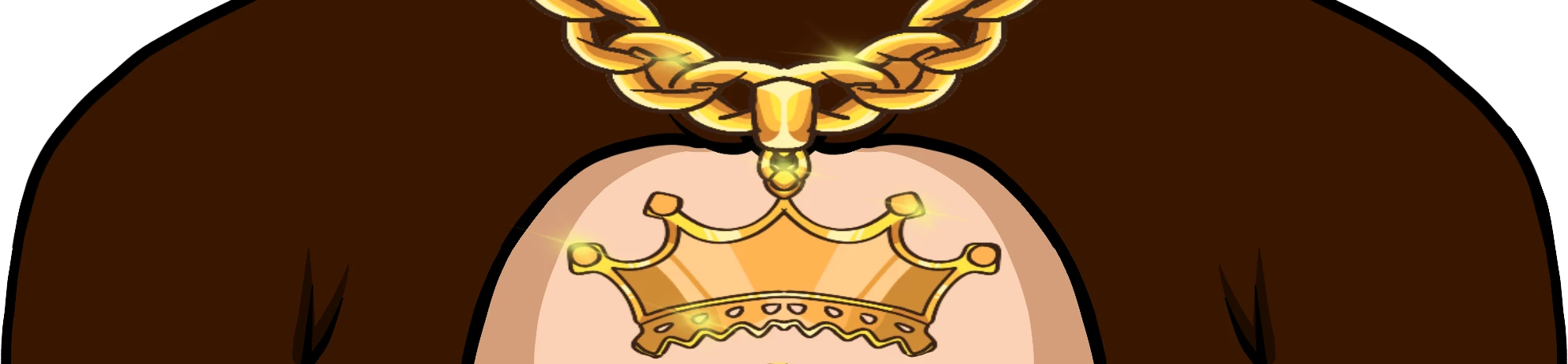
I really need help. I am diong a art project. I've learned most of the editing process from Youtube. I'm trying to edit something from an image. I managed to content fill it but I keep getting these weird outlines. I believe they're vector lines from Adobe Illustrator. I don't how to get rid of them.



This topic has been closed for replies.
Correct answer jane-e

@Cheezelord 

This is a guess, but it looks to as if a selection was made around the crown which was a bit too small and did not include the edge. The crown was removed, leaving the part that was not properly selected. When you look in your Layers panel, is everything on one layer?


Try using the Spot Healing Brush "J" or the Clone Stamp tool "S" to clean up the edges of the crown.


Jane


1 reply

jane-e
Community Expert
jane-eCommunity ExpertCorrect answer
Community Expert
February 20, 2022

@Cheezelord 

This is a guess, but it looks to as if a selection was made around the crown which was a bit too small and did not include the edge. The crown was removed, leaving the part that was not properly selected. When you look in your Layers panel, is everything on one layer?


Try using the Spot Healing Brush "J" or the Clone Stamp tool "S" to clean up the edges of the crown.


Jane