


Participant
January 29, 2025
Answered

How can I add a heart shape to custom tools in photoshop

  • January 29, 2025
  • 2 replies
  • 2089 views

I did the legacy shapes thing in the shapes window only to find out that they are not there anymore...
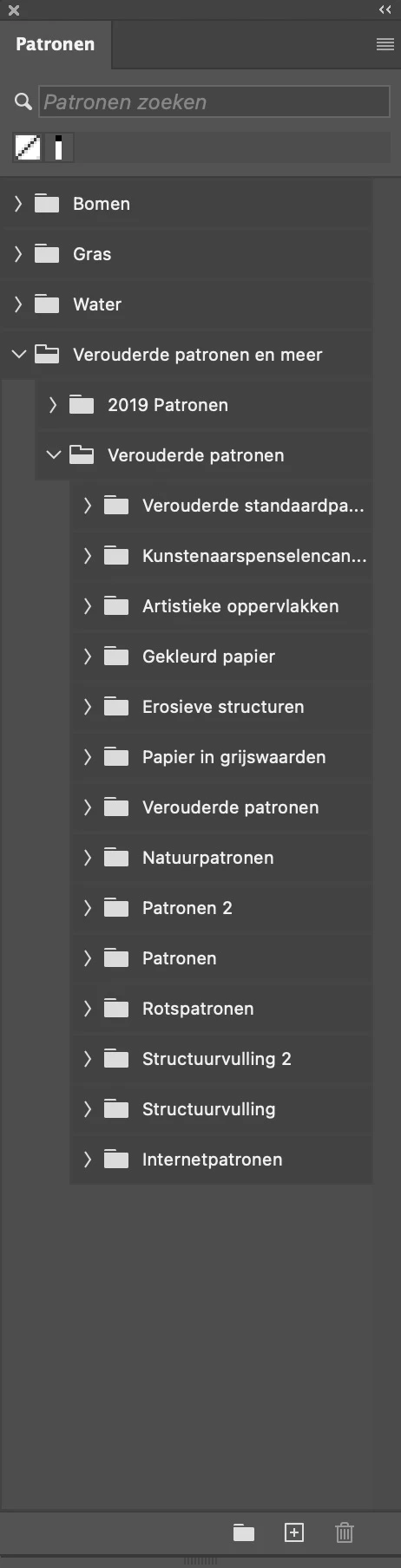


I checked all the shapes and they have disapeared?  

Why would adobe do such an annoying thing?

Correct answer D Fosse

I kind of agree that this badly organized and too cumbersome.


The thing is, you need to open the Shapes panel. Not just the tool menu, but the dedicated Shapes panel. They will be there.


Once you've picked them there, they will be available from the ordinary tool menu and you don't need the panel again.


Yeah, I know...

2 replies

c.pfaffenbichler
Community Expert
Community Expert
January 29, 2025

Please actually show the dropdown menu.

jane-e
Community Expert
Community Expert
January 29, 2025

@Frans35958056anyp 


In addition to what @c.pfaffenbichler asked for, I Googled "patronen" and see that it is translated as "patterns". Please confirm that you have the Shapes panel opened from the Window menu.


Jane


Participant
January 29, 2025

you are right, I was wrong the shapes are there I got confused!

Nevertheless I do not understand why Adobe makes the choice to alter these kind of things knowing that ever designer once in a while uses these settings blindly only to find out that they first have to be added?


Anyway, thanx for the help!


Participant
January 29, 2025

So I am losing allready over an hour to get to find the legacy shapes in PS 2024. Fist I had to find the shapes again in the menu.... Next I had to find out that the legacy shapes like arrows and other old shapes, just disapeared so I had to find a video on how to find them back only to find out that they are gon!


Yes ther is the option to activate them again (why on earth deactivate them??) but NO they are gone as you can see on my screenshot


I checked then all only to find out that the¡y are gone???


So Adobe does charge me with 12€ per month to be able to use their software, NO where do I sent the bill for the lost time @75€ per hour and how do I get these legacy shapes back to be able to use them??


And can tell somebody me why on earth change fixed things like menu setting and asociated things or make them disappear??


Ever heard of : NEVER CHANGE A WIINING TEAM?


Yes I am quite annoyed, you sure got that right!


Any one knows where to download these tings, would be super apreceated!! 


D Fosse
Community Expert
D FosseCommunity ExpertCorrect answer
Community Expert
January 29, 2025

I kind of agree that this badly organized and too cumbersome.


The thing is, you need to open the Shapes panel. Not just the tool menu, but the dedicated Shapes panel. They will be there.


Once you've picked them there, they will be available from the ordinary tool menu and you don't need the panel again.


Yeah, I know...