



Simonetos The Greek
Inspiring
November 2, 2021
Answered

How can I rename a layer group or a layer with the same name using an action?

  • November 2, 2021
  • 5 replies
  • 2397 views

I have quite a bit projects which contain a layer group by the name "Cover" and I want to rename it to "Cover Group" using this action.
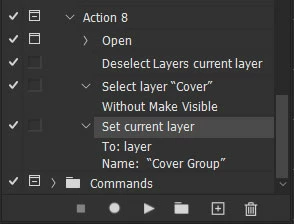
But into "Cover" layer group there is a layer with the same name. So when my action starts, instead of find and rename the layer group "Cover", renames the layer "Cover"!!!
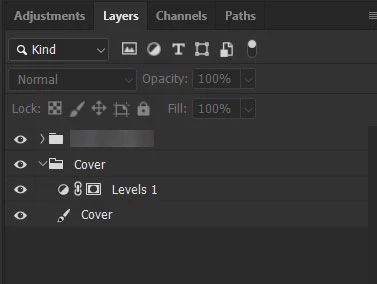
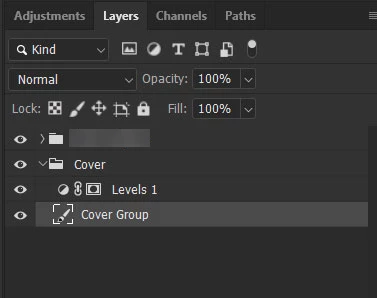
Any idea how can I define my action so to rename the layer group and not the layer?

This topic has been closed for replies.
Correct answer JJMack

You may need to script that, Script can use logic to process layersets and also  test the object kind that is targeted or currently active.  Layers can be addressed by the Layer ID which is unique where Name need not be unique. You can have many layers with the name cover,  In Actions it best to navigate layers relatively then by name.  Even that can be a problem for only visible layer will be targeted relatively. If you  want to do complex processing Scripting is your best option.

5 replies

Legend
November 2, 2021

select layer Cover

rename CoverTmp

select layer Cover

rename CoverGroup

select layer CoverTmp

rename Cover


Kukurykus
Legend
November 2, 2021

Loll, I had earlier to suggest exaclty same workaround, but then thought, nah, too nasty 😉

Legend
November 2, 2021

That's english slang - antitype for yeah 😄


In Russian, the meaning is about the same, but this is an obscene vocabulary 😄

Kukurykus
Legend
November 2, 2021

According to given scenario you may use below script:


aD.activeLayer = (aD = activeDocument).layerSets.getByName('Cover')


or directly rename it (so without selecting):


activeDocument.layerSets.getByName('Cover').name += ' Group'


Legend
November 2, 2021
#target photoshop

s2t = stringIDToTypeID;

renameGroup('Cover', 'Cover Group')

function renameGroup(from, to) {
    (ref = new ActionReference()).putProperty(s2t('property'), p = s2t('numberOfLayers'));
    ref.putEnumerated(s2t('document'), s2t('ordinal'), s2t('targetEnum'));
    var len = executeActionGet(ref).getInteger(p);
    for (var i = 1; i <= len; i++) {
        (r = new ActionReference()).putProperty(s2t('property'), p = s2t('layerSection'));
        r.putIndex(s2t('layer'), i);
        if (typeIDToStringID(executeActionGet(r).getEnumerationValue(p)) == 'layerSectionEnd') continue;

        (r = new ActionReference()).putProperty(s2t('property'), p = s2t('layerKind'));
        r.putIndex(s2t('layer'), i);
        if (executeActionGet(r).getInteger(p) != 7) continue;

        (ref = new ActionReference()).putProperty(s2t('property'), p = s2t('name'));
        ref.putIndex(s2t('layer'), i);
        if (executeActionGet(ref).getString(p).match(new RegExp(from, 'i'))) {
            (r = new ActionReference()).putIndex(s2t('layer'), i);
            (d = new ActionDescriptor()).putReference(s2t('null'), r);
            (d1 = new ActionDescriptor()).putString(s2t('name'), to);
            d.putObject(s2t('to'), s2t('layer'), d1);
            executeAction(s2t('set'), d, DialogModes.NO);
        }
    }
}
Legend
November 2, 2021

doesn't seem to work ...

(ps2020)

Legend
November 2, 2021

Maybe we need to select group before renaming? I have no 20 version to check


#target photoshop

s2t = stringIDToTypeID;

renameGroup('Cover', 'Cover Group')

function renameGroup(from, to) {
    (r = new ActionReference()).putProperty(s2t('property'), p = s2t('numberOfLayers'));
    r.putEnumerated(s2t('document'), s2t('ordinal'), s2t('targetEnum'));
    var len = executeActionGet(r).getInteger(p);
    for (var i = 1; i <= len; i++) {
        (r = new ActionReference()).putProperty(s2t('property'), p = s2t('layerSection'));
        r.putIndex(s2t('layer'), i);
        if (typeIDToStringID(executeActionGet(r).getEnumerationValue(p)) == 'layerSectionEnd') continue;

        (r = new ActionReference()).putProperty(s2t('property'), p = s2t('layerKind'));
        r.putIndex(s2t('layer'), i);
        if (executeActionGet(r).getInteger(p) != 7) continue;

        (r = new ActionReference()).putProperty(s2t('property'), p = s2t('name'));
        r.putIndex(s2t('layer'), i);
        if (executeActionGet(r).getString(p).match(new RegExp(from, 'i'))) {
            (r = new ActionReference()).putIndex(s2t("layer"), i);
            (d = new ActionDescriptor()).putReference(s2t("null"), r);
            executeAction(s2t("select"), d, DialogModes.NO);

            (r = new ActionReference()).putEnumerated(s2t('layer'), s2t('ordinal'), s2t('targetEnum'));
            (d = new ActionDescriptor()).putReference(s2t('null'), r);
            (d1 = new ActionDescriptor()).putString(s2t('name'), to);
            d.putObject(s2t('to'), s2t('layer'), d1);
            executeAction(s2t('set'), d, DialogModes.NO);
        }
    }
}


Chuck Uebele
Community Expert
Community Expert
November 2, 2021

As JJ mentioned, scripts are the way to go. Even with scripts, if you have two or more layers with the same name, you can run into issues. You can use a command to get a layer by name, but it will only find the first instance of that name. Unless you know the exact ID of the layer, you might need to loop through the layers to detect a match. In your case, checking to see it the layer is an art layer or a layer set. 

JJMack
Community Expert
JJMackCommunity ExpertCorrect answer
Community Expert
November 2, 2021

You may need to script that, Script can use logic to process layersets and also  test the object kind that is targeted or currently active.  Layers can be addressed by the Layer ID which is unique where Name need not be unique. You can have many layers with the name cover,  In Actions it best to navigate layers relatively then by name.  Even that can be a problem for only visible layer will be targeted relatively. If you  want to do complex processing Scripting is your best option.

JJMack