Inspiring
December 31, 2018
Answered

How can I rename photos?

  • December 31, 2018
  • 4 replies
  • 7291 views

Trick question.....

I need to automatically rename about 600 photos, but I need to KEEP all of the original photo numbers. I just need to put some stuff AFTER the original numbers, then the jpg.

For example, DSC_5452.jpg is the original.

I need to ADD a series of numbers, that would turn it into DSC_5452_000_000_000_000_0001.jpg

How can I do that in either Photoshop or Lightroom?
    This topic has been closed for replies.
    Correct answer Conrad_C

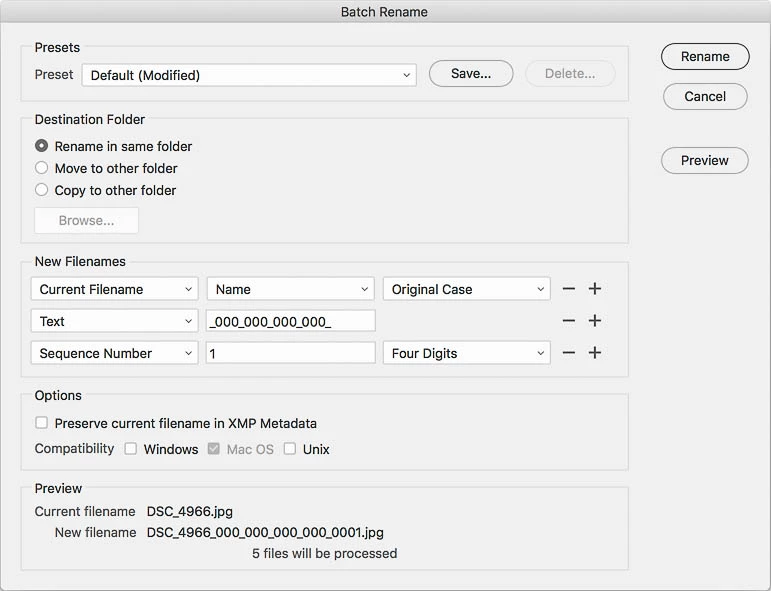
    In Bridge, you can do it like this:

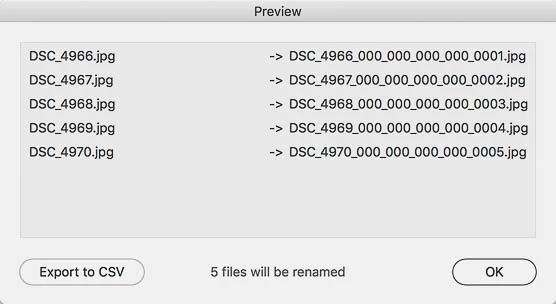
    Then, if you click Preview, you can see what you'll get:

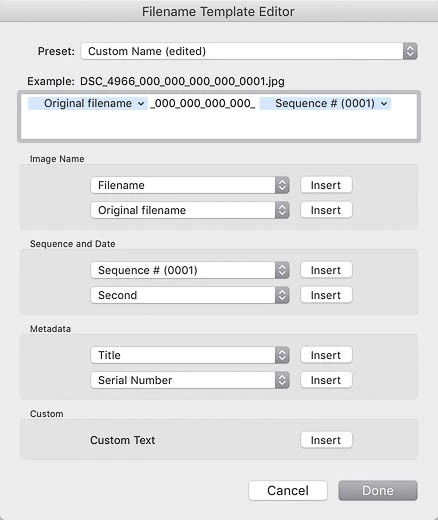
    In Lightroom, it's the same idea, but slightly different setup inserting the blue rename tokens plus custom text:

    4 replies

    Community Expert
    December 31, 2018

    I have been using the following free Bulk Rename Utility (Windows) for years:

    Introduction - Bulk Rename Utility

    it is very simple and intuitive. It can add characters to the begging or end of the file name, can replace characters, shorten and lots more.

    Conrad_C
    Community Expert
    Conrad_CCommunity ExpertCorrect answer
    Community Expert
    December 31, 2018

    In Bridge, you can do it like this:

    Then, if you click Preview, you can see what you'll get:

    In Lightroom, it's the same idea, but slightly different setup inserting the blue rename tokens plus custom text:

    TerryLn22Author
    Inspiring
    December 31, 2018

    I can't get either to do what you're showing here.

    In Bridge, you see the current filename as 8572.jpg. Yet the New filename under that, it automatically put in what I guess is the sequence number that I don't want, and I can't figure out how to get rid of it.

    In Lightroom, I saw instructions on how to pull up the Filename Template Editor which says it's "to the right of Import", but on my Win10 computer, "Export" is to the right of Import. Within Export you can rename files but it's a very basic thing, no options to do what you're saying to do.

    And you were asking if the 001 is a static or sequencing number, it needs to be static; each photo needs to have that same 001 at the end.

    Stephen Marsh
    Community Expert
    Community Expert
    December 31, 2018

    You need to change the first row from Name + Extension to Name (otherwise you would need to employ a more complex setup using a string substitution to remove the extension). Then all you need is a static string of text added as below:

    P.S. Happy New Year from Australia!

    Bojan Živković11378569
    Community Expert
    Community Expert
    December 31, 2018
    TerryLn22Author
    Inspiring
    December 31, 2018

    Without me watching those videos, I don't think any of those will number them the way I want. I need to keep the original number and put something after that.

    Chuck Uebele
    Community Expert
    Community Expert
    December 31, 2018

    Use Bridge batch rename. Select the photos you want to renumber in Bridge, then right click and select batch rename. Use the dialog box to number them how you want them.

    TerryLn22Author
    Inspiring
    December 31, 2018

    I'm still having problems of adding anything beyond the original number, and prior to the jpg. Even if I wipe out the original jpg and add it in as a change, I can't see how to do this.

    Take an original photo, say DSC_4966.jpg, and add this in after the number (not after the jpg)........

    _000_000_000_000_001

    to turn the whole thing into

    DSC_4966_000_000_000_000_001.jpg

    But each of the 600 photos has to keep their original photo number.

    I can't figure out how to do that. Oddly enough, Bridge adds in 20120904_001 to the original number (after the jpg) without me typing anything. It just automatically shows that in the preview. I get DSC_4966.jpg20120904_001. How and why is it doing this?

    Thanks

    Stephen Marsh
    Community Expert
    Community Expert
    December 31, 2018

    I believe that I’ll be able to help... can you provide 3 random before and after filename examples?

    It would also be helpful if y can upload a screenshot to the forum of your batch rename settings.