

Exit
  • Global community
    • Language:
      • Deutsch
      • English
      • Español
      • Français
      • Português
  • 日本語コミュニティ
  • 한국 커뮤니티
0

How could I remove template from photoshop?

New Here ,
Dec 15, 2016 Dec 15, 2016

I think that may be this template downloaded incorrectly, but I don't know how to delete it and download it again....
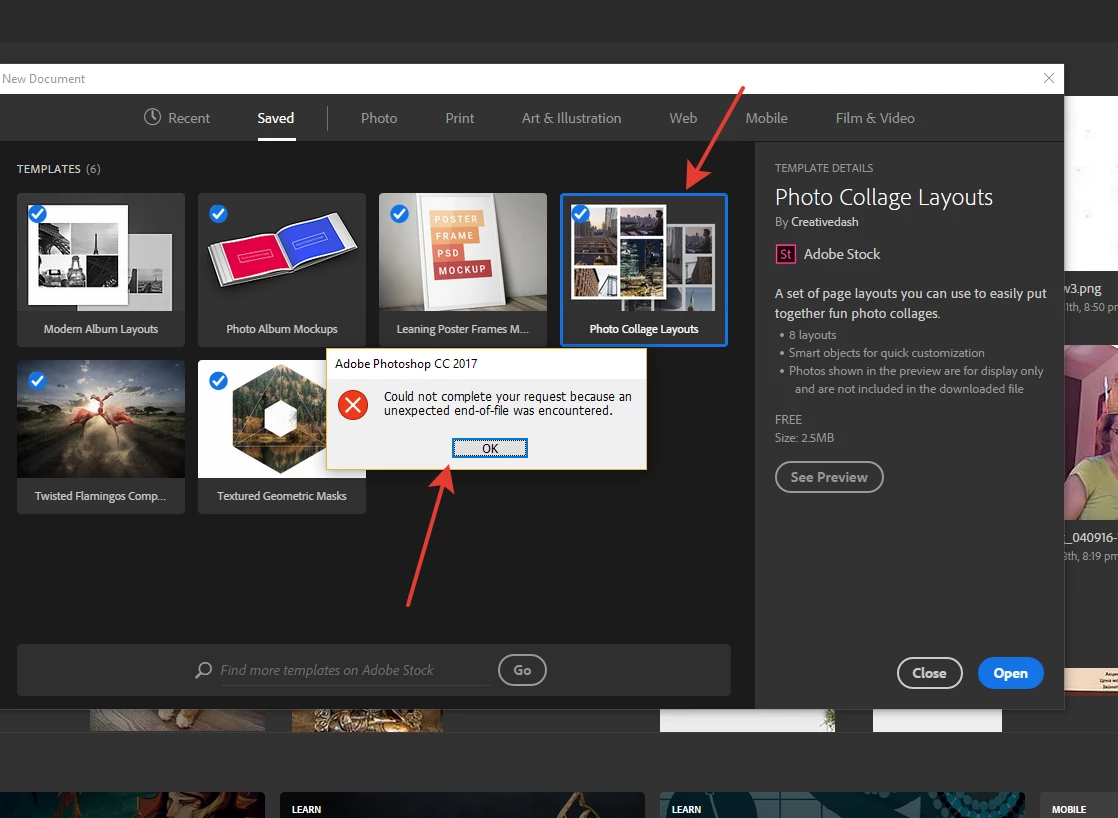

2016-12-15_20-10-58.png

8.1K
Translate
Report
Community guidelines
Be kind and respectful, give credit to the original source of content, and search for duplicates before posting. Learn more
community guidelines

correct answers 1 Correct answer

Adobe Employee , Dec 15, 2016 Dec 15, 2016

Hi progrecc,

If you go into the Libraries panel you should have a Library called Stock Templates, if you delete the templates you see there, you should be able to redownload them from the New Document screen.

Hope this helps,

Regards

Pete

Translate
Adobe
Community Expert ,
Dec 15, 2016 Dec 15, 2016

Would download from Adobe not be put into you library.  If that is the case try deleting the bad template from new document save and your library to see if you can get a good download. There should be a trash can Icon when select the bad template in the saved new documents. I do not see all the check nark icons you seem to have in your saved templates I have my templates outside of Adobe new documents workspace.

Capture.jpg

JJMack
Translate
Report
Community guidelines
Be kind and respectful, give credit to the original source of content, and search for duplicates before posting. Learn more
community guidelines
New Here ,
Dec 15, 2016 Dec 15, 2016

there is no trash bin icon

here is you can see by yourself2016-12-15_21-05-25.png

Translate
Report
Community guidelines
Be kind and respectful, give credit to the original source of content, and search for duplicates before posting. Learn more
community guidelines
Adobe Employee ,
Dec 15, 2016 Dec 15, 2016

Hi progrecc,

If you go into the Libraries panel you should have a Library called Stock Templates, if you delete the templates you see there, you should be able to redownload them from the New Document screen.

Hope this helps,

Regards

Pete

Translate
Report
Community guidelines
Be kind and respectful, give credit to the original source of content, and search for duplicates before posting. Learn more
community guidelines
New Here ,
Jan 12, 2017 Jan 12, 2017

where is the library ?

Translate
Report
Community guidelines
Be kind and respectful, give credit to the original source of content, and search for duplicates before posting. Learn more
community guidelines
Community Expert ,
Jan 12, 2017 Jan 12, 2017

Capture.jpg

JJMack
Translate
Report
Community guidelines
Be kind and respectful, give credit to the original source of content, and search for duplicates before posting. Learn more
community guidelines
New Here ,
Oct 24, 2017 Oct 24, 2017

C:\Users\[Your_user]\AppData\Roaming\Adobe\Creative Cloud Libraries\LIBS

Delete everything inside this folder

Translate
Report
Community guidelines
Be kind and respectful, give credit to the original source of content, and search for duplicates before posting. Learn more
community guidelines
New Here ,
Jan 31, 2018 Jan 31, 2018
LATEST

thanks man, worked!!

Translate
Report
Community guidelines
Be kind and respectful, give credit to the original source of content, and search for duplicates before posting. Learn more
community guidelines
Community Expert ,
Dec 15, 2016 Dec 15, 2016

They seem to be saved on my windows system in my Photoshop Preferences file "New Doc Sizes.json"  in the folder

"C:\Users\My user id\AppData\Roaming\Adobe\Adobe Photoshop CC 2017\Adobe Photoshop CC 2017 Settings\"

You could try closing CC 2017 and editing that file with a text editor and remove bad entries.

There are bugs in CC 2017 New Document interface, It can even open like this:

Capture.jpg

JJMack
Translate
Report
Community guidelines
Be kind and respectful, give credit to the original source of content, and search for duplicates before posting. Learn more
community guidelines
Adobe Employee ,
Dec 15, 2016 Dec 15, 2016

Is that your screenshot JJ?

Do you know how you got the new doc dialog in that small of a state?

Or am I seeing the image incorrectly? it looks like a thin/tall image

Regards

Pete

Translate
Report
Community guidelines
Be kind and respectful, give credit to the original source of content, and search for duplicates before posting. Learn more
community guidelines
Community Expert ,
Dec 15, 2016 Dec 15, 2016
Translate
Report
Community guidelines
Be kind and respectful, give credit to the original source of content, and search for duplicates before posting. Learn more
community guidelines
Adobe Employee ,
Dec 15, 2016 Dec 15, 2016

Thanks man. I'm investigating this with the team now.

Regards

Pete

Translate
Report
Community guidelines
Be kind and respectful, give credit to the original source of content, and search for duplicates before posting. Learn more
community guidelines