This topic has been closed for replies.
Correct answer r-bin

thanks,I desperately need this knowledge of ActionManager


var param = get_brush_param();

// examples

alert(param.opacity, "Opacity");

alert(param.diameter, "Diameter");

// show all (almost all) brush props

alert(obj_to_str(param), "Brush options");

function obj_to_str(obj){var str = ""; for (var p in obj) if(obj.hasOwnProperty(p))try{str+=p+"::"+obj

+"\n";}catch(e){};return str;}

//////////////////////////////////////////////////////////////////

function get_brush_param()

    {

    try {

        var r = new ActionReference();

        r.putProperty(stringIDToTypeID("property"), stringIDToTypeID("tool"));

        r.putEnumerated(stringIDToTypeID("application"), stringIDToTypeID("ordinal"), stringIDToTypeID("targetEnum"));

        var d = executeActionGet(r);

        var options = d.getObjectValue(stringIDToTypeID("currentToolOptions"));          

        var ret = new Object();

        try { var brush = options.getObjectValue(stringIDToTypeID("brush")); } catch(e) { alert("Current tool not brush!"); return ret; }

        for (var i = 0; i < options.count; i++)

            {

            var key = options.getKey(i);

            var type = options.getType(key);

            var val = undefined;

            switch (type)

                {

                case DescValueType.BOOLEANTYPE:    val = options.getBoolean(key); break;

                case DescValueType.DOUBLETYPE:     val = options.getDouble(key);  break; 

                case DescValueType.INTEGERTYPE:    val = options.getInteger(key); break;

                case DescValueType.ENUMERATEDTYPE: val = typeIDToStringID(options.getEnumerationValue(key)); break;

                case DescValueType.UNITDOUBLE:     val  = options.getUnitDoubleValue(key); break; // not quite right

                }


            if (val != undefined)

                {

                var name = typeIDToStringID(key);

                if (!name) name = typeIDToCharID(key);

                if (typeof(val) == "string")

                    eval("ret." + name +"='"+val+"'");

                else

                    eval("ret." + name +"="+val);

                }

            }

        for (var i = 0; i < brush.count; i++)

            {

            var key = brush.getKey(i);

            var type = brush.getType(key);

            var val = undefined;

            switch (type)

                {

                case DescValueType.BOOLEANTYPE:    val = brush.getBoolean(key); break;

                case DescValueType.DOUBLETYPE:     val = brush.getDouble(key);  break; 

                case DescValueType.INTEGERTYPE:    val = brush.getInteger(key); break;

                case DescValueType.ENUMERATEDTYPE: val = typeIDToStringID(brush.getEnumerationValue(key)); break;

                case DescValueType.UNITDOUBLE:     val = brush.getUnitDoubleValue(key); break; // not quite right

                }


            if (val != undefined)

                {

                var name = typeIDToStringID(key);

                if (!name) name = typeIDToCharID(key);

                if (typeof(val) == "string")

                    eval("ret." + name +"='"+val+"'");

                else

                    eval("ret." + name +"="+val);

                }

            }               

        return ret;

        }

    catch (e) { alert(e); }

    }

3 replies

JJMack
Community Expert
January 21, 2019

Here you are looking for the current brush tool features.   This is not straight forward for there as so many brush types.   Brush features vary between brush type.  A round brush, a sample tipped brush,  special brush like a fan tip brush.   Different features are supported or not supported.   For example all brushes do not support Hardness/softness.

In the Photoshop Scripting forum there are many scripting sample that gets at some brush types current features.  I have not seem a generalized brush script that well retrieve the features of the current brush no matter what kind of brush is current. I also only hack at scripting I do not know JavaScript and Adobe DOM does not cover all of Photoshop feature.  Often Action Manager code must be user in a Photoshop scripts to do some things.  Here is a JavaScript function to set a round brush tip brush tip feature,  The function first uses Action Manager code to retrieve the current round tip brush's features in case a setting has not been pass to the function. The last thing the function  does is set the setting passed to the function by the coder.

function setBrushFeatures (Diameter,Hardness,Angle,Roundness,Spacing,Flipy,Flipx) {

    //A Brush tool must be the current tool

    if (!app.toolSupportsBrushes(app.currentTool)) selectBrush();  //CC 2014 test if the current tool is a brush type tool else select the brusg tool

    var ref = new ActionReference();

    ref.putEnumerated( charIDToTypeID("capp"), charIDToTypeID("Ordn"), charIDToTypeID("Trgt") );

    var appDesc = executeActionGet(ref);

    var toolDesc = appDesc.getObjectValue(stringIDToTypeID('currentToolOptions'));

    var brushDesc = toolDesc.getObjectValue(stringIDToTypeID('brush'));

    if (Diameter == undefined || Diameter == null) Diameter = brushDesc.getDouble(stringIDToTypeID('diameter'));

    if (Hardness == undefined || Hardness == null) Hardness = brushDesc.getDouble(stringIDToTypeID('hardness'));

    if (Angle == undefined || Angle == null ) Angle = brushDesc.getDouble(stringIDToTypeID('angle'));

    if (Roundness  == undefined || Roundness  == null) Roundness = brushDesc.getDouble(stringIDToTypeID('roundness'));

    if (Spacing == undefined || Spacing == null ) Spacing = brushDesc.getDouble(stringIDToTypeID('spacing')); 

    if (Flipy == undefined || Flipy == null ) Flipy = brushDesc.getBoolean(stringIDToTypeID('flipY')); 

    if ( Flipx == undefined || Flipx == null ) Flipx = brushDesc.getBoolean(stringIDToTypeID('flipX'));

    var desc = new ActionDescriptor();

    var ref = new ActionReference();

    ref.putEnumerated( charIDToTypeID( "Brsh" ), charIDToTypeID( "Ordn" ), charIDToTypeID( "Trgt" ) );

    desc.putReference( charIDToTypeID( "null" ), ref );

    var desc1 = new ActionDescriptor();

    desc1.putDouble(stringIDToTypeID('diameter'), Diameter);

    desc1.putDouble(stringIDToTypeID('hardness'), Hardness);

    desc1.putDouble(stringIDToTypeID('angle'), Angle);

    desc1.putDouble(stringIDToTypeID('roundness'), Roundness);

    desc1.putUnitDouble( stringIDToTypeID('spacing'), charIDToTypeID('#Prc'), Spacing);

    desc1.putBoolean(stringIDToTypeID('flipY'), Flipy);

    desc1.putBoolean(stringIDToTypeID('flipX'), Flipx);

    desc.putObject( stringIDToTypeID('to'), charIDToTypeID( "Brsh" ), desc1 );

    executeAction( charIDToTypeID( "setd" ), desc, DialogModes.NO ); 

}

JJMack
greless
grelessAuthor
Inspiring
January 22, 2019

Thanks for your answer that It's just what I need, I need not only brush but all  properties of tools, in addition, I need to “get “”rather than “put”, it's a succuss cases that i try to get the diameter of brush,the script as follow:

     var ref = new ActionReference();

    ref.putEnumerated( charIDToTypeID("capp"), charIDToTypeID("Ordn"), charIDToTypeID("Trgt") );

    var appDesc = executeActionGet(ref);

    var toolDesc = appDesc.getObjectValue(stringIDToTypeID('currentToolOptions'));

    var brushDesc = toolDesc.getObjectValue(stringIDToTypeID('brush'));

    var   Diameter = brushDesc.getDouble(stringIDToTypeID('diameter'));

    alert(Diameter);

but i have a question that  i try to get property of Opacity( or Flow or Smoothing) is fail.how  do i get it ?

,,

JJMack
Community Expert
January 22, 2019

You should be asking in the  in the Photoshop Scripting forum I only hack as Photoshop scripting.   Action Manager code is above my pay grade.   I can hack at the action manager code the scriptlisener plug-in records for me but that is all execution steps not get reference information. You need to know JavaScript well ( I do not)  and also know how to get Photoshop internal name descriptors id codes whatever.  I do not have that knowledge. The user that seems to have a good handle on things like that is r-bin he hangs out in the scripting forum and is usually very helpful.

JJMack
Marja de Klerk
Inspiring
January 21, 2019

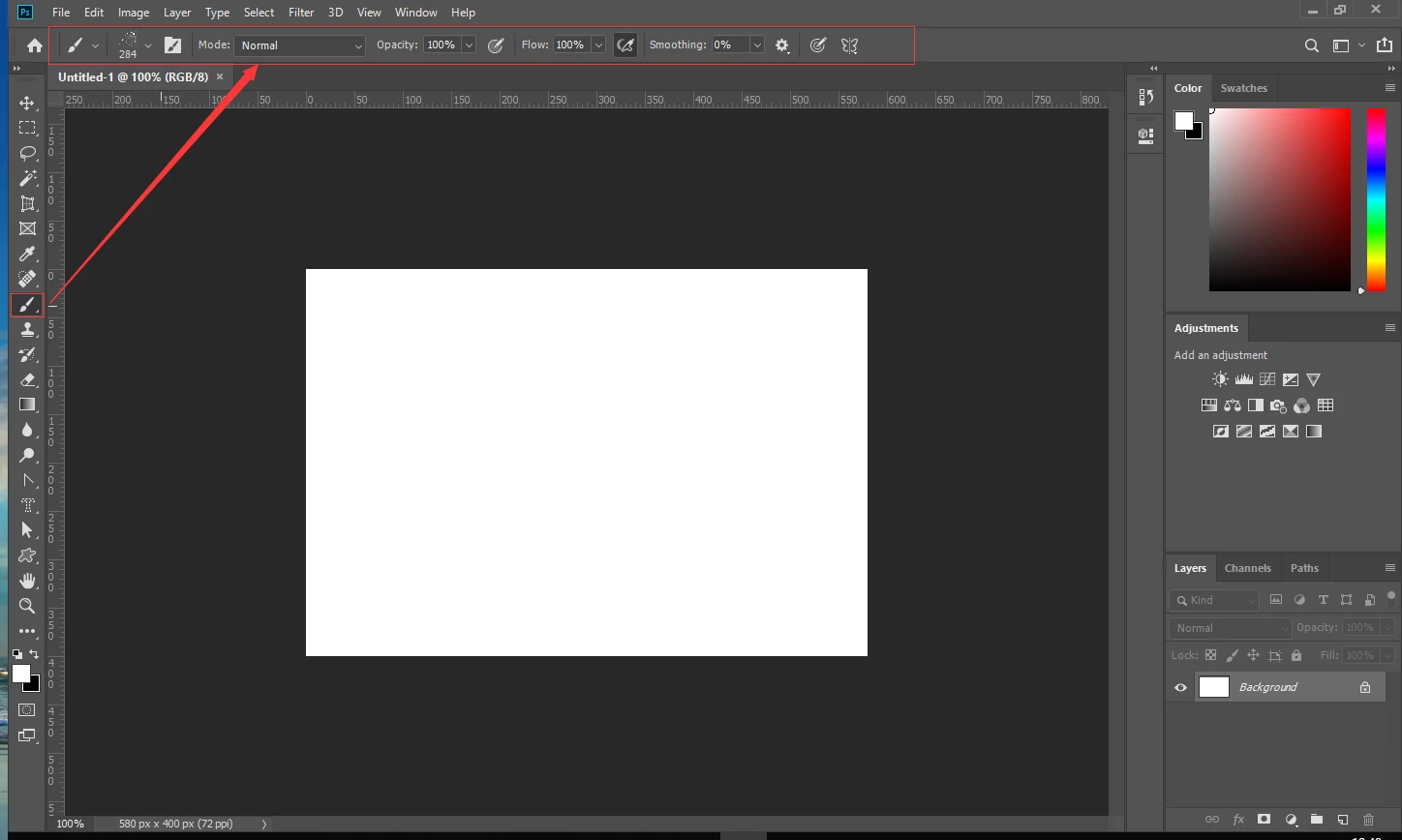
You can find and adjust the tool properties in the Options bar control panel. But I see in the picture that you already found it. So what exactly is your question?

greless
grelessAuthor
Inspiring
January 21, 2019

Thanks for your reply. i want to get the property of Tools via script such as the artlayer (app.activeDocument.activeArtlayer.fillOpacity)

January 21, 2019

Hi

Perhaps you should try here Photoshop Scripting

Trevor.Dennis
Community Expert
January 21, 2019

F5 toggles the Brush panels, or you can turn them on via the Window menu