Participant
October 28, 2023
Answered

How do I uninstall the Adobe compatibility pack?

  • October 28, 2023
  • 1 reply
  • 4408 views

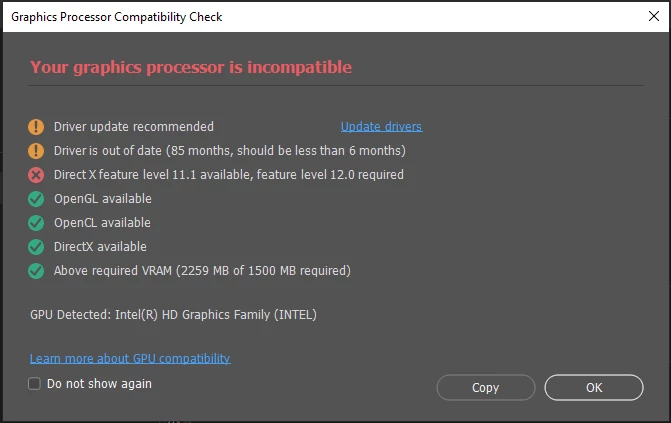
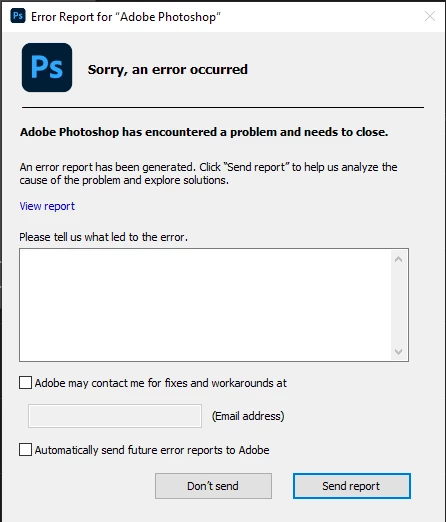
I have this issue with Adobe Creative Cloud and PS on my old laptop.

I understand that it's time I bought a new laptop but until then, how do I uninstall the compatibility pack as suggested? There seems to be a lack of instructions on how to do this.


This topic has been closed for replies.
Correct answer D Fosse

Thanks once again Jane.

Yes, use an older version. That's what I was hoping to avoid. I am processing some old images - an image set taken back in 2021 for star trails. The photos are good but my original processing back then wasn't so good so I decided that they were worth a revisit using the new tools available in PS 2024. I have however following your suggetsion. I have installed PS  2022 (I never have auto updates set for Adobe - it has a habit of updating at the most inconvenient of times!) - so, armed with a few years of improved processing skills, I aim to do a better job this time (249 images) albeit with PS 2022 rather than PS2024. Whish me luck 🙂


Here's a (screen grab) of a single image taster from the set:

 

Kind regards,


Alan 


@atlaurie  DirectX Support is not the same thing as DirectX Feature Level.


DirectX 12 "support" refers to the DirectX12 APIs, the programming interfaces. The GPU speaks the right language. This is mainly important in the gaming world, so that it can run games written for DirectX 12.


DirectX "feature level" is what the GPU can actually do, its actual physical capabilities. Feature level is hardware, not software. This is the Photoshop requirement, and currently it's feature level 12.0.


So a GPU can support DX12, but only have feature level 11.0, 11.1, etc.


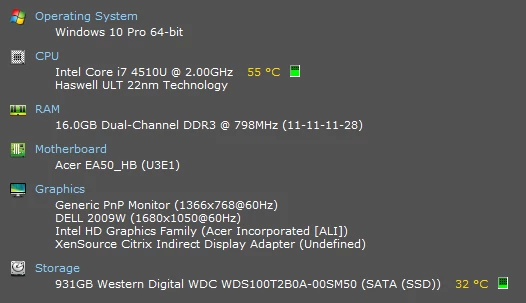
The second thing to note is that you have an integrated Intel HD series GPU. That is in itself a very marginal GPU for Photoshop. Even if it did formally have the required feature level, its general performance is on the low end. It may work and it may not. Some functions might not run properly.


If you do get a new laptop, there is an additional problem these days: Nearly all of them come with dual GPUs now, a dedicated high performance Nvidia/AMD GPU, plus an integrated Intel GPU. That sounds like a good idea for battery saving - but in advanced applications like Photoshop the two will quickly conflict. The GPU is used for actual data processing, it's not a simple one-way downstream flow. It's quite likely that you may need to disable the integrated GPU completely from the operating system.


Generally, laptop manufacturers tend to put "helpful" layers between the user and the operating system. This, again, tends to cause problems. Try to get one that is as lean as possible, with a minimum of extra manufacturer interfaces. You really want to deal directly with Windows, not Dell/Asus/Acer etc.


1 reply

jane-e
Community Expert
Community Expert
October 28, 2023


quote

how do I uninstall the compatibility pack as suggested?

By @atlaurie


Hi


The compatibility pack is from Microsoft, not Adobe. I couldn't find anything about uninstalling it from Microsoft, but I found a couple of links, including Reddit and the one below. I can't vouch for it, as I do not have the pack installed.

https://www.tenforums.com/tutorials/168452-how-install-opencl-opengl-compatibility-pack-windows-10-a.html


The other issue you have is that newer versions of Photoshop require a DirectX 12 feature level of 12.0, and your GPU does not have it. 


A side note is that your driver is 85 months out of date. That won't fix the Feature Level issue.


Jane


atlaurieAuthor
Participant
October 29, 2023

Thanks for your helpful pointers Jane, much appreciated!

My laptop has been a great workhorse over the years and as you might imagine I have been diligent in upgrades and updates. I have checked just checked for driver updates but alas, looks like I'm all out of luck there - probably just down to the age and underlying technology of the laptop, motherboard and graphics card.

I also ran the DirectX Diagnostic Tool (from Start, type dxdiag in the Search box then press enter.,  tap or click on dxdiag from the results, check DirectX Version on the first page of the report in the System Information section). This is reporting that I have DirectX 12. 

My conclusion is that my problem is down to the old tech no longer able to keep up with the demands of the latest software - especially the Adobe suite. The only think I'm not quite understanding here though, is (see below), the display adapter Availability being listed as Offline.

Other than that, looks like it'll have to be a new laptop. Expensive; my philosophy is that there is no point in getting something just mediocre. A new laptop should be something with punch, as an investment - this Acer E5-571 has lasted almost 9 years (with upgrades). 


Thanks for your help.


Alan

D Fosse
Community Expert
Community Expert
October 29, 2023

Thank you D Fosse for your excellent explanations and advice., it's much appreciated.  I'm sure it will help me and many others who read this.


Technology, H/W, S/W, Firnware etc., and all the layers knitting them together have indeed come a long, long way over the years and the way that these components, real, virtual or othrwise interact has become bewilderingly complex. I will take your advice onboard when choosing my laptop successor. 


It was only a matter of time that I'd encounter a 'Halt And Catch Fire" instruction with my limited H/W and processing  needs 🙂


Not  before I managed this though:


Regards,


Alan


That's very nice - but I think I'd be a bit worried if I stepped out of my front door one morning and saw that... ‌‌:-D


(BTW there was a wonderful TV series with that title, Halt and Catch Fire, set in the early days of "personal computers", starring Mackenzie Davis - there were others, but she kind of stood out and is the one I remember. It was available via HBO here in Norway, but they took it off and I can't find it anywhere now.)