

yajiviki
Known Participant
November 28, 2020
Answered

How do we to get the corner points value from Quadrilateral?

  • November 28, 2020
  • 2 replies
  • 4234 views

Hi EveryOne!,


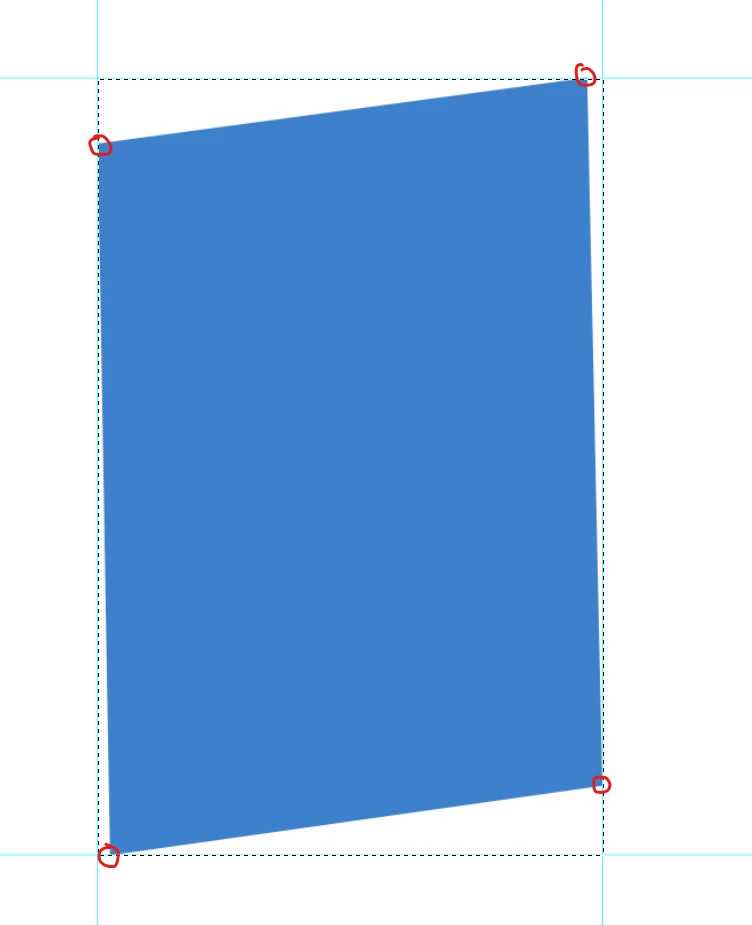
Is this possible to get the corner points value from Quadrilateral?

Thanks in advance.

-yajiv


This topic has been closed for replies.
Correct answer r-bin

The problem may be if the shape is much smaller than the canvas.

If I change the canvas size to 8000 instead of the size of your file, I also got an error.


To avoid this, replace the line in the code


var from = scan(0, w/2, h, 50);


with


var from = scan(0, Math.min(w,h), h, 50);


The previously proposed version can also fail if the figure is too small and shifted from the center to the right and up. The new version is free of this drawback.
 
UPD: improved and accelerated.


var doc = activeDocument;
var tmp = "tmp"+Math.random();

var ok = true;

try { doc.selection.bounds; } catch (e) { alert("No selection"); ok = false; }

if (ok)
    {
    activeDocument.suspendHistory("script", "main()");
    }

/////////////////////////////////////////////////
function main()
    {
    try {
        app.preferences.rulerUnits = Units.PIXELS;

        save_selection(tmp);

        scan(scan());

        del_channel(tmp);

        doc.guides.add(Direction.VERTICAL, doc.selection.bounds[0])
        doc.guides.add(Direction.HORIZONTAL, doc.selection.bounds[1])
        }
    catch(e) { alert(e.line+"\n"+e); }
    }

/////////////////////////////////////////////////
function scan(from)
    {
    try {
        app.preferences.rulerUnits = Units.PIXELS;

        load_selection(tmp);

        var x0 = doc.selection.bounds[0].value;
        var y0 = doc.selection.bounds[1].value;

        var x1 = doc.selection.bounds[2].value;
        var y1 = doc.selection.bounds[3].value;

        var w = x1-x0;
        var h = y1-y0;

        var safe = 3;

        var beg = -w/2-h/2;
        var end =  w/2+h/2;
        var step = 20;

        if (from != undefined)
            {
            beg = from;
            end = from+step;
            step = 1;
            }

        for (var off = beg; off <= end; off+=step)
            {
            load_selection(tmp);

            doc.selection.select([[(x0+x1)/2-h/2+off, (y0+y1)/2-h/2-safe], [(x0+x1)/2-h/2+1+off, (y0+y1)/2-h/2-safe], [(x0+x1)/2+h/2+1+off, (y0+y1)/2+h/2+safe], [(x0+x1)/2+h/2+off, (y0+y1)/2+h/2+safe]], SelectionType.INTERSECT, 0, false);

            try { doc.selection.bounds; } catch (e) { continue; }

            return off-step;

            break;
            }
        }
    catch(e) { alert(e.line+"\n"+e); }
    }

/////////////////////////////////////////////////
function save_selection(name)
    {
    try {
        var d = new ActionDescriptor();
        var r = new ActionReference();
        r.putProperty(stringIDToTypeID("channel"), stringIDToTypeID("selection"));
        d.putReference(stringIDToTypeID("null"), r);
        d.putString(stringIDToTypeID("name"), name);

        executeAction(stringIDToTypeID("duplicate"), d, DialogModes.NO);
        }
    catch(e) { alert(e.line+"\n"+e); }
    }

/////////////////////////////////////////////////
function load_selection(name)
    {
    try {
        var d = new ActionDescriptor();
        var r = new ActionReference();
        r.putProperty(stringIDToTypeID("channel"), stringIDToTypeID("selection"));
        d.putReference(stringIDToTypeID("null"), r);
        var r1 = new ActionReference();
        r1.putName(stringIDToTypeID("channel"), name);
        d.putReference(stringIDToTypeID("to"), r1);
        executeAction(stringIDToTypeID("set"), d, DialogModes.NO);
        }
    catch(e) { alert(e.line+"\n"+e); }
    }

/////////////////////////////////////////////////
function del_channel(name)
    {
    try {
        var d = new ActionDescriptor();
        var r = new ActionReference();
        r.putName(stringIDToTypeID("channel"), name);
        d.putReference(stringIDToTypeID("null"), r);
        executeAction(stringIDToTypeID("delete"), d, DialogModes.NO);
        }
    catch(e) { alert(e.line+"\n"+e); }
    }


UPD: improved and accelerated.


2 replies

Known Participant
November 28, 2024

Hello, could you please tell me if you have solved this problem with the script?

c.pfaffenbichler
Community Expert
Community Expert
November 28, 2024

What is your scenario? 

Could you please post screenshots with the pertinent Panels (Toolbar, Layers, Options Bar, Paths, …) visible? 

Legend
November 29, 2024

I only need the coordinates of this place, because I can solve it by adding other materials after getting the coordinates. Thank you very much again for your reply. This problem bothers me very much. I think about it even in my sleep and dreams. I even started to try to draw a circle on this shape according to the size of this shape. After aligning the shape, I used the edge of this circle to calculate the distance. Far away (that is, this black dot)


quote

I think about it even in my sleep and dreams.


By @mushroom bomb

Just a demo.

Before running, you need to create a selection from shape.

This script finds and selects the lower left corner of the shape as one pixel.

It also puts guides on it.

Tested on CS6 on the provided tiff file. I have no way to test on CC.


var doc = activeDocument;
var tmp = "tmp"+Math.random();

var ok = true;

try { doc.selection.bounds; } catch (e) { alert("No selection"); ok = false; }

if (ok)
    {
    activeDocument.suspendHistory("script", "main()");
    }

///////////////////////////////////////////////////////////////////////////////////////////////////
function main()
    {
    try {
        app.preferences.rulerUnits = Units.PIXELS;

        var w = doc.width.value;
        var h = doc.height.value;

        save_selection(tmp);

        var from = scan(0, w/2, h, 50);

        scan(from, from+50, h, 1);

        del_channel(tmp);

        doc.guides.add(Direction.VERTICAL, doc.selection.bounds[0])
        doc.guides.add(Direction.HORIZONTAL, doc.selection.bounds[1])
        }
    catch(e) { alert(e.line+"\n"+e); }
    }

///////////////////////////////////////////////////////////////////////////////////////////////////
function scan(from, to, max, step)
    {
    try {
        app.preferences.rulerUnits = Units.PIXELS;

        for (var i = from; i <= to; i+=step)
            {
            load_selection(tmp);

            doc.selection.select([[0,max-i], [0,max-i-1], [i+1,max], [i,max]], SelectionType.INTERSECT, 0, false);

            try { doc.selection.bounds; } catch (e) { continue; }

            break;
            }

        return i-step;
        }
    catch(e) { alert(e.line+"\n"+e); }
    }

///////////////////////////////////////////////////////////////////////////////////////////////////
function save_selection(name)
    {
    try {
        var d = new ActionDescriptor();
        var r = new ActionReference();
        r.putProperty(stringIDToTypeID("channel"), stringIDToTypeID("selection"));
        d.putReference(stringIDToTypeID("null"), r);
        d.putString(stringIDToTypeID("name"), name);

        executeAction(stringIDToTypeID("duplicate"), d, DialogModes.NO);
        }
    catch(e) { alert(e.line+"\n"+e); }
    }

///////////////////////////////////////////////////////////////////////////////////////////////////
function load_selection(name)
    {
    try {
        var d = new ActionDescriptor();
        var r = new ActionReference();
        r.putProperty(stringIDToTypeID("channel"), stringIDToTypeID("selection"));
        d.putReference(stringIDToTypeID("null"), r);
        var r1 = new ActionReference();
        r1.putName(stringIDToTypeID("channel"), name);
        d.putReference(stringIDToTypeID("to"), r1);
        executeAction(stringIDToTypeID("set"), d, DialogModes.NO);
        }
    catch(e) { alert(e.line+"\n"+e); }
    }

///////////////////////////////////////////////////////////////////////////////////////////////////
function del_channel(name)
    {
    try {
        var d = new ActionDescriptor();
        var r = new ActionReference();
        r.putName(stringIDToTypeID("channel"), name);
        d.putReference(stringIDToTypeID("null"), r);
        executeAction(stringIDToTypeID("delete"), d, DialogModes.NO);
        }
    catch(e) { alert(e.line+"\n"+e); }
    }


c.pfaffenbichler
Community Expert
Community Expert
November 28, 2020

Nice of you to post a screenshot but please post a meaningful screenshot that includes the pertinent Panels. 

Are you talking about a Shape Layer for example? 

yajiviki
yajivikiAuthor
Known Participant
November 28, 2020

Hi c.pfaffenbichle,

Thank you for the prompt response.

Please find the meaningful screenshot below.

I need to get the cornerpoints value from the selection.

if I use activeDocument.selection.bounds code, It is show as 0,100 for topLeft.

However I need to get the value (100,145) instead of (0,100) viceversa for all sides.

Could yoy please share your suggestion.Inputs?


yajiv


c.pfaffenbichler
Community Expert
Community Expert
November 28, 2020

You misunderstood – the screenshot fails to illustrate if the blue shape is a Shape Layer or something else.
