


Known Participant
April 3, 2020
Question

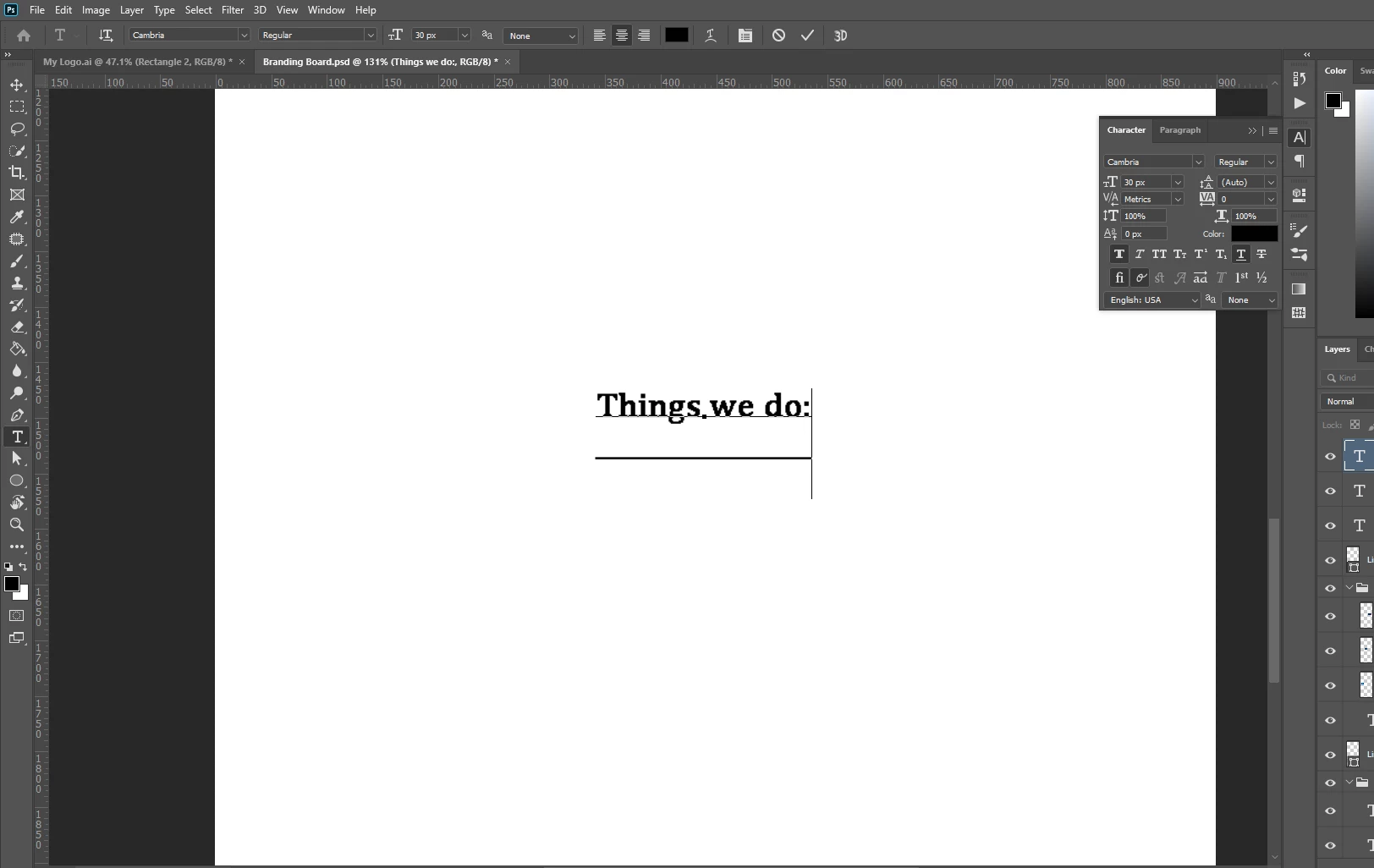
How do you fix Underlining text acting weird

  • April 3, 2020
  • 1 reply
  • 821 views

This didn't happen before, but when I try to underline text, the actual line is way below the text, and it doesn't look right. And no matter what text size I make the text, the cursor is always way bigger. Is there any way to fix this?
This topic has been closed for replies.

1 reply

c.pfaffenbichler
Community Expert
Community Expert
April 3, 2020

Coudl you provide a file with such a Type Layer? 


What have you done for trouble-shooting so far? 

Restoring Preferences after making sure all customized presets like Actions, Patterns, Brushes etc. have been saved might be a good starting point:

https://helpx.adobe.com/photoshop/kb/basic-trouble-shooting-steps.html

NelsonAAuthor
Known Participant
April 3, 2020

Not quite sure how to provide a file here, since it won't let me upload a .psd file.


Also, how do you save settings/restore them

c.pfaffenbichler
Community Expert
Community Expert
April 3, 2020