



bartonlew
Legend
March 23, 2023
Answered

how do you install a color profile in photoshop

  • March 23, 2023
  • 1 reply
  • 2330 views

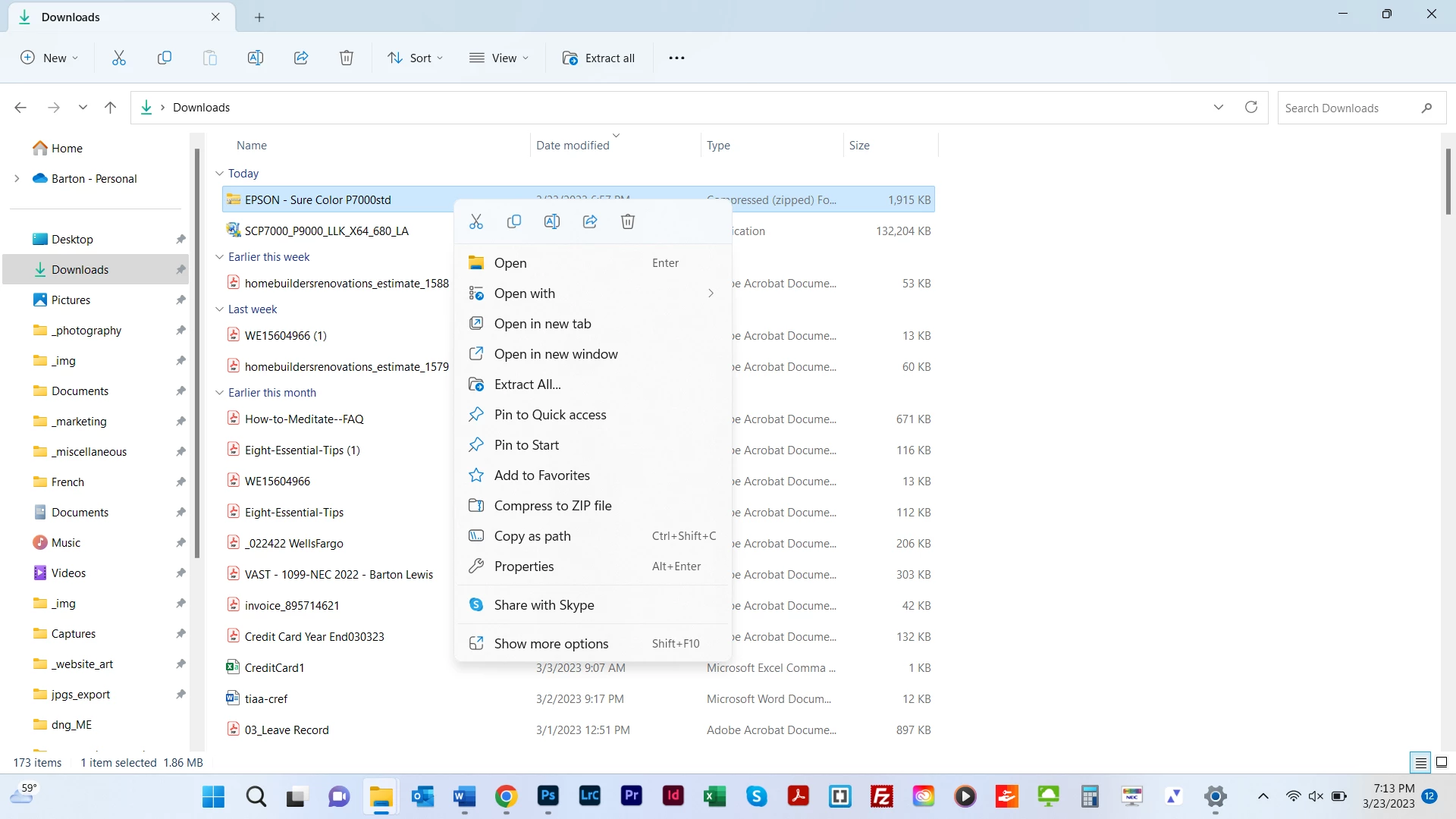
I need to install a color profile.  I Googled it and found a post that said you just right click on the downloaded profile and select "Install."  I don't get the option per screen shot.  The post said then PS would automatically find the profile and populate it in the Printer Profile dropdown after selecting Printer Manages Colors in the Color Handling option.  Any help appreciated.  


This topic has been closed for replies.
Correct answer Per Berntsen

It seems that you have a downloaded a zip file, which probably contains several profiles for the P 7000 printer.

If you set Windows to show file extensions (recommended), you'll probably see the extension .zip.

Double-click the zip file to extract the profiles (or choose Extract all from the context menu, then install the profiles.

Instead of installing the profiles one by one, you can copy them all to C:\Windows\System32\spool\drivers\color

1 reply

Per Berntsen
Community Expert
Per BerntsenCommunity ExpertCorrect answer
Community Expert
March 23, 2023

It seems that you have a downloaded a zip file, which probably contains several profiles for the P 7000 printer.

If you set Windows to show file extensions (recommended), you'll probably see the extension .zip.

Double-click the zip file to extract the profiles (or choose Extract all from the context menu, then install the profiles.

Instead of installing the profiles one by one, you can copy them all to C:\Windows\System32\spool\drivers\color

bartonlew
bartonlewAuthor
Legend
March 24, 2023

Thank you.  I extracted the zip folder contents to the path you specified.  However, per the screen shot below, the drop down for Printer Profile is still grayed out.  I thought PS would automatically recognize the profile.  Per the 2d screen shot, the profile is in a subfolder called "icc" in C:\Windows\System32\spool\drivers\color.  Is that the problem?


TheDigitalDog
Inspiring
March 24, 2023

Switch to Photoshop Manages Color. You will not see profiles using Printer Manages Color. 

Author “Color Management for Photographers" & "Photoshop CC Color Management/pluralsight"