


Participant
October 31, 2022
Question

How many GPU cores does a MAC need to use Illustrator and Photoshop

  • October 31, 2022
  • 2 replies
  • 16844 views

I'm going to buy a MAC to use Illustrator and Photoshop
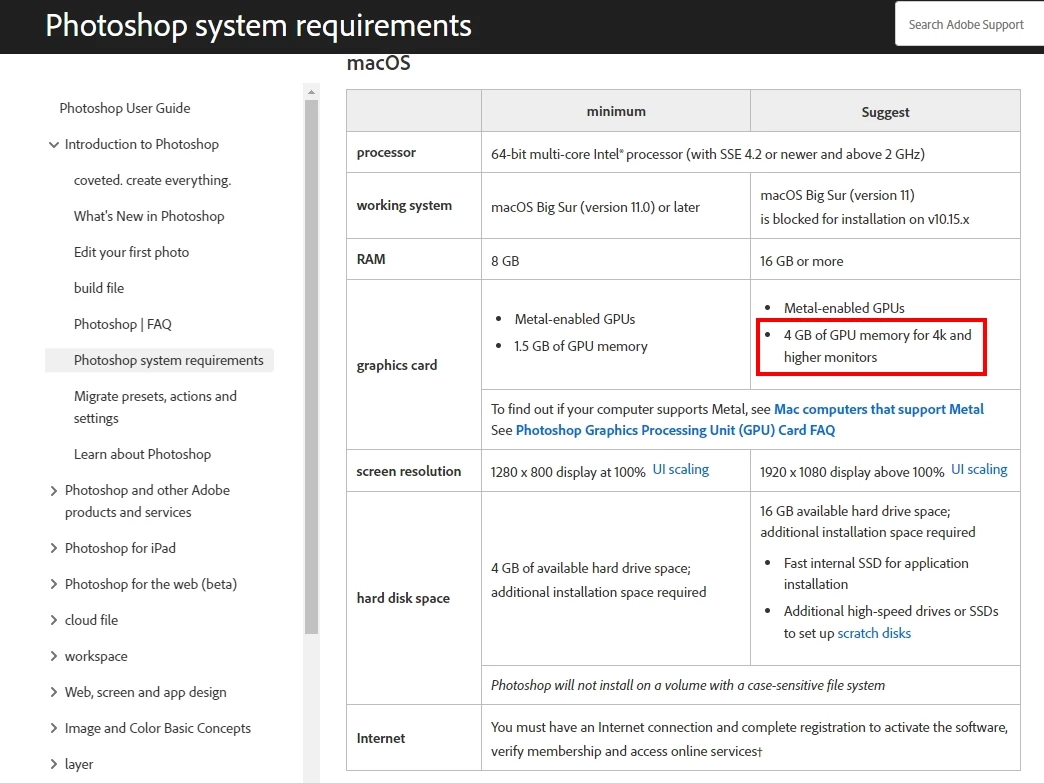
How many GPU cores are required for minimum and recommended system requirements?
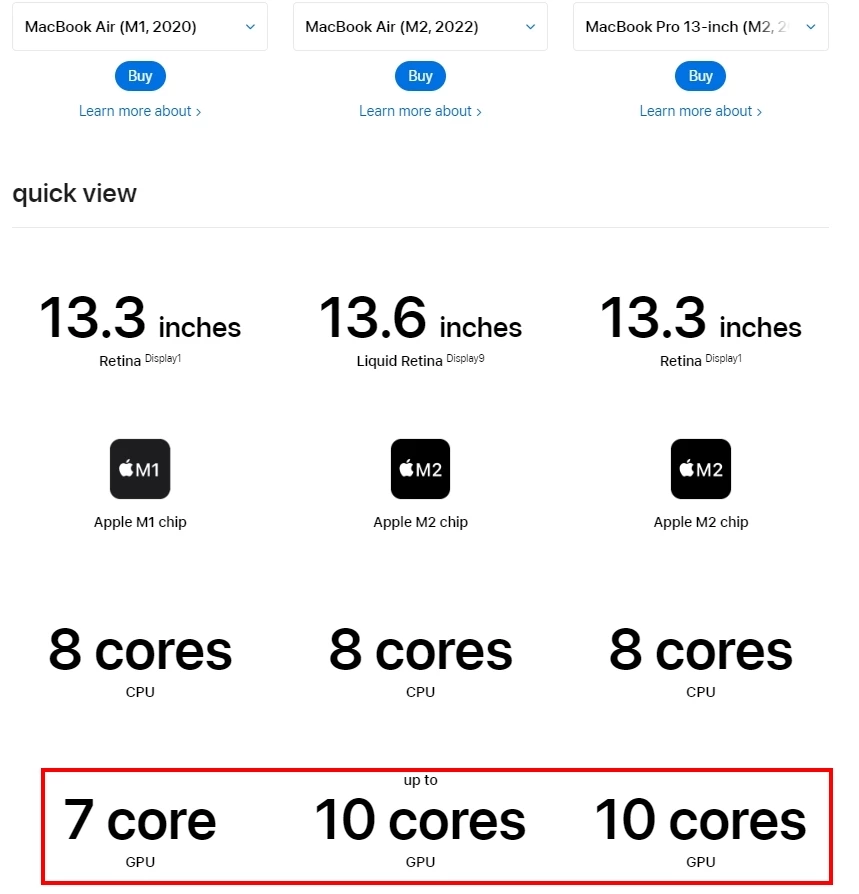
Because the product specifications on APPLE's official website show that the GPU core is not the GPU memory
  

This topic has been closed for replies.

2 replies

NB, colourmanagement
Community Expert
Community Expert
October 31, 2022

Here are some suggestions from Adobe for GPU issues.

https://helpx.adobe.com/photoshop/kb/troubleshoot-gpu-graphics-card.html

I hope this helps, perhaps it has some tips for you


neil barstow, colourmanagement net :: adobe forum volunteer:: co-author: 'getting colour right'

google me "neil barstow colourmanagement" for lots of free articles on colour management

Community Expert
October 31, 2022

Surprisingly - it's more about the CPU than the GPU - if you have a 4k display then more cores possibly better in the GPU.


Photoshop can operate with a low-end GPU - most onboard graphics use between 512-1024mb of Memory which is fine for a 1080 screen. 


It's the CPU that requires a bit of oomph and plenty of Scratch Disk space for Photoshop - so a larger Hard Drive is preferred. 


https://helpx.adobe.com/ie/photoshop/using/scratch-disks-preferences.html


If you can afford all the GPU cores then go for it.


But in terms of the CPU - Photoshop and Illustrator top out at about 8 cores - after that more cores are not going to help. 


Community Expert
October 31, 2022

Sorry I should emphasise that it's not really about cores but how much memory the GPU has - for the Macbook it should be enough for the display in 4k - which is more than enough for Photoshop. So it's not about Cores in the GPU really. 

My advice, get what you can afford to get now.


You cannot upgrade anything in the Mac - you can't upgrade RAM, Hard Drive Space or GPU. 

Max out at the top end of your budget while you can.

Community Expert
October 31, 2022

Indeed you did 🙂


In the broader picture, RAM isn't nearly as important now as it used to be. With the new crazy fast NVMe drives, the Photoshop scratch disk isn't really a bottleneck anymore. Gen 4 PCIe has a nominal speed of 8000 MB/s. While I'm sure RAM is theoretically faster, that's more or less academic. You're not sitting around waiting, that's the main thing.


All in all, I think 32 GB is comfortable for most practical scenarios, in the sense that you probably won't notice much difference going to 64 or 128.


Also they want to use Illustrator on top of it. 32gb is kinda standard these days unless you're going into animation/video editing then we're talking 64gb or higher. 


But definitely running Illustrator/Photoshop side by side - 32gb should be the job.