

Participant
May 28, 2021
Question

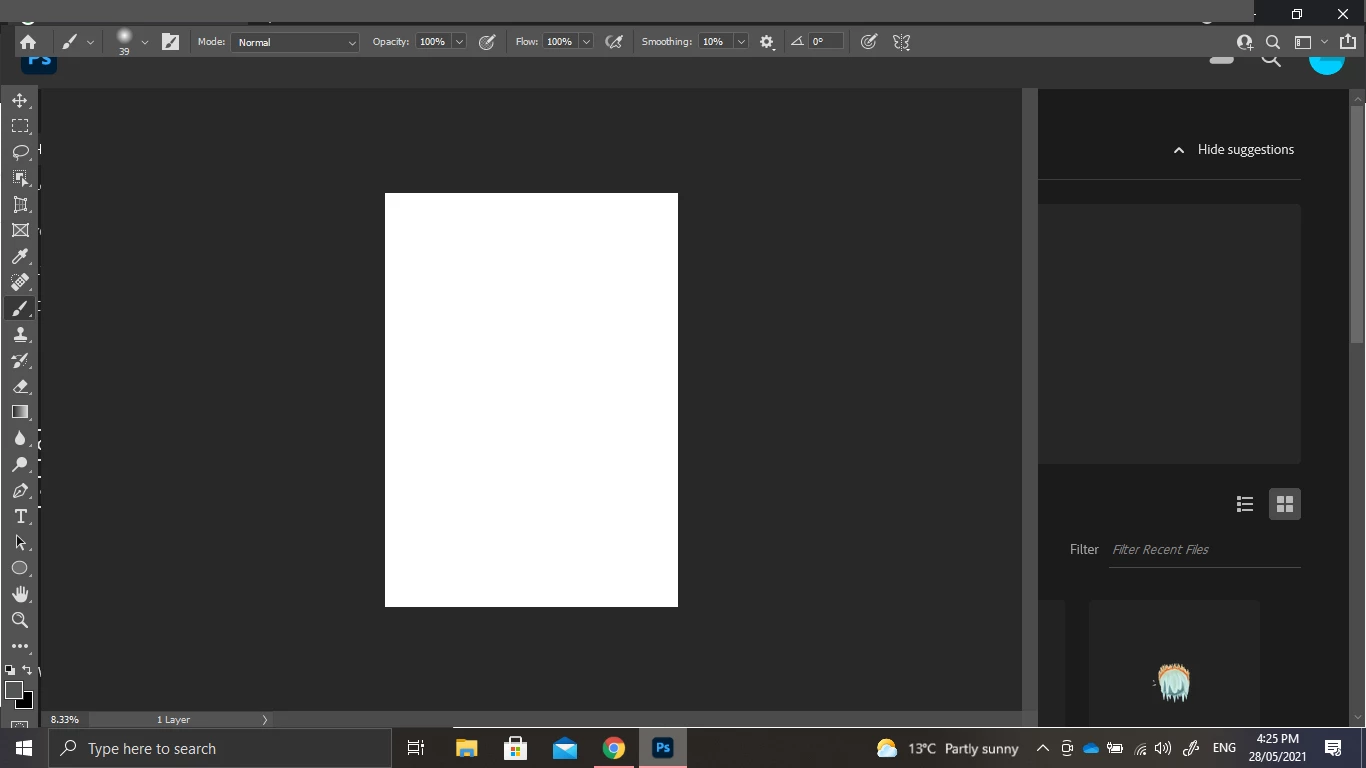
How the [removed] do I fix this? Menu bar missing & UI issues in Photoshop 2021 on Windows 10
  • May 28, 2021
  • 4 replies
  • 1913 views


{Thread title edited by moderator}

This topic has been closed for replies.

4 replies

Michael Bullo
Community Expert
Community Expert
May 29, 2021

Any chance resetting the Workspace might help?
Window > Workspace > Reset [Your workspace name]

Leslie Moak Murray
Community Expert
Community Expert
May 29, 2021

In CS6, it's just Window>Options and Window>Tools, Window>Layers etc.

PECourtejoie
Community Expert
Community Expert
May 28, 2021

The menu bar is not showing, but are the menus activating? Try to do ALT+H, I (ALT+H, then ALT+I to activate Help/System Info, and then paste the contents here. I'm wondering if the screen size meets the minimum requirements.

nikunj.m
Community Manager
Community Manager
May 28, 2021

Hi,


We're sorry about the trouble with Photoshop. Would you mind sharing the exact version of Photoshop you're using? Did you start experiencing this behavior after an update to Photoshop or after a Windows update? Do you have dual Graphics cards on the computer?


Please ensure you have all available Windows updates installed on the computer along with the latest graphics card drivers from the manufacturer's website. You can also check out: https://feedback.photoshop.com/conversations/photoshop/photoshop-2020-menu-bar-missing/5f5f462c4b561a3d4277eec9


Please let us know if it helps!

Regards,

Nikunj

Participant
May 28, 2021

using photoshop 2021 and its been doing this for a while (a few months) so I don't think it's linked to an update issue. And I don't know how to update the graphics driver but I know it's out of date. Sometimes  when I open photoshop it doesn't do this but it will start to usually once I open it up again. 

nikunj.m
Community Manager
Community Manager
May 29, 2021

Thanks for the reply! For troubleshooting the graphics card or graphics driver issues (if they are outdated), please check out the steps suggested here: https://helpx.adobe.com/photoshop/kb/troubleshoot-gpu-graphics-card.html


Regards,

Nikunj
