


Question
How to adjust underline for text?
Hi. I know that Photoshop text features and customization is limited.
But is there maybe some sort of good workaround for adjusting the underline?
I'm working on bi-lingual files. English and Japanese, English and Chinese.
The file is using Noto Sans for English, and Noto Sans JP and Noto Sans SC for Japanese and Chinese respectively.
Some text has to be underlined.
The underline feature in the text panel seems to behave differently between the English using Noto Sans and the JP and SC versions of Noto Sans.
For JP and SC - the underline is very far from the baseline.
Is there any way to adjust this? I really need for the underlines in the JP and SC text to match the underlines in the English.
See example: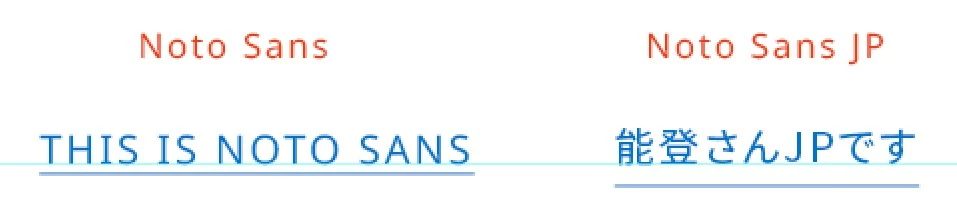
 AdChoices