


Participating Frequently
August 16, 2025
Answered

How to batch copy and paste layer masks

  • August 16, 2025
  • 2 replies
  • 379 views

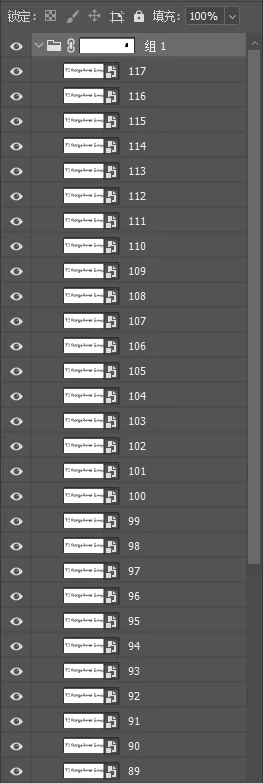
"I added a mask to the group in Photoshop, and there are many layers inside the group. I want to apply the mask from the group to all layers inside the group with one click. How can I copy the mask to all layers, or is there a plugin that can achieve this? Why hasn't the Adobe team implemented such a simple feature of copying and pasting masks individually?"
Correct answer Stephen Marsh

This one works:


1) Load a selection from the group's mask (Cmd/Ctrl click the mask icon in the layers panel)
 
2) Then select all layers in the group in the layers panel so that they are highlighted
 
3) Run the script, the active selection is applied as an individual mask to all selected layers

2 replies

Stephen Marsh
Community Expert
Community Expert
August 16, 2025
quote

"I added a mask to the group in Photoshop, and there are many layers inside the group. I want to apply the mask from the group to all layers inside the group with one click. How can I copy the mask to all layers, or is there a plugin that can achieve this? Why hasn't the Adobe team implemented such a simple feature of copying and pasting masks individually?"


By @116064


The "child" layers are grouped and therefore inherit the mask from the "parent" group, without requiring a mask on each individual layer within the group. That's one of the points of having a group.


It would take a custom script to apply the group mask as a mask to each individual layer within the group.


Such a script may already exist, or it might need to be created from a similar script or created from scratch.

116064Author
Participating Frequently
August 16, 2025

Thank you for your reply. The reason I need to do this operation is that I need to slice images. When using the slicing plugin, the layers must have a mask. If I add the mask to the group, the exported result won't be what I need. Since I have many layers, I need a feature to copy and paste the mask to all the layers within the group. However, I’ve been searching for a similar plugin for 3 hours and still haven't found one. It seems like such a simple feature. Why hasn't Adobe implemented it in the software?

Stephen Marsh
Community Expert
Community Expert
August 16, 2025

@116064 wrote:

Why hasn't Adobe implemented it in the software?


Perhaps because it's a niche requirement.


I'm searching for existing scripts, to either do exactly what you want or to use as a basis for a modifed script, before looking at creating something from scratch.


116064Author
Participating Frequently
August 16, 2025

"Is there anyone who can answer this for me? Thank you, and I wish you a pleasant day!"