



Question
How to call "Fit to Screen" in UXP JavaScript?
Is there any way to use Zoom Fit to Screen (same as Ctrl+0) in UXP scripting?
In CEP/ExtendScript, we can use as following.
app.runMenuItem(app.charIDToTypeID("FtOn"));
// Fit to Screen (same as Ctrl+0)
It seems not implemented simiar way on Photoshop UXP DOM as
require('photoshop').app.runMenuItem(1182027630);
Result:

From UXP Alchemist plugin's ScriptListner is showing:
{
  "_obj": "invokeCommand",
  "commandID": 1192,
  "kcanDispatchWhileModal": true,
  "_isCommand": false
}
From batchPlay(), above seems not runnable (this part is not quite sure).
    var result = require('photoshop').action.batchPlay([
        {
            "_obj": "invokeCommand",
            "commandID": 1192,
            "kcanDispatchWhileModal": true,
            "_isCommand": false
        }
    ], {synchronousExecution: true});
Result:
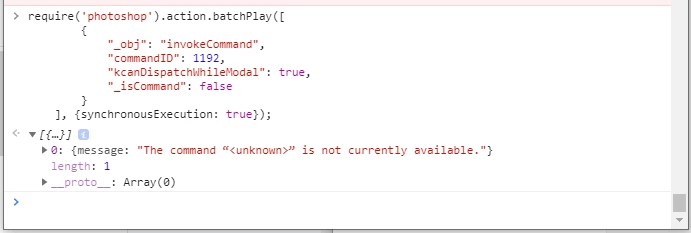
I'm not quite sure if above is proper usage of batchPlay() as well.
But is there any way to use Zoom Fit to Screen (same as Ctrl+0) in UXP scripting?
Thank you,
Naoki
 AdChoices