


Participant
January 24, 2024
질문

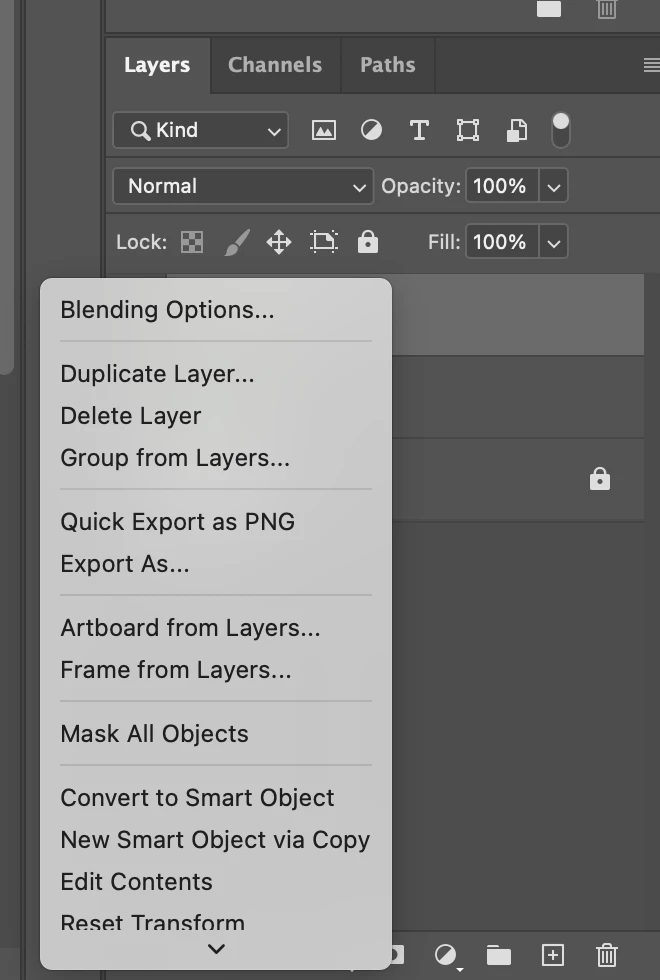
How to change? Menus in Photoshop on Mac do not open in full, but appear with a display arrow.

  • January 24, 2024
  • 3 답변들
  • 699 조회

Hi everyone,

I recently moved to Mac from Windows. In Windows Ps, right clicking a layer (for example) showed ALL the possibilities in the menu straight away.


In Mac, a shorter menu appears with a little arrow at the bottom, and you must wait for the menu to scroll open to see every option. Is there a way to adjust settings so the whole menu immediately appears by default? It only takes a second each time to see all the options, but it sure is annoying.


이 주제는 답변이 닫혔습니다.

3 답변

Myra Ferguson
Community Expert
Community Expert
January 27, 2024
Participant
January 27, 2024

Thank you, Myra. It seems I'm not alone in having this issue. Unfortunately, none of the fixes in that thread worked for me when I tried them.

Conrad_C
Community Expert
Community Expert
January 25, 2024

This isn’t a fix, just a workaround...


If your keyboard has an End key, press it. That’s a shortcut for selecting the last menu item, so a side effect is that it reveals the whole menu.


I do the same thing with menus so long they go off both the top and bottom of a small screen, like a font menu: I’ll use the Home, End, Page Up, and Page Down keys to quick-scroll the menu. I think those work in menus on both macOS and Windows.

Participant
January 27, 2024

Thank you for the suggestion. On the laptop key pad, the END shortcut is "fn + right arrow". So it does the trick, but with a similar delay as scrolling.


For now, my workaround will be to have some strategy about panel placement. If I place the layers panel near the top AND place a panel underneath it, that gives the menus space to open more fully. It's not ideal, but I'll go with it.


I'll still check back here in the future to see if anyone finds a solution. I did see someone asked a similar question on Reddit once upond a time, and no one had an answer for that person either.


Thanks to all! I appreciate the help.

Legend
January 24, 2024

Both Windows and Mac automatically position popup menus on screen. Other than moving the panel that includes that menu, there isn't much you can do.

Participant
January 25, 2024

Thank you for the quick reply... though I wish it weren't true! It's such a clumsy feature when the menu could just as easily open upwards and reveal everything all at once.


Is there any chance I could find an app that would allow me to adjust this setting? I would pay money for an app not to deal with this.

Legend
January 29, 2024
quote

1600 nits is brightness. Resolution would depend on the display and computer. With a high resolution, menus should all stay on screen.

By @Lumigraphics


This is not a display resolution problem. The problem happens even where there is plenty of vertical height to show the entire menu, but Photoshop insists on not showing the entire menu on open. That causes the user to do an extra step (the workarounds we’re suggesting) to get it to open all the way, when it should just show the entire menu on open.


In the picture below, the left picture is how the menu opens when you click it. The bottom is hidden. The right picture shows that even on this 13" laptop screen, there is no height resolution restriction: There’s enough vertical height to show the entire menu height twice. But for some weird reason Photoshop chooses to hide the bottom of it on first click, and that is the problem.


I'm well aware, I've used Macs for almost thirty years now 😄

It happens on Windows too, if you don't have enough vertical resolution. In fact its even worse there, as a menu can be cut off and you CAN'T scroll to the end.