WordWeaver
Known Participant
February 24, 2022
Answered

How to Duplicate a Layer Multiple Times Not Using Command-J (macOS)

  • February 24, 2022
  • 2 replies
  • 1587 views

Hello. Considering what an advanced graphics program Adobe Photoshop is, I am sure that there must be a way to do this, but I have never figured it out, and I haven't been able to find an answer elsewhere online to date.


I am not talking about duplicatiang a layer a few times using command-j on my iMac.


What if I want to duplicate a layer say 100 times, for example? I find no options under any of the menus which will allow this? Is there perhaps some keyboard command?


I have tried using both the option key and the shift key while simultaneously selecting the "Duplicate Layer" option under the "Layer" menu, but it is to no avail.


So, what is the secret for accomplishing this simple task?


Thank you in advance!

This topic has been closed for replies.
Correct answer Stephen Marsh

@WordWeaver wrote:

So, what is the secret for accomplishing this simple task?


Scripting is the secret!
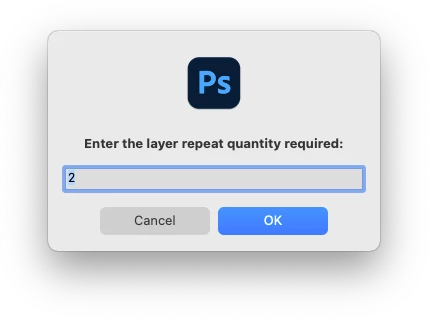


An action can repeat a fixed amount of times, so it has limitations. A script can use a variable rather than a fixed value.


/*
Repeat Layer.jsx
v1.0 - Stephen Marsh, 14th January 2022
Note: No check is performed against the layer kind
https://community.adobe.com/t5/photoshop-ecosystem-discussions/how-to-drawl-in-multiple-layers-in-photoshop/td-p/12657971
*/

#target photoshop

function main() {

    if (app.documents.length > 0) {

        // Loop the input prompt until a number is entered
        var userInput;
        while (isNaN(userInput = prompt("Enter the layer repeat quantity required:", "2")));
        // Test if cancel returns null, then terminate the script
        if (userInput === null) {
            //alert('Script cancelled!');
            return
        }
        // Test if an empty string is returned, then repeat 
        while (userInput.length === 0) {
            userInput = prompt("Blank value not accepted, please enter the layer repeat quantity required:", "");
        }
        // Convert decimal input to integer
        var dupeValue = parseInt(userInput);
        // Iterate the dupe
        for (var i = 0; i < dupeValue; i++) {
            // Select front layer hack to control layer creation order
            var idselect = stringIDToTypeID("select");
            var desc1307 = new ActionDescriptor();
            var idnull = stringIDToTypeID("null");
            var ref436 = new ActionReference();
            var idlayer = stringIDToTypeID("layer");
            var idordinal = stringIDToTypeID("ordinal");
            var idfront = stringIDToTypeID("front");
            ref436.putEnumerated(idlayer, idordinal, idfront);
            desc1307.putReference(idnull, ref436);
            var idmakeVisible = stringIDToTypeID("makeVisible");
            desc1307.putBoolean(idmakeVisible, false);
            var idlayerID = stringIDToTypeID("layerID");
            var list112 = new ActionList();
            list112.putInteger(26);
            desc1307.putList(idlayerID, list112);
            executeAction(idselect, desc1307, DialogModes.NO);
            // Duplicate layer
            app.activeDocument.activeLayer.duplicate();
        }
        // Select the top layer
        app.activeDocument.activeLayer = app.activeDocument.layers[0];
    } else {
        alert('A document must be open to use this script!');
    }
}
app.activeDocument.suspendHistory("Repeat Layer.jsx", "main()");


Instructions:

  1. Copy the code text to the clipboard
  2. Open a new blank file in a plain-text editor (not word-processor)
  3. Paste the code in
  4. Save the text file as Repeat Layer.txt
  5. Rename the file extension from .txt to .jsx
  6. Install or browse to the .jsx file to run

2 replies

Bojan Živković11378569
Community Expert
February 24, 2022

"I find no options under any of the menus which will allow this? Is there perhaps some keyboard command?"


As already stated above, there isn't built in option to duplicate layer XX or desired amonut of times automatically or using single instruction.

WordWeaver
Known Participant
February 24, 2022

Bojan, please see my comment. You have to navigate to the scrpt apparently by using File/Scripts/Browse, and then navigate to the script.

Stephen Marsh
Stephen MarshCorrect answer
Community Expert
February 24, 2022

@WordWeaver wrote:

So, what is the secret for accomplishing this simple task?


Scripting is the secret!


An action can repeat a fixed amount of times, so it has limitations. A script can use a variable rather than a fixed value.


/*
Repeat Layer.jsx
v1.0 - Stephen Marsh, 14th January 2022
Note: No check is performed against the layer kind
https://community.adobe.com/t5/photoshop-ecosystem-discussions/how-to-drawl-in-multiple-layers-in-photoshop/td-p/12657971
*/

#target photoshop

function main() {

    if (app.documents.length > 0) {

        // Loop the input prompt until a number is entered
        var userInput;
        while (isNaN(userInput = prompt("Enter the layer repeat quantity required:", "2")));
        // Test if cancel returns null, then terminate the script
        if (userInput === null) {
            //alert('Script cancelled!');
            return
        }
        // Test if an empty string is returned, then repeat 
        while (userInput.length === 0) {
            userInput = prompt("Blank value not accepted, please enter the layer repeat quantity required:", "");
        }
        // Convert decimal input to integer
        var dupeValue = parseInt(userInput);
        // Iterate the dupe
        for (var i = 0; i < dupeValue; i++) {
            // Select front layer hack to control layer creation order
            var idselect = stringIDToTypeID("select");
            var desc1307 = new ActionDescriptor();
            var idnull = stringIDToTypeID("null");
            var ref436 = new ActionReference();
            var idlayer = stringIDToTypeID("layer");
            var idordinal = stringIDToTypeID("ordinal");
            var idfront = stringIDToTypeID("front");
            ref436.putEnumerated(idlayer, idordinal, idfront);
            desc1307.putReference(idnull, ref436);
            var idmakeVisible = stringIDToTypeID("makeVisible");
            desc1307.putBoolean(idmakeVisible, false);
            var idlayerID = stringIDToTypeID("layerID");
            var list112 = new ActionList();
            list112.putInteger(26);
            desc1307.putList(idlayerID, list112);
            executeAction(idselect, desc1307, DialogModes.NO);
            // Duplicate layer
            app.activeDocument.activeLayer.duplicate();
        }
        // Select the top layer
        app.activeDocument.activeLayer = app.activeDocument.layers[0];
    } else {
        alert('A document must be open to use this script!');
    }
}
app.activeDocument.suspendHistory("Repeat Layer.jsx", "main()");


Instructions:

  1. Copy the code text to the clipboard
  2. Open a new blank file in a plain-text editor (not word-processor)
  3. Paste the code in
  4. Save the text file as Repeat Layer.txt
  5. Rename the file extension from .txt to .jsx
  6. Install or browse to the .jsx file to run

WordWeaver
Known Participant
February 24, 2022

Hello Stephen. Thank you very much for your prompt reply, and your script.

Well, I followed your instructions precisely. I copied your script into a BBEdit text file. Then I duplicated it, and changed the file extension to .jsx. After that, I placed it in Photoshop's Presets/Scripts folder. Photoshop was not running at the time. Once I restarted Photoshop, I discovered that the script does not appear in any menus, and that I had to go to File/Scripts/Browse, and then navigate to the script. However, it is when I did that, that I ran into a problem. The script is grayed out, meaning that I cannot select it. I checked some of the other scripts in that folder, and there permissions are set to:


System = read and write

Wheel = read only

Everyone = read only


When I checked your script, it is set to:


My admin account = read and write

Wheel = read only

Everyone = read only


Do you think it is a permissions problem, or something else?