


Answered
How to Export JPG files Scripting Automatically
I am having art and garment Group folder separately , i want export the files form Red color garment with red Art, and blue color garment to blue color Art ,etc
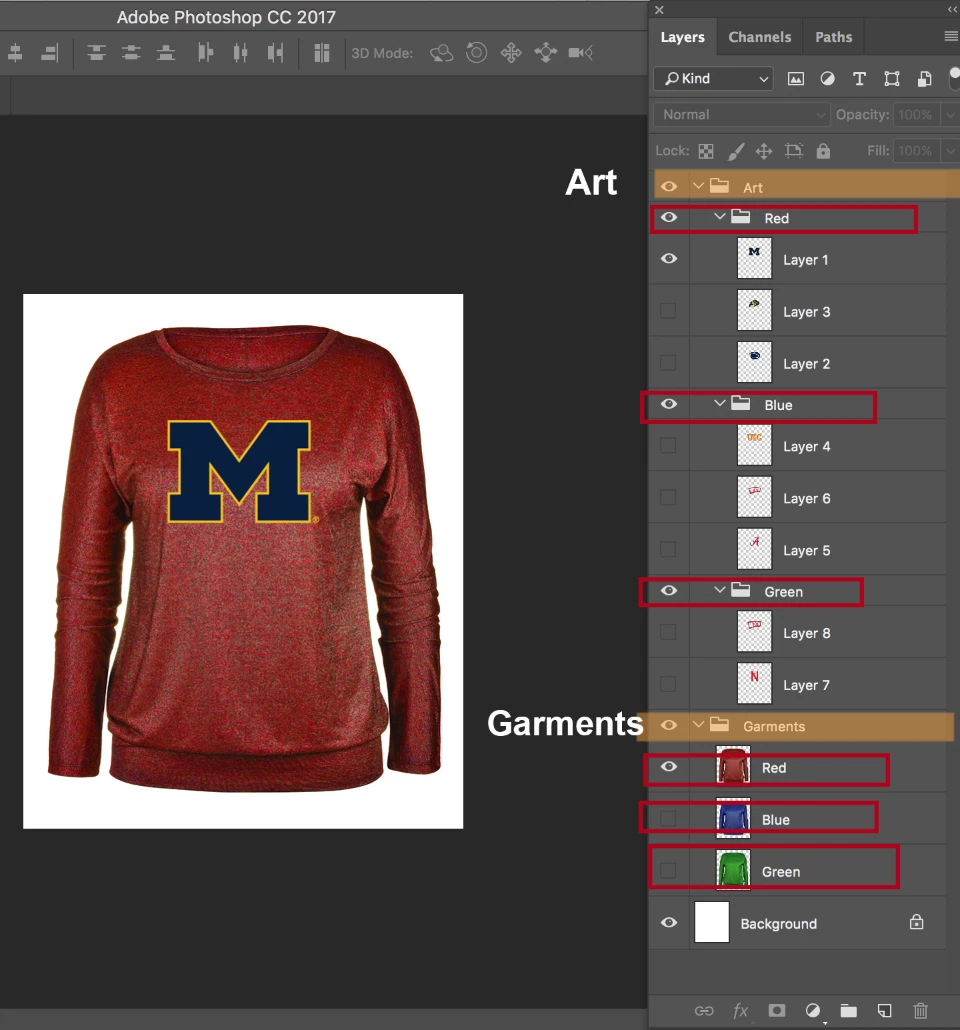
Example:
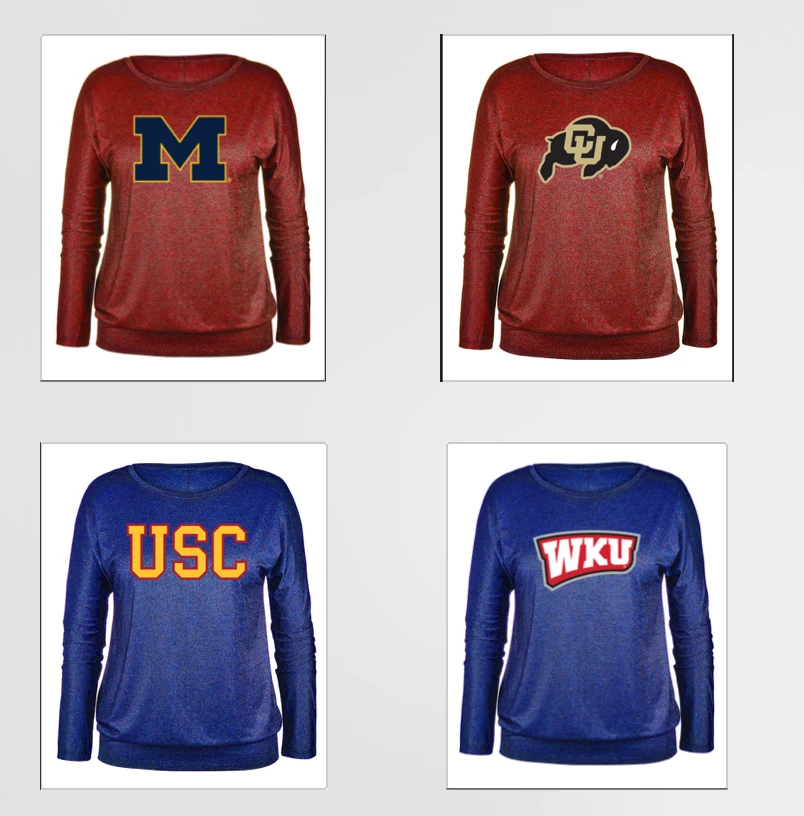

I am having art and garment Group folder separately , i want export the files form Red color garment with red Art, and blue color garment to blue color Art ,etc
Example:
thank you very much is working
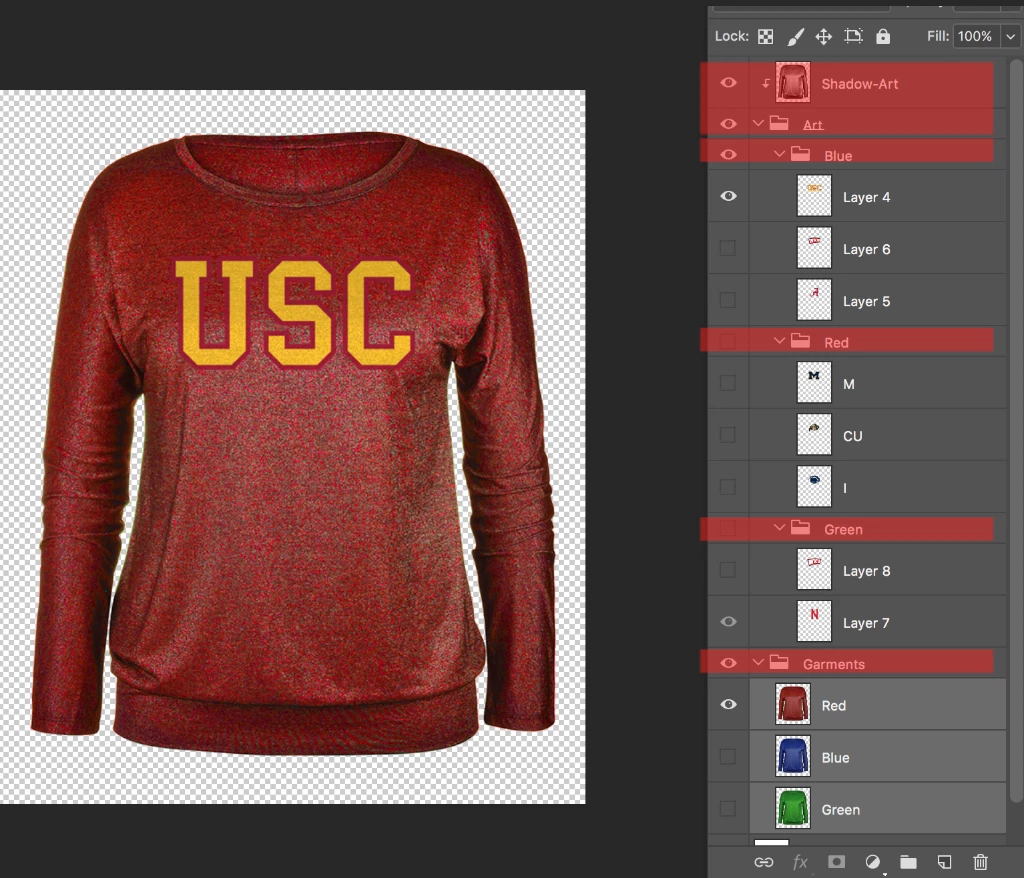
It is possible this layer structure working the script?
you understand my English
Sorry for my bad english.
I appreciate your help!
// if group of same name as layer exists save jpg of combinations of layer with each layer in group except if the layer is situated in the group;
// 2017, use it at your own risk;
#target photoshop
if (app.documents.length > 0) {
// jpg options;
var jpegOptions = new JPEGSaveOptions();
jpegOptions.quality = 9;
jpegOptions.embedColorProfile = true;
jpegOptions.matte = MatteType.NONE;
var myDocument = activeDocument;
var theName= myDocument.name.match(/(.*)\.[^\.]+$/)[1];
var thePath = myDocument.path;
// get layers and groupd;
var theArrays = getLayerAndGroupsNamesAndIDs();
var theLayers = theArrays[0];
var theGroups = theArrays[1];
// hide layers;
showHideByIdentifier (theLayers, false);
// show groups;
showHideByIdentifier (theGroups, true);
// compare layer names to group names;
for (var m = 0; m < theLayers.length; m++) {
var thisName = theLayers
selectLayerByID(theLayers
var thisLayer = myDocument.activeLayer;
thisLayer.visible = true;
for (var n = 0; n < theGroups.length; n++) {
// if group has same name as layer;
if (thisName == theGroups
selectLayerByID(theGroups
var thisGroup = myDocument.activeLayer;
// save one copy per layer in group;
for (var o = 0; o < thisGroup.layers.length; o++) {
thisGroup.layers
myDocument.saveAs((new File(thePath+"/"+theName+"_"+theGroups
thisGroup.layers
}
}
}
myDocument.activeLayer = thisLayer;
thisLayer.visible = false;
};
};
////////////////////////////////////
function getLayerAndGroupsNamesAndIDs () {
// the file;
var myDocument = app.activeDocument;
// get number of layers;
var ref = new ActionReference();
ref.putEnumerated( charIDToTypeID("Dcmn"), charIDToTypeID("Ordn"), charIDToTypeID("Trgt") );
var applicationDesc = executeActionGet(ref);
var theNumber = applicationDesc.getInteger(stringIDToTypeID("numberOfLayers"));
// process the layers;
var theLayers = new Array;
var theGroups = new Array;
for (var m = 0; m <= theNumber; m++) {
try {
var ref = new ActionReference();
ref.putIndex( charIDToTypeID( "Lyr " ), m);
var layerDesc = executeActionGet(ref);
var layerSet = typeIDToStringID(layerDesc.getEnumerationValue(stringIDToTypeID("layerSection")));
var isBackground = layerDesc.getBoolean(stringIDToTypeID("background"));
// if not layer group collect values;
if (layerSet != "layerSectionEnd" && layerSet != "layerSectionStart" && isBackground != true) {
var theName = layerDesc.getString(stringIDToTypeID('name'));
var theID = layerDesc.getInteger(stringIDToTypeID('layerID'));
theLayers.push([theName, theID])
};
// if layer group start;
if (layerSet == "layerSectionStart") {
var theName = layerDesc.getString(stringIDToTypeID('name'));
var theID = layerDesc.getInteger(stringIDToTypeID('layerID'));
theGroups.push([theName, theID])
};
}
catch (e) {};
};
/*alert (theLayers.join("\n"));
alert (theGroups.join("\n"));*/
return [theLayers, theGroups]
};
// based on code by mike hale, via paul riggott;
function selectLayerByID(id,add){
add = undefined ? add = false:add
var ref = new ActionReference();
ref.putIdentifier(charIDToTypeID("Lyr "), id);
var desc = new ActionDescriptor();
desc.putReference(charIDToTypeID("null"), ref );
if(add) desc.putEnumerated( stringIDToTypeID( "selectionModifier" ), stringIDToTypeID( "selectionModifierType" ), stringIDToTypeID( "addToSelection" ) );
desc.putBoolean( charIDToTypeID( "MkVs" ), false );
try{
executeAction(charIDToTypeID("slct"), desc, DialogModes.NO );
}catch(e){
alert(e.message);
}
};
// by mike hale, via paul riggott;
// http://forums.adobe.com/message/1944754#1944754
function selectLayerByIndex(index,add){
add = undefined ? add = false:add
var ref = new ActionReference();
ref.putIndex(charIDToTypeID("Lyr "), index);
var desc = new ActionDescriptor();
desc.putReference(charIDToTypeID("null"), ref );
if(add) desc.putEnumerated( stringIDToTypeID( "selectionModifier" ), stringIDToTypeID( "selectionModifierType" ), stringIDToTypeID( "addToSelection" ) );
desc.putBoolean( charIDToTypeID( "MkVs" ), false );
try{
executeAction(charIDToTypeID("slct"), desc, DialogModes.NO );
}catch(e){
alert(e.message);
}
};
////// show or hide layers by id //////
function showHideByIdentifier (theLayers, show) {
for (var x = 0; x < theLayers.length; x++) {
if (show == true) {var idShw = charIDToTypeID( "Shw " )}
else {var idShw = charIDToTypeID( "Hd " )};
var desc3 = new ActionDescriptor();
var list2 = new ActionList();
var ref2 = new ActionReference();
ref2.putIdentifier( charIDToTypeID( "Lyr " ), theLayers
list2.putReference( ref2 );
desc3.putList( charIDToTypeID( "null" ), list2 );
executeAction( idShw, desc3, DialogModes.NO );
};
};
Already have an account? Login
Enter your E-mail address. We'll send you an e-mail with instructions to reset your password.
 AdChoices