saranr37921948
Known Participant
July 20, 2017
Answered

How to Export JPG files Scripting Automatically

  • July 20, 2017
  • 2 replies
  • 4774 views

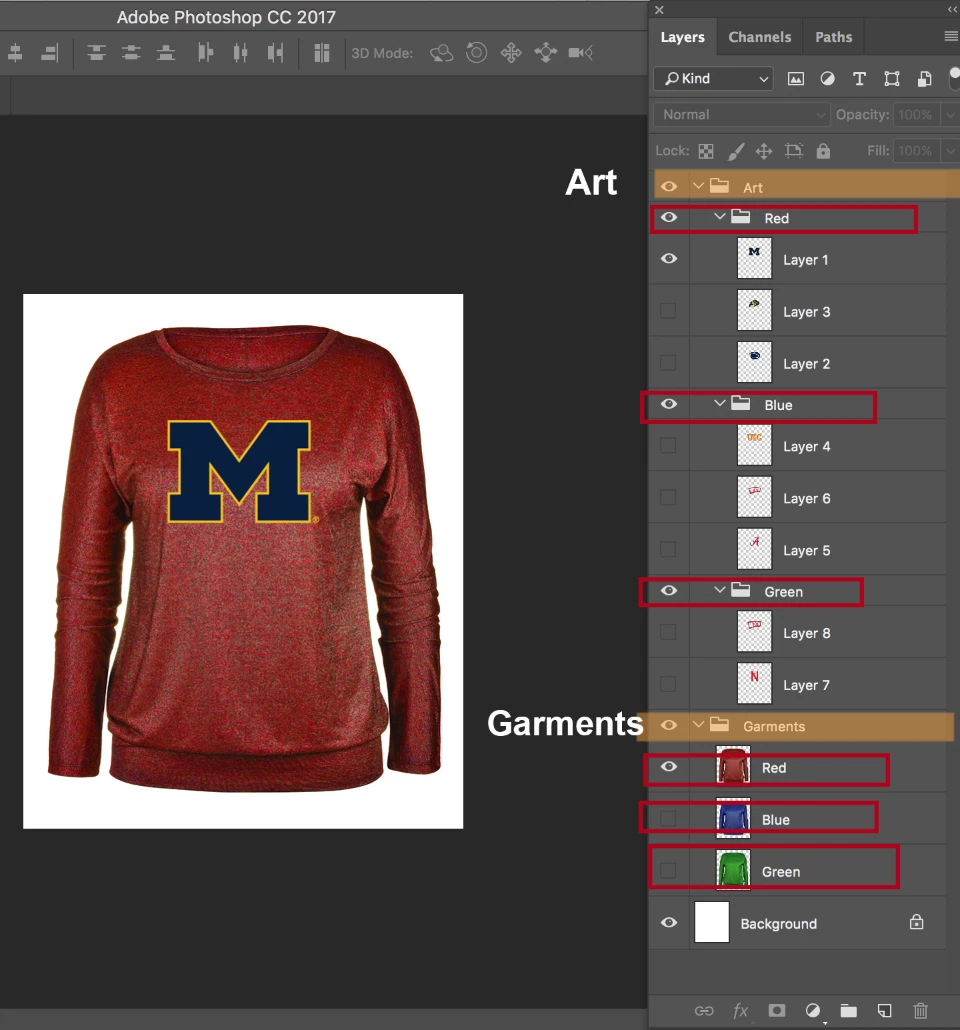
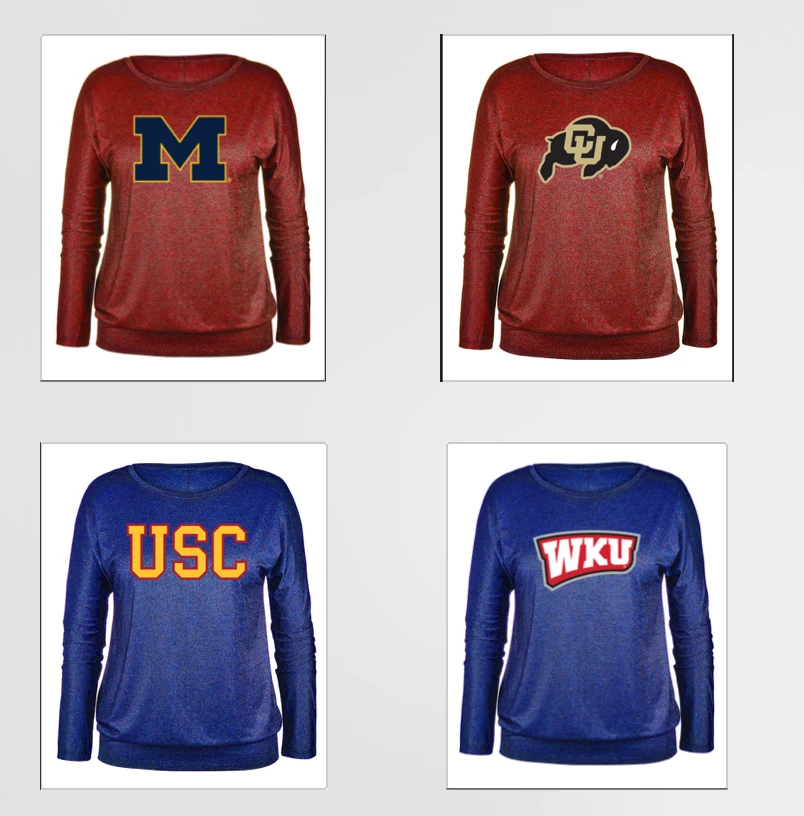
I am having art and garment Group folder  separately , i want export the files form Red color garment with red Art, and blue color garment to blue color Art ,etc
Example:

This topic has been closed for replies.
Correct answer c.pfaffenbichler

thank you very much is working

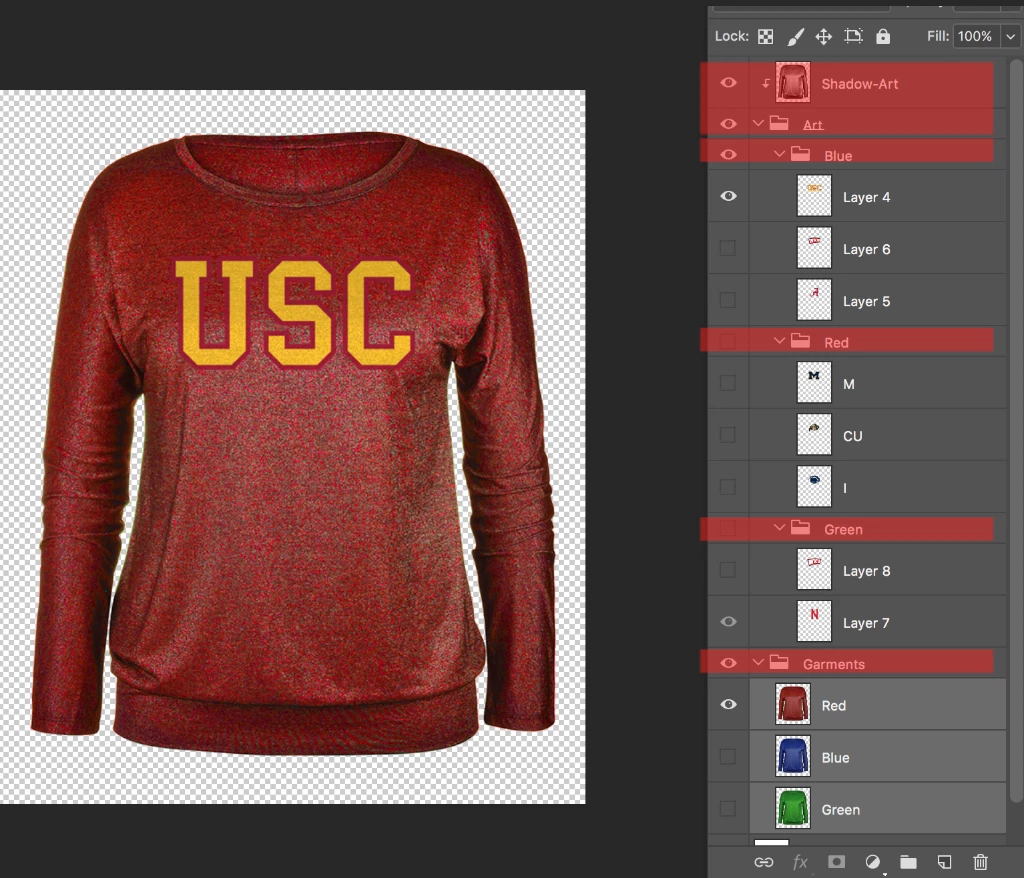
It is possible this layer structure working the script?

you understand my English

Sorry for my bad english.

I appreciate your help!

// if group of same name as layer exists save jpg of combinations of layer with each layer in group except if the layer is situated in the group;

// 2017, use it at your own risk;

#target photoshop

if (app.documents.length > 0) {

// jpg options;

var jpegOptions = new JPEGSaveOptions();

jpegOptions.quality = 9;

jpegOptions.embedColorProfile = true;

jpegOptions.matte = MatteType.NONE;

var myDocument = activeDocument;

var theName= myDocument.name.match(/(.*)\.[^\.]+$/)[1];

var thePath = myDocument.path;

// get layers and groupd;

var theArrays = getLayerAndGroupsNamesAndIDs();

var theLayers = theArrays[0];

var theGroups = theArrays[1];

// hide layers;

showHideByIdentifier (theLayers, false);

// show groups;

showHideByIdentifier (theGroups, true);

// compare layer names to group names;

for (var m = 0; m < theLayers.length; m++) {

var thisName = theLayers[0];

selectLayerByID(theLayers[1], false);

var thisLayer = myDocument.activeLayer;

thisLayer.visible = true;

for (var n = 0; n < theGroups.length; n++) {

// if group has same name as layer;

if (thisName == theGroups[0]) {

  selectLayerByID(theGroups[1],false);

  var thisGroup = myDocument.activeLayer;

// save one copy per layer in group;

  for (var o = 0; o < thisGroup.layers.length; o++) {

  thisGroup.layers.visible = true;

  myDocument.saveAs((new File(thePath+"/"+theName+"_"+theGroups[0]+"_"+String(o)+".jpg")),jpegOptions,true);

  thisGroup.layers.visible = false;

  }

  }

}

myDocument.activeLayer = thisLayer;

thisLayer.visible = false;

};

};

////////////////////////////////////

function getLayerAndGroupsNamesAndIDs () {

// the file;

var myDocument = app.activeDocument;

// get number of layers;

var ref = new ActionReference();

ref.putEnumerated( charIDToTypeID("Dcmn"), charIDToTypeID("Ordn"), charIDToTypeID("Trgt") );

var applicationDesc = executeActionGet(ref);

var theNumber = applicationDesc.getInteger(stringIDToTypeID("numberOfLayers"));

// process the layers;

var theLayers = new Array;

var theGroups = new Array;

for (var m = 0; m <= theNumber; m++) {

try {

var ref = new ActionReference();

ref.putIndex( charIDToTypeID( "Lyr " ), m);

var layerDesc = executeActionGet(ref);

var layerSet = typeIDToStringID(layerDesc.getEnumerationValue(stringIDToTypeID("layerSection")));

var isBackground = layerDesc.getBoolean(stringIDToTypeID("background"));

// if not layer group collect values;

if (layerSet != "layerSectionEnd" && layerSet != "layerSectionStart" && isBackground != true) {

var theName = layerDesc.getString(stringIDToTypeID('name'));

var theID = layerDesc.getInteger(stringIDToTypeID('layerID'));

theLayers.push([theName, theID])

};

// if  layer group start;

if (layerSet == "layerSectionStart") {

var theName = layerDesc.getString(stringIDToTypeID('name'));

var theID = layerDesc.getInteger(stringIDToTypeID('layerID'));

theGroups.push([theName, theID])

};

}

catch (e) {};

};

/*alert (theLayers.join("\n"));

alert (theGroups.join("\n"));*/

return [theLayers, theGroups]

};

// based on code by mike hale, via paul riggott;

function selectLayerByID(id,add){

add = undefined ? add = false:add

var ref = new ActionReference();

    ref.putIdentifier(charIDToTypeID("Lyr "), id);

    var desc = new ActionDescriptor();

    desc.putReference(charIDToTypeID("null"), ref );

       if(add) desc.putEnumerated( stringIDToTypeID( "selectionModifier" ), stringIDToTypeID( "selectionModifierType" ), stringIDToTypeID( "addToSelection" ) );

      desc.putBoolean( charIDToTypeID( "MkVs" ), false );

   try{

    executeAction(charIDToTypeID("slct"), desc, DialogModes.NO );

}catch(e){

alert(e.message);

}

};

// by mike hale, via paul riggott;

// http://forums.adobe.com/message/1944754#1944754

function selectLayerByIndex(index,add){

add = undefined ? add = false:add

var ref = new ActionReference();

    ref.putIndex(charIDToTypeID("Lyr "), index);

    var desc = new ActionDescriptor();

    desc.putReference(charIDToTypeID("null"), ref );

       if(add) desc.putEnumerated( stringIDToTypeID( "selectionModifier" ), stringIDToTypeID( "selectionModifierType" ), stringIDToTypeID( "addToSelection" ) );

      desc.putBoolean( charIDToTypeID( "MkVs" ), false );

   try{

    executeAction(charIDToTypeID("slct"), desc, DialogModes.NO );

}catch(e){

alert(e.message);

}

};

////// show or hide layers by id //////

function showHideByIdentifier (theLayers, show) {

for (var x = 0; x < theLayers.length; x++) {

if (show == true) {var idShw = charIDToTypeID( "Shw " )}

else {var idShw = charIDToTypeID( "Hd  " )};

    var desc3 = new ActionDescriptor();

        var list2 = new ActionList();

            var ref2 = new ActionReference();

            ref2.putIdentifier( charIDToTypeID( "Lyr " ), theLayers[1] );

        list2.putReference( ref2 );

    desc3.putList( charIDToTypeID( "null" ), list2 );

executeAction( idShw, desc3, DialogModes.NO );

};

};

2 replies

saranr37921948
Known Participant
July 21, 2017

can anybody help me

c.pfaffenbichler
Community Expert
Community Expert
July 21, 2017

// if group of same name as layer exists save jpg of combinations of layer with each layer in group except if the layer is situated in the group;

// 2017, use it at your own risk;

#target photoshop

if (app.documents.length > 0) {

// jpg options;

var jpegOptions = new JPEGSaveOptions();

jpegOptions.quality = 9;

jpegOptions.embedColorProfile = true;

jpegOptions.matte = MatteType.NONE;

var myDocument = activeDocument;

var theName= myDocument.name.match(/(.*)\.[^\.]+$/)[1];

var thePath = myDocument.path;

// get layers and groupd;

var theArrays = getLayerAndGroupsNamesAndIDs();

var theLayers = theArrays[0];

var theGroups = theArrays[1];

// compare layer names to group names;

for (var m = 0; m < theLayers.length; m++) {

var thisName = theLayers[0];

selectLayerByID(theLayers[1],false);

var thisLayer = myDocument.activeLayer;

thisLayer.visible = false;

hideOthers ();

thisLayer.visible = true;

for (var n = 0; n < theGroups.length; n++) {

// if group has same name as layer;

if (thisName == theGroups[0]) {

  selectLayerByID(theGroups[1],false);

  var thisGroup = myDocument.activeLayer;

  thisGroup.visible = true;

// hide all layers in group:

  for (var p = 0; p < thisGroup.layers.length; p++) {thisGroup.layers

.visible = false};

// save one copy per layer in group;

  for (var o = 0; o < thisGroup.layers.length; o++) {

  thisGroup.layers.visible = true;

  myDocument.saveAs((new File(thePath+"/"+theName+"_"+theGroups[0]+"_"+String(o)+".jpg")),jpegOptions,true);

  thisGroup.layers.visible = false;

  }

  thisGroup.visible = false;

  }

}

};

myDocument.activeLayer = thisLayer;

thisLayer.visible = false;

};

////////////////////////////////////

function getLayerAndGroupsNamesAndIDs () {

// the file;

var myDocument = app.activeDocument;

// get number of layers;

var ref = new ActionReference();

ref.putEnumerated( charIDToTypeID("Dcmn"), charIDToTypeID("Ordn"), charIDToTypeID("Trgt") );

var applicationDesc = executeActionGet(ref);

var theNumber = applicationDesc.getInteger(stringIDToTypeID("numberOfLayers"));

// process the layers;

var theLayers = new Array;

var theGroups = new Array;

for (var m = 0; m <= theNumber; m++) {

try {

var ref = new ActionReference();

ref.putIndex( charIDToTypeID( "Lyr " ), m);

var layerDesc = executeActionGet(ref);

var layerSet = typeIDToStringID(layerDesc.getEnumerationValue(stringIDToTypeID("layerSection")));

var isBackground = layerDesc.getBoolean(stringIDToTypeID("background"));

// if not layer group collect values;

if (layerSet != "layerSectionEnd" && layerSet != "layerSectionStart" && isBackground != true) {

var theName = layerDesc.getString(stringIDToTypeID('name'));

var theID = layerDesc.getInteger(stringIDToTypeID('layerID'));

theLayers.push([theName, theID])

};

// if  layer group start;

if (layerSet == "layerSectionStart") {

var theName = layerDesc.getString(stringIDToTypeID('name'));

var theID = layerDesc.getInteger(stringIDToTypeID('layerID'));

theGroups.push([theName, theID])

};

}

catch (e) {};

};

/*alert (theLayers.join("\n"));

alert (theGroups.join("\n"));*/

return [theLayers, theGroups]

};

// based on code by mike hale, via paul riggott;

function selectLayerByID(id,add){

add = undefined ? add = false:add

var ref = new ActionReference();

    ref.putIdentifier(charIDToTypeID("Lyr "), id);

    var desc = new ActionDescriptor();

    desc.putReference(charIDToTypeID("null"), ref );

       if(add) desc.putEnumerated( stringIDToTypeID( "selectionModifier" ), stringIDToTypeID( "selectionModifierType" ), stringIDToTypeID( "addToSelection" ) );

      desc.putBoolean( charIDToTypeID( "MkVs" ), false );

   try{

    executeAction(charIDToTypeID("slct"), desc, DialogModes.NO );

}catch(e){

alert(e.message);

}

};

////// hide others //////

function hideOthers () {

var idShw = charIDToTypeID( "Shw " );

    var desc2 = new ActionDescriptor();

        var list1 = new ActionList();

            var ref1 = new ActionReference();

            ref1.putEnumerated( charIDToTypeID( "Lyr " ), charIDToTypeID( "Ordn" ), charIDToTypeID( "Trgt" ) );

        list1.putReference( ref1 );

    desc2.putList( charIDToTypeID( "null" ), list1 );

    desc2.putBoolean( charIDToTypeID( "TglO" ), true );

executeAction( idShw, desc2, DialogModes.NO );

};

saranr37921948
Known Participant
July 21, 2017

If all you want is a shadow  for the shirt why not add a drop shadow layer style on the garment group why add unnecessary complexity. Removing the Art group simplified the scripting required  and the group itself served no real useful function and the structure you now show would most likely not even work the shadow layer you show if made visible would be clipped by the logo visible in the Art group and overlay the logo.

One of the reasons I did not want to program the script was I could not download your psd without allowing that site to use cookies on my machine.

With only top level groups the script process required is the loop within a loop I wrote about. Adding more group levels would complicate the scripting required. All the the ART group does is allow you to collapse you layers pallets and hide the layers that you have to see to manipulate their visibility. The ART Group add complexity you do not need.

You want an automate process to be as simple as it can be. The script will be easier to design and write and require less code and perform better because there is less code required..


this is for the Test file PSD file link

Test File.psd - Google Drive

JJMack
Community Expert
Community Expert
July 20, 2017

You would set the visible on of what you want visible and everything else visibility off and use Save As naming the file using some file naming convention. You may also be able to use layer comps and export layer comps.  I have never user then but I think they allow you to have different views of your documents

JJMack
saranr37921948
Known Participant
July 20, 2017

Thanks Mack

I am doing the same now . But tis need to be done automatic thru script is that possible .

Thanks in advance

JJMack
Community Expert
Community Expert
July 20, 2017

Looking at the structure of your document.  to me it looks like you could script it. Turn all layers visibility off. Then loop through the garment group. Turn on a layer and loop through the color group for that color garment turn on a layer save out a file turn off the layer. when the color group has been processed. the garment loop turn off the current garment layer and moves onto the next garment.

Basically the script would be two loops. Garment loop and color group loop. Though I have processed all layer in a document with a recursive function  I have never process group of layer by group name.  So I would not know how one address a group by name. I would need to learn how to do that. 

JJMack