


New Participant
June 1, 2024
Question

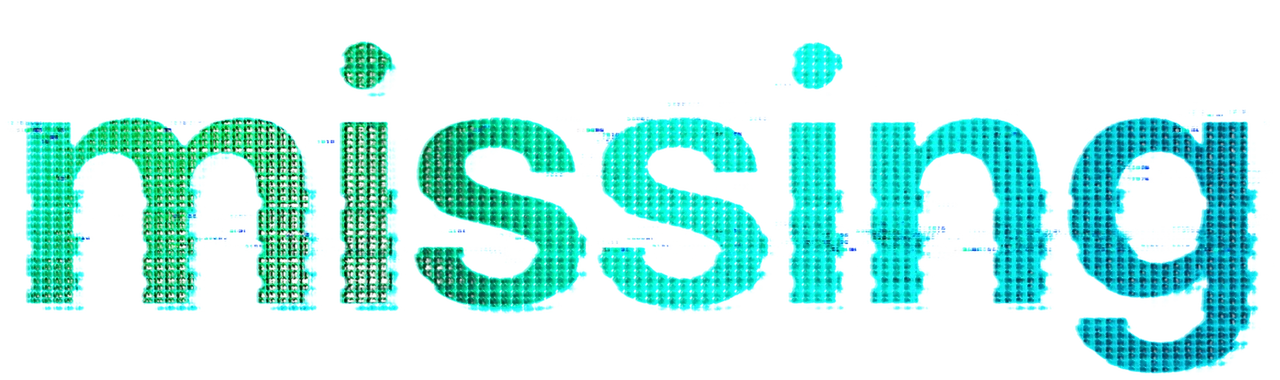
How to extract the pattern/texture from this text?
  • June 1, 2024
  • 4 replies
  • 1129 views


I want to create my own text using this text style. Mainly, I'm trying to copy the texture. I know how to copy a pattern from a whole/homogenous image, but not if the pattern is broken up on text like this. In this case, I'd also like to preserve the gradient of the pattern/color across the text. Any tips?


(If anyone knows how to replicate the distortion effect that'd be awesome as well!)


Thank you!

This topic has been closed for replies.

4 replies

c.pfaffenbichler
Community Expert
June 7, 2024

The Smart Objects (for the grid and for the text) offer the advantage that they can be edited and, on saving, all the instances update. 

The pattern: 

The text: 

c.pfaffenbichler
Community Expert
June 5, 2024

The blue (as opposed to cyan) »frizzles« seem a bit mystifying to me, but one can at least create something somewhat similar. 

New Participant
June 7, 2024

Looks great! Can I ask how you achieved that?

c.pfaffenbichler
Community Expert
June 7, 2024

Multiple instances of a Smart Object containing a rectangular grid with Gradient Overlays etc. 

Those are Clipping Masked to a Group with Fill 0% and »Blend Clipped Layers as Group« unchecked that contains a Smart Object with the Filter »Displace« applied (based on a custom Displacement Map) and has a Stroke. 

The blue frizzles are a bit more complex – they use two instances of the Smart Object containin the text. 

c.pfaffenbichler
Community Expert
June 3, 2024

c.pfaffenbichler
Community Expert
June 2, 2024

As the Pattern includes varying transparency the setup might be somewhat complex. 

As for the gradient a »Gradient Overlay« Layer Style might work out or a clipping masked Gradient Layer.