


Participating Frequently
July 25, 2025
Answered

How to get the rendering box info of a text layer?

  • July 25, 2025
  • 2 replies
  • 132 views

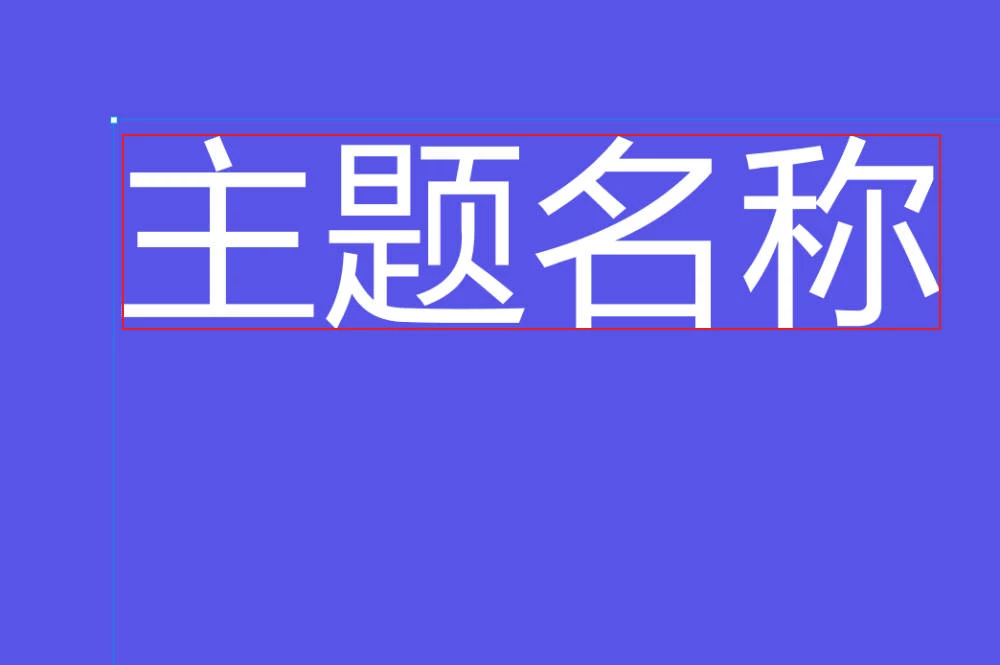
Can I obtain the rendering box size and position of a text layer using UPX? By "rendering box," I mean the box that tightly surrounds the text (like the red box in the image). This concept is similar to "absoluteRenderBounds" in Figma. I'm developing a Photoshop plugin to convert Figma files to PSD format, and this information is essential for achieving precise text alignment.
 

Correct answer creative explorer

@songnan_6255 that's your 'bounding box' or 'bounds' . By using the bounds property of the textItem object in Photoshop's scripting API, you can obtain the precise rendering box information needed for your Figma to PSD conversion plugin. 

2 replies

Legend
July 25, 2025

Just be careful because the bounding box also includes whatever extra spacing is specified for your paragraphs. It may not exactly line up with the edges of your visible glyphs.

Participating Frequently
July 28, 2025

Yes, you are right. "boundingBox" also includes the extra spacing. I used "bounds" instead. 

creative explorer
Community Expert
creative explorerCommunity ExpertCorrect answer
Community Expert
July 25, 2025

@songnan_6255 that's your 'bounding box' or 'bounds' . By using the bounds property of the textItem object in Photoshop's scripting API, you can obtain the precise rendering box information needed for your Figma to PSD conversion plugin. 

m
Participating Frequently
July 28, 2025

You are right. Thank you very much!

FYI, this is the final code:

async function getTextLayerBounds(layerId) {
    try {
        const result = await core.executeAsModal(async () => {
            return await action.batchPlay(
                [
                    {
                        _obj: "get",
                        _target: [
                            { 
                                _ref: "layer", 
                                _id: layerId
                            }
                        ],
                        _options: {
                            dialogOptions: "dontDisplay"
                        }
                    }
                ],
                {}
            );
        }, { commandName: "Get Text Layer Bounds" });

        if (result && result.length > 0 && result[0].bounds) {
            console.log("Found Text Bounds for layer ID:", layerId);
            const bounds = result[0].bounds;
            return bounds;
        } else {
            console.log("Text Bounds not found for layer ID:", layerId);
            return null;
        }
    } catch (e) {
        console.error("Error getting text bounds:", e);
        return null;
    }
}