

Known Participant
February 14, 2023
Question

How to layer move to ?

  • February 14, 2023
  • 2 replies
  • 6481 views

How to move the layer with the help of script and place it on another layer. is that possible ?
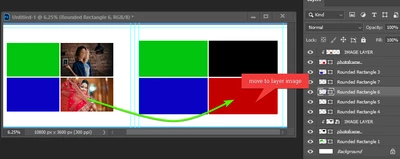
[moderator cured the message formatting to make it more readable]

This topic has been closed for replies.

2 replies

Stephen Marsh
Community Expert
Community Expert
February 15, 2023

I'm a bit confused. If the video demonstrates the process you want, then what is the problem?


Is the video a "real time" recording, or did you create the video to demonstrate the process that you want scripted (therefore it wasn't a live recording)?


It also appears that the image is being resized in the video, rather than only being clipped to a new shape?

nandu nagAuthor
Known Participant
February 16, 2023
Sir thanks for your reply. " I'm a bit confused. If the video demonstrates the process you want, then what is the problem? "= Ye moveing ek software se ho raha hai. .. Kya ye script se move & place ho sakta hai
Stephen Marsh
Community Expert
Community Expert
February 16, 2023
quote
Sir thanks for your reply. "Ye moveing ek software se ho raha hai. .. 
Kya ye script se move & place ho sakta hai"

By @nandu nag


Translation software from Hindi: "This movement is being done by a software. ..can it be move & place from script"


The short answer is yes, in a scripting kind of way!


The script would be run once on a selected layer to set the source layer. Then the same/different script could be run a second time to move the previously nominated layer to the newly selected target layer position.


Or perhaps if there were uniquely coloured labels on the layers, or unique names, a specific script could be run once as the source and target is explicitly indicated.


You would need to write out step by step exactly what you require.


For example, when the layer is moved, it must be above the clipping group layer.


When the layer is moved, should it be centred or upper left to the new clipping group layer content? Should the image be resized or left at the same size as before? What if the aspect ratio is different, what has to happen?


Why use clipping group layers? Why not use layer alpha channels to create selections/masks? Why don't you use a frame instead?


It would be best to supply a PSD copy of the template file.


The project scope and requirements really need to be made clear so as not to waste any volunteer's time.

Community Expert
February 14, 2023
Abambo
Community Expert
Community Expert
February 14, 2023

Oh yes, because of the odd formatting, I did read only half of the message. 😉


(I deleted my message, as it was obviously not answering the question)


ABAMBO | Hard- and Software Engineer | Photographer