


Houseok
Participant
November 8, 2018
Answered

HOW TO MOVE ALL LAYERS IN THE FOLDER

  • November 8, 2018
  • 4 replies
  • 6754 views

I want to drag all layers from one  folder to be positioned in the right location on the picture that I am creating. How can I select all layer in the folder together without selecting one by one? Can I only select the folder and the layers will move together?
    This topic has been closed for replies.
    Correct answer MarekMularczyk

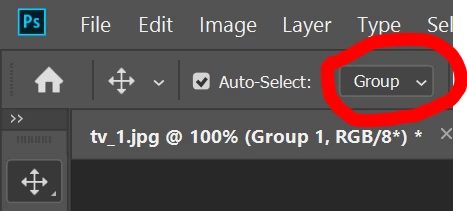
    You can also use "Auto Select" feature of Move tool and set it to "Group":

    4 replies

    jane-e
    Community Expert
    Community Expert
    November 9, 2018

    Houseok  wrote

    ... to be positioned in the right location on the picture that I am creating.

    You didn’t say where the “right location” is, but if you press and hold the shift key before releasing the mouse in the new image, the layers will be centered.

    Trevor.Dennis
    Community Expert
    Community Expert
    November 9, 2018

    Or select the relevant layers, right click and make a Smart Object.  That gives you one object to move around, and you can double click to open the Smart Object in a new window to edit.

    MarekMularczyk
    Community Expert
    MarekMularczykCommunity ExpertCorrect answer
    Community Expert
    November 9, 2018

    You can also use "Auto Select" feature of Move tool and set it to "Group":

    Adobe Community ExpertAdobe Certified Professional
    Elsie ~
    Participant
    August 14, 2023

    Great! Thanks!

    MarekMularczyk
    Community Expert
    Community Expert
    August 16, 2023

    You're welcome!


    Adobe Community ExpertAdobe Certified Professional
    davescm
    Community Expert
    Community Expert
    November 8, 2018

    There are two ways

    1. As you have found, select the group

    or

    2. Click on the first layer then Shift Click on the last layer. the layers between will be selected.

    Dave