


New Participant
April 19, 2019
Answered

How to optimize images for web performance?

  • April 19, 2019
  • 7 replies
  • 3206 views

Hi guys!


I am using photoshop to edit all images before i upload them to my website.

I am not an expert "photoshoper" but I have some basic understanding.


My issue is, how do you guys prepare all your pictures before uploading them to web?

I am resizing everything (reduce 4k images size to 1280xToAnything) and then exporting it for web as a JPEG high quality format.


The thing is, I don't get small (less than 50kb pictures) pictures without any pixeled area (low quality, even exported as high quality jpeg).

If I would export as a PNG format, then it would be much better but also size increases.


I saw a lot of websites that use huge background images and they don't lose any image quality nor is it taking long for loading (website speed).

Please don't talk about using CDN (cloud delivery networks) I know them, just keep it only at the Photoshop side.


If you want to check the website i am working on, is [link removed by a moderator] it is a lawyer website.

As you see, i am using small images, so it is harder to see any image quality loss.


Thank you!
This topic has been closed for replies.
Correct answer Nancy OShea

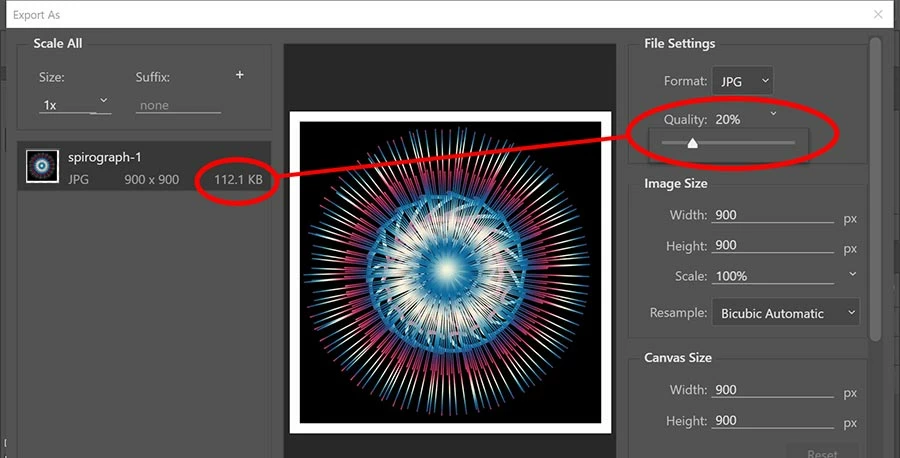
Use File >Export > Export As.

Move the quality slider down to reudce file size.

If your image has sufficient total pixels (height x width), you should not notice much if any quality loss.

In this example, my 1x image is  900 x 900 for a total of 810,000 pixels.   File size is well below 300 KB.

An online example from my Portfolio.

7 replies

Bojan Živković11378569
Community Expert
April 20, 2019

My $0.02. There is huge difference in size between image 1280x something filled with solid color, a few colors and continuous tone image with million of colors, just keep that in mind. More colors bigger file size.

postrophix
Participating Frequently
April 19, 2019

Hi

improve page speed

My 2cent, Reduce the use of plugins (probably your main problem) and use a better theme : https://diythemes.com/

I'v been using Thesis framework for more than 10 years. Focus is it's new Skin.

Pierre

Nancy OShea
Community Expert
April 19, 2019

There are other ways to improve page speed starting at the hosting level.  GZIP Compression makes a big difference.  Also a WordPress hosting plan is usually better than ordinary hosting because it's optimized specifically for WordPress sites.

Run your site through Google Page Speed Insights for more tips on improving performance.

https://developers.google.com/speed/pagespeed/insights/

Nancy O'Shea— Product User & Community Expert
New Participant
April 19, 2019

I thought that the only difference where that wordpress is pre installed and there are some specialized functionality like easy backups and restore and so on.. I will take a look into that!

Community Expert
April 20, 2019

Wordpress hosting example: https://www.clook.net/wordpress-optimised-hosting/  ....

I'm not a user of Wordpress but generally don't most Wordpress themes use frameworks like Bootstrap which will always add bloat and plugins will add further bloat. Maybe research and look for some 'lighter' Wordpress themes that meet your needs.

As Nancy says use the Google Page Speed Tool and it will give you a lot of information on where you can speed up your site (minification, compression of images etc).

Good hosting will have Brotli compression with GZIP compression fallback - see here for a quick test.

Paul-M - Community Expert
Nancy OShea
Nancy OSheaCorrect answer
Community Expert
April 19, 2019

Use File >Export > Export As.

Move the quality slider down to reudce file size.

If your image has sufficient total pixels (height x width), you should not notice much if any quality loss.

In this example, my 1x image is  900 x 900 for a total of 810,000 pixels.   File size is well below 300 KB.

An online example from my Portfolio.

Nancy O'Shea— Product User & Community Expert
Brainiac
April 19, 2019

Please post two links.

One to your own image, which is too big for your wishes.

One to an image of the same pixel size, from another site, which is as small as you wish.

Perhaps we can explain the difference.

Do not email the images! We will not see the true original, we need the link.

postrophix
Participating Frequently
April 19, 2019

Hi

Understand that when you upload Jpeg's to your Wordpress Media uploader, Wordpress automatically compress them to 82% quality.

So, don't go too drastic about optimizations.

Your images have a width of 1280px and it's container has a width of 880px net (not counting paddings). So, you could go 2x the size in pixel. (for retina display)

Your images look washed out, use Curves to give them some contrast.

Pierre

Brainiac
April 19, 2019

These sites which deliver: have you downloaded and examined their files? Especially, to examine their file sizes and pixel dimensions?

New Participant
April 19, 2019

Yes, they have also big image size (about 1280xWhatEver or sometimes even 1920xWhatEver) but some how they are very small from 50kb to 100kb but with no quality loss. Thats exactly what happens to me when I export in photoshop to web.