


mauricior6328708
Inspiring
November 29, 2016
Question

How to resize an image inside a selection!

  • November 29, 2016
  • 2 replies
  • 2995 views

Good afternoon guys, everyone salutes you!

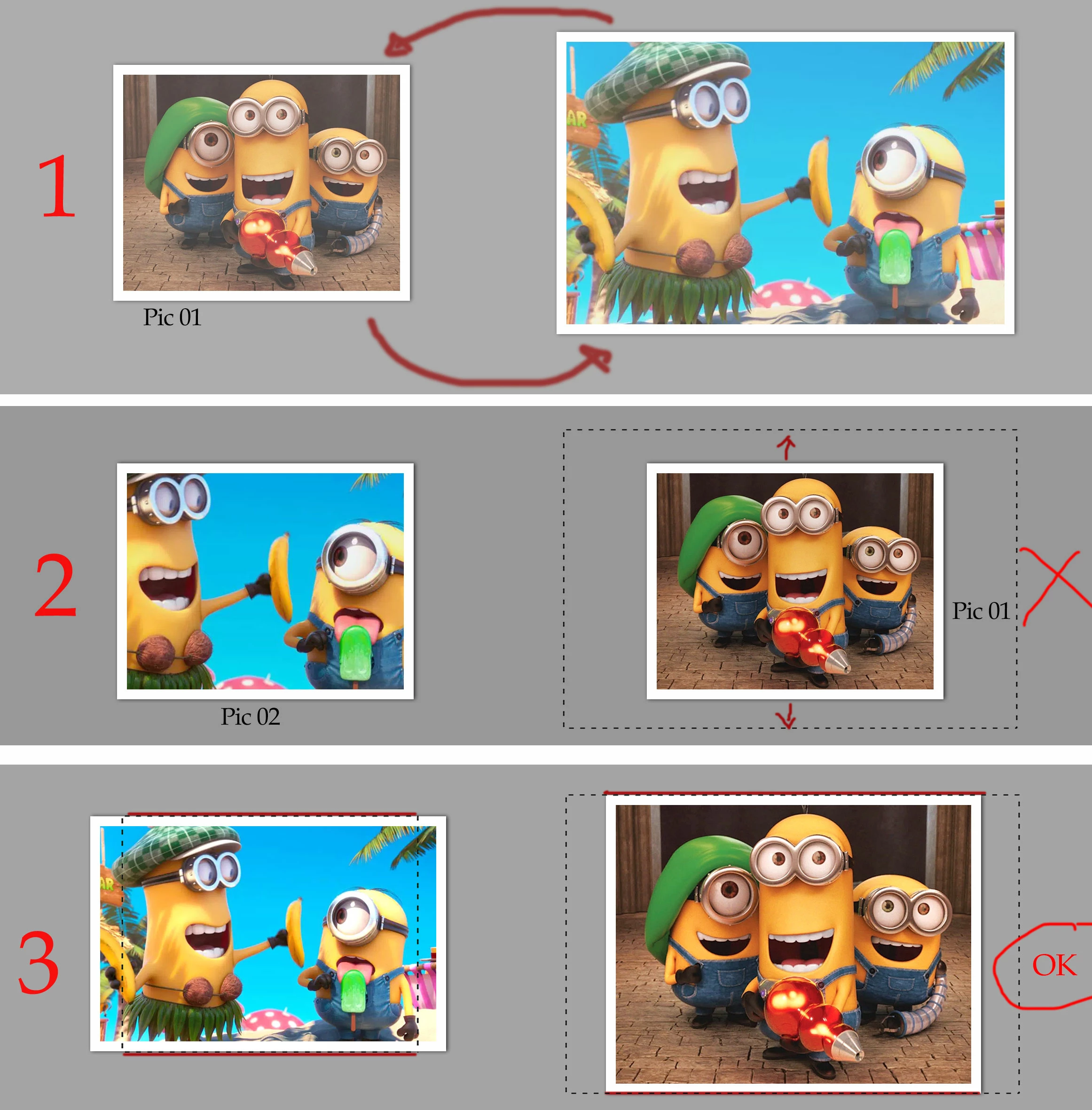
It would be possible for a script to resize an image within a selection based on height so that the image does not distort, thus maintaining the same aspect ratio. Is that I created an action to exchange two images inside the document, however there is not cool when they are images of different sizes and with this script, I can solve this problem. Thank you!
This topic has been closed for replies.

2 replies

Inspiring
November 30, 2016

Here's a script I wrote a while back to deal with various ways of scaling to fit a selection.

app.preferences.rulerUnits = Units.PIXELS

app.preferences.typeUnits = TypeUnits.PIXELS

    var scriptName = "NinjaScript FitSelection";

    var scriptVersion = "0.1";

function boundsToSize (inBounds)

{

    return [inBounds[2] - inBounds[0], inBounds[3] - inBounds[1]];

}

function boundsToPivot (inBounds)

{

    return [(inBounds[2] + inBounds[0])/2, (inBounds[3] + inBounds[1])/2]

}

function fitScale()

{

    activeDocument.activeLayer.resize(sizeSL[0]/sizeAL[0]* 100, sizeSL[1]/sizeAL[1]* 100)

    activeDocument.activeLayer.translate (pivotSL[0] - pivotAL[0] ,   pivotSL[1] - pivotAL[1])

}

function fitWidth()

{

    activeDocument.activeLayer.resize(sizeSL[0]/sizeAL[0]* 100, sizeSL[0]/sizeAL[0]* 100)

    activeDocument.activeLayer.translate (pivotSL[0] - pivotAL[0] ,   pivotSL[1] - pivotAL[1])

}

function fitHeight()

{

    activeDocument.activeLayer.resize(sizeSL[1]/sizeAL[1]* 100, sizeSL[1]/sizeAL[1]* 100)

    activeDocument.activeLayer.translate (pivotSL[0] - pivotAL[0] ,   pivotSL[1] - pivotAL[1])

}

function fitInside()

{

    var inSize = Math.min(sizeSL[0]/sizeAL[0]* 100, sizeSL[1]/sizeAL[1]* 100);


    activeDocument.activeLayer.resize(inSize, inSize)

    activeDocument.activeLayer.translate (pivotSL[0] - pivotAL[0] ,   pivotSL[1] - pivotAL[1])

}

activeDocument.suspendHistory("NS_FitSelection", "main();")

function main()

{

    try

    {    activeDocument.selection.bounds}

    catch(e)

    { alert ("Error, no selection made"); return;}

sizeAL = boundsToSize(activeDocument.activeLayer.bounds);

sizeSL = boundsToSize(activeDocument.selection.bounds);

pivotAL = boundsToPivot(activeDocument.activeLayer.bounds);

pivotSL = boundsToPivot(activeDocument.selection.bounds);


    dialogFitSelection();

}

function dialogFitSelection()

{

    var thisDialog = new Window("dialog", scriptName + " v" + scriptVersion);

    thisDialog.orientation = 'column';

    thisDialog.alignChildren = 'center';

    thisDialog.alignment = 'center';


    var groupOptions = thisDialog.add("group");

        var radioFitInside = groupOptions.add("radiobutton", undefined, "Fit Inside");

        radioFitInside.value = true;

        var radioFitScale = groupOptions.add("radiobutton", undefined, "Fit Stretch");

        var radioFitHeight = groupOptions.add("radiobutton", undefined, "Fit Height");

        var radioFitWidth = groupOptions.add("radiobutton", undefined, "Fit Width");


     var groupButtons = thisDialog.add("group");

        myOkButton = groupButtons.add("button", undefined, "Ok",{name: "ok"});

        myOkButton.onClick = function()

        {

            if (radioFitInside.value) fitInside();

            if (radioFitScale.value) fitScale();

            if (radioFitWidth.value) fitWidth();       

            if (radioFitHeight.value) fitHeight();

            thisDialog.close();

        }

        myCancelButton = groupButtons.add("button", undefined, "Cancel",{name: "cancel"});

        myCancelButton.onClick = function()

        {

            thisDialog.close();

        }


        thisDialog.center();

        var result = thisDialog.show();  

}

JJMack
Community Expert
Community Expert
November 30, 2016

There is a nasty bug in Photoshop scripting that I reported to Adobe. Adobe acknowledged they can reproduce the problem but Adobe does not fix it. Every version of Photoshop I have tested has the bug.  This bug bite the script you posted.  If you suspend history state recording. Have an active selection and resize/move a layer Photoshop will back up a one history state prior to when you suspended history state recording.  Your script also seems to have other problem. It does not seem to resize smart object layers correctly. Here is the nasty bug report on file.

Photoshop: Script bug resize layer back document up one history state | Photoshop Family Customer Community

Here what I see running your script the last thing in the history state stack before running your script is Fill.  I filled the selection with gray in a layer under the image layer targeted the image layer and ran your script and used fit inside radio button.  Note the gray fill was removed. The image was aligned to the selection however it was not resized to fit within the selection. Your script hit the bug twicd Two previous steps are lost.

JJMack
mauricior6328708
Inspiring
December 1, 2016

Great script EnsilZah! It's very close to what I really need. You could delete the dialog box and execute option 3 "Fit Height" directly. That's all I need. Thank you!

mauricior6328708
Inspiring
November 29, 2016

Remembering that the script is to resize in the selection based on its height, respecting the same proportion, only that!!

JJMack
Community Expert
Community Expert
November 30, 2016

mauricior6328708 wrote:

Remembering that the script is to resize in the selection based on its height, respecting the same proportion, only that!!

It can not only be the height for there are two aspect ratios involved to fit an image to a rectangle area it will either be as exact fit resize or the resize will  be fitted to the width or height that would depend on the two aspect ratios evolved.  The Images aspect ratio and the selection area aspect ratio.

As in your exanple 3 the left image is not fitted within the selection.   You can of course only take into account the selection height,  as shown in #3 without masking Resize side by side image like shown could wind up overlapping when both images have a wide aspect ratio. Both will exceed the selections width. If selected aras are near each other.

As I wrote  I prefer to fill the selection area and mask the resized image to that area.

Keep in mind images and selection area should have the same type of orientation.  Landscape into portrait area or Portrait into Landscape do not fair well the virtual center crop compositions most likely will not be acceptable.

JJMack
mauricior6328708
Inspiring
November 30, 2016

Got it!

I'm looking for another way using smart object ... Any news I come back and report the result. Thank you!