


Known Participant
January 4, 2023
Answered

How to save very large file (flattened 5GB+) in CMYK for print (PS)

  • January 4, 2023
  • 1 reply
  • 1826 views

Hey there, once again I ask for your help.

Currently I am working on a project of few graphical panels 2,8m (9,18ft) to 1,3m (4,26ft) that have to be printed and attached on a side of a display booth. I was told to send the file in 300 ppi (which I doubt is needed for something as big as this print is due to the viewing distance, but they re-assured me that is what they need)

So if I follow these rules, the files created, even when flattened to a single layer, are 5GB+. 

Questions - Is there a way to export/save as JPG with included CMYK picture profile? Or what other way should I save this file to send it to printer? Is .psb (the format that saves 4GB+ files) my only option?

Normally I was exporting files over Lightroom and set parameters as limited file size/PPI in there, but lightroom does not save in CMYK, and .tif that I would normally use for print jobs (flattened to one layer, converted to a printer´s picture profile) could not be used since it exceeds the 4GB file size limit of photoshop.

Thanks in advance for any help.
This topic has been closed for replies.
Correct answer NB, colourmanagement

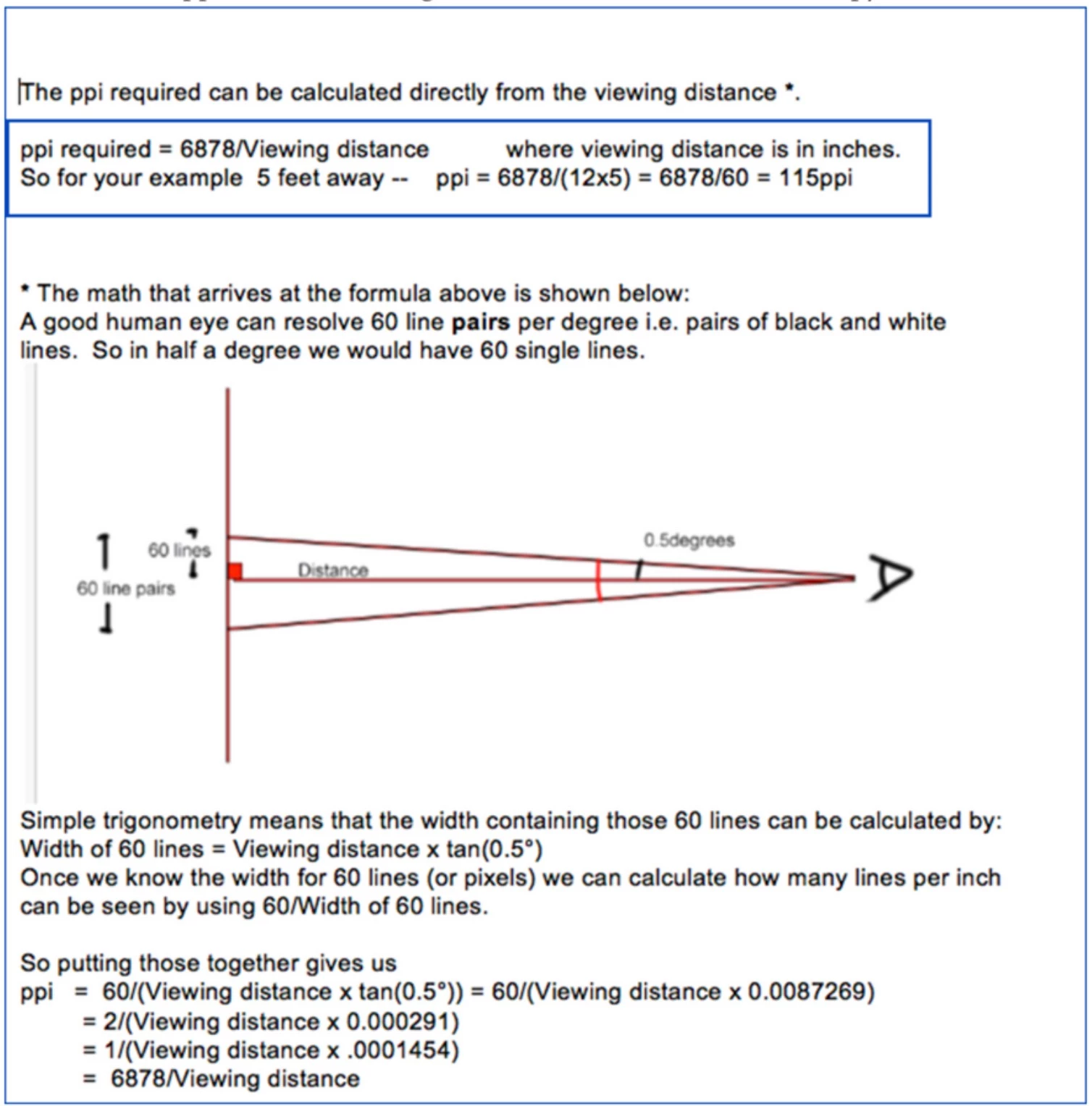
hi D.Fosse, Here's a PPI / viewing distance formula posted a while ago by DavesCM

it might require a bit more explanation.


I hope this helps
neil barstow, colourmanagement net - adobe forum volunteer - co-author: 'getting colour right'
google me "neil barstow colourmanagement" for lots of free articles on colour management


1 reply

D Fosse
Community Expert
Community Expert
January 4, 2023
quote

I was told to send the file in 300 ppi (which I doubt is needed for something as big as this print is due to the viewing distance, but they re-assured me that is what they need)


By @Zower


You're absolutely dead correct, and the person who told you this simply doesn't know what they're talking about. Printing services are full of customer relations people who know nothing about the technical side. Unfortunately, those are often the only people you can talk to, you don't get to the people who actually do the printing.


PSD is limited to 2GB, TIFF to 4GB. Anything above that is strictly PSB.


But keep in mind that this is file size on disk. For jpeg, you can get around that with heavy compression. That will shrink the native file size down to anywhere beteen 1 and 10 %. It will obviously degrade the file in the process, making the 300ppi requirement even more meaningless.


So what ppi would you need for this? There is a formula for "standard distance" viewing that I can never remember. But even assuming you're supposed to go right up to it: Consider a computer screen, say a standard 27 inch at 2560 x 1440. That's about 110 ppi. How close would you have to go before you start seeing pixels? Just try that out for yourself. (the answer is...very close 😉 )


At specification, they're asking for 33 000 x 15 500 pixels. That's ridiculous. A good working rule of thumb is that anything above 15 000 pixels long side is most likely wasted, except in some very special circumstances (and this isn't one of them).


I'd settle for 120 here, maybe 150 if I felt it was important. But 300 - no way.

NB, colourmanagement
Community Expert
NB, colourmanagementCommunity ExpertCorrect answer
Community Expert
January 4, 2023

hi D.Fosse, Here's a PPI / viewing distance formula posted a while ago by DavesCM

it might require a bit more explanation.


I hope this helps
neil barstow, colourmanagement net - adobe forum volunteer - co-author: 'getting colour right'
google me "neil barstow colourmanagement" for lots of free articles on colour management