brianl51359352 wrote I need to create a header for a website. Simple text header... |
Use Web Fonts instead of images. The main advantage to web fonts is the content can be indexed and translated because it's real text. Google and Typekit have large libraries of web fonts ready for copy & paste insertion. And you can style the fonts as needed with CSS code.
Browse fonts | Typekit
Google Fonts
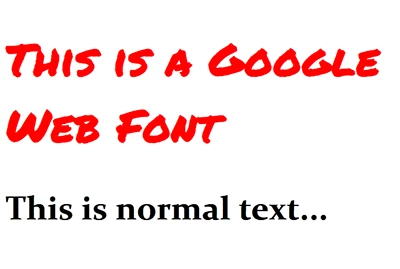
HTML & CSS Code:
<!doctype html>
<html lang="en">
<head>
<meta charset="utf-8">
<title>Google Web Font Demo</title>
<!--Google Web fonts-->
<link href="https://fonts.googleapis.com/css?family=Permanent+Marker" rel="stylesheet">
<style>
body {font-family: Constantia, "Lucida Bright", "DejaVu Serif", Georgia, "serif";}
h1 {font-family: 'Permanent Marker', cursive; color:red;
</style>
</head>
<body>
<h1>This is a Google Web Font</h1>
<h2>This is normal text...</h2>
</body>
</html>
Graphics for modern web sites have changed a lot in recent years, too. For text, logos and icons, I recommend using Illustrator and exporting to SVG (scalable vector graphics). The advantages to SVG over raster images (JPG & PNG) are 3 fold. 1) better image quality on hi-DPI displays. 2) your SVG can be re-scaled without losing any details. 3) SVGs can be styled with CSS code.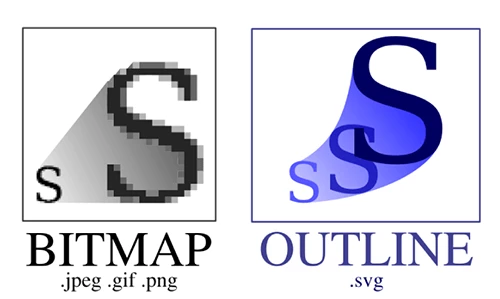
Nancy



 AdChoices