


Known Participant
June 10, 2020
Answered

How to stop Photoshop from adding new placed smart objects to library?

  • June 10, 2020
  • 4 replies
  • 8497 views

I have the latest PS installment. I'm pretty sure this didn't happen before, but now each new smart object I place is automatically added to CC Libraries and I can't for the life of me figure how to disable this feature.


As a result, my laptop lags (just now it freezed and was waiting for something in Libraries) and the cloud is full of useless unimporant pieces of graphics. 


Any ideas? 
This topic has been closed for replies.
Correct answer c.pfaffenbichler

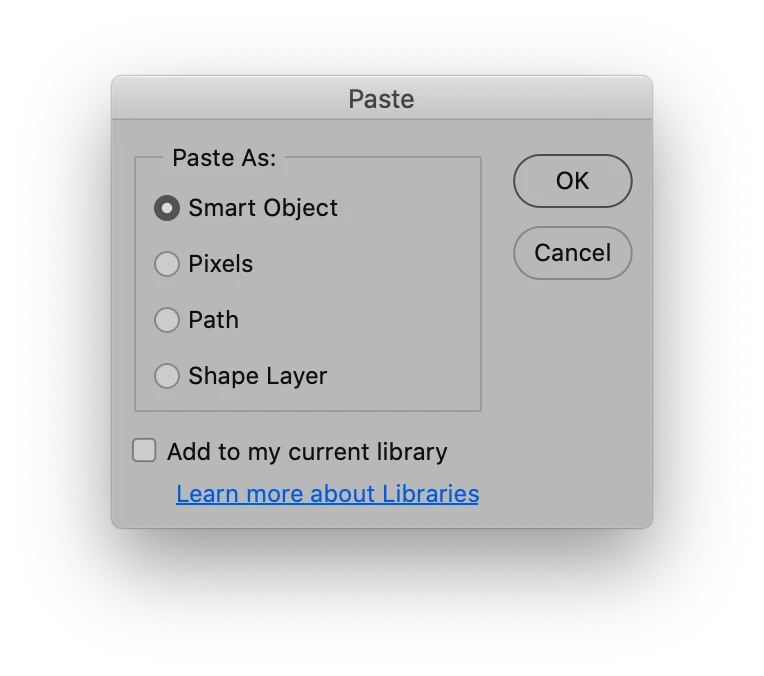
To make sure: Are you talking about placed SO (File > Place …) or pasted ones? 

The dialog for pasting SOs clearly features a checbox for »Add to my current library«. 

4 replies

Participant
April 20, 2022

This is ridiculous. I've disabled this SEVERAL times and from time to time Adobe just decides to ignore what I put before and re-enables it.  But I do not notice the change and now my library is FULL of items I did not, and never wanted to be added to my library. 
SUPER FRUSTRATING!


c.pfaffenbichler
Community Expert
Community Expert
April 21, 2022

This is ridiculous. I've disabled this SEVERAL times and from time to time Adobe just decides to ignore what I put before and re-enables it.

Well, you may want to ask yourself under which exact circumstances this happens. 

Can you reproduce the issue? 

Is there any possible relation to updates (Photoshop, OS, drivers, …), other applications, …? 

Participating Frequently
September 10, 2022

Well, that is a rant and seems to do nothing with regard to actual trouble-shooting. 


4. Delete all the unnecessary items in my Library.


Linked Smart Objects refer to linked files, so what did you expect deleting the objects you had placed as linked Smart Objects previously would do? 


6. realize that OH NO, PHOTOSHOP HAS DEFAULTED BACK TO HAVING 'Add to my current Libary' checked.

Apparently this has not happened for many other Photoshop users so that’s the »point« you should have been focusing on. 

Is there any recognizable pattern?

Did any updates, crashes, preferences resets, … precede the reset of the pasting behaviour? 


Did you check if the Library objects you deleted might still be available? 

https://community.adobe.com/t5/creative-cloud-services-discussions/how-do-i-recover-an-asset-i-deleted-in-the-creative-cloud-library/td-p/7755093


It is an accurate description of how the software you are hired to defend is malfunctioning and behaving in a manner that annoys all users except those getting paid by adobe, be it developers or community managers. 

Legend
March 24, 2022

Why is it enabled by default? The libraries panel shows up in many apps from time-to-time, especially after you update to a new version - it's just happened to me in Photoshop after disabbling it sveral times over the years.


We need a CC-wide way of disabling CC Libaries for all apps, forever - as in, never show a libraries panel in any app, for any reason, ever again.

Participating Frequently
September 10, 2022

I 100% agree. CC Libraries are dumb useless and annoying. The perfect example of how big corp destroys everything. because CEO says "I like smart libraries i'm the boss" (while consistently not fixing 5-10 year old bugs)

c.pfaffenbichler
Community Expert
Community Expert
September 11, 2022

CC Libraries are dumb useless and annoying. 

What is your reasoning here? 

You do underestand that you do not need to use them if they are not useful to you? 


while consistently not fixing 5-10 year old bugs

The Cache Level 1-bug comes to my mind in that timeframe (or thereabouts), which other Photoshop bugs are you referring to? 

c.pfaffenbichler
Community Expert
c.pfaffenbichlerCommunity ExpertCorrect answer
Community Expert
June 10, 2020

To make sure: Are you talking about placed SO (File > Place …) or pasted ones? 

The dialog for pasting SOs clearly features a checbox for »Add to my current library«. 

mmiummiuAuthor
Known Participant
June 18, 2020

Yes, thank you. That's the thing, I have seen this dialog so many times I didn't notice the change.

c.pfaffenbichler
Community Expert
Community Expert
June 10, 2020

Have you actually looked at the dialog that appears when pasting external content in Photoshop?