


gleng89199390
Participant
March 11, 2017
Answered

HOW TO USE LINE TOOL TO CREATE HACHURE LINES?

  • March 11, 2017
  • 2 replies
  • 3205 views

I am a mapmaker, and I need PhotoShop to make hachure lines for me automatically. Hachures are the old-fashioned representation of ridges, by means of short, parallel lines, packed close together, which go down each side of a topographic ridge. I have many features which I need to label this way over the top of an airphoto. I would like to use the Line Tool to draw the ridge lengthwise, then have PS create the small, parallel lines across the line I draw. These are sometimes referred to as "caterpillars" because they look like that. Thank you!
    This topic has been closed for replies.
    Correct answer c.pfaffenbichler

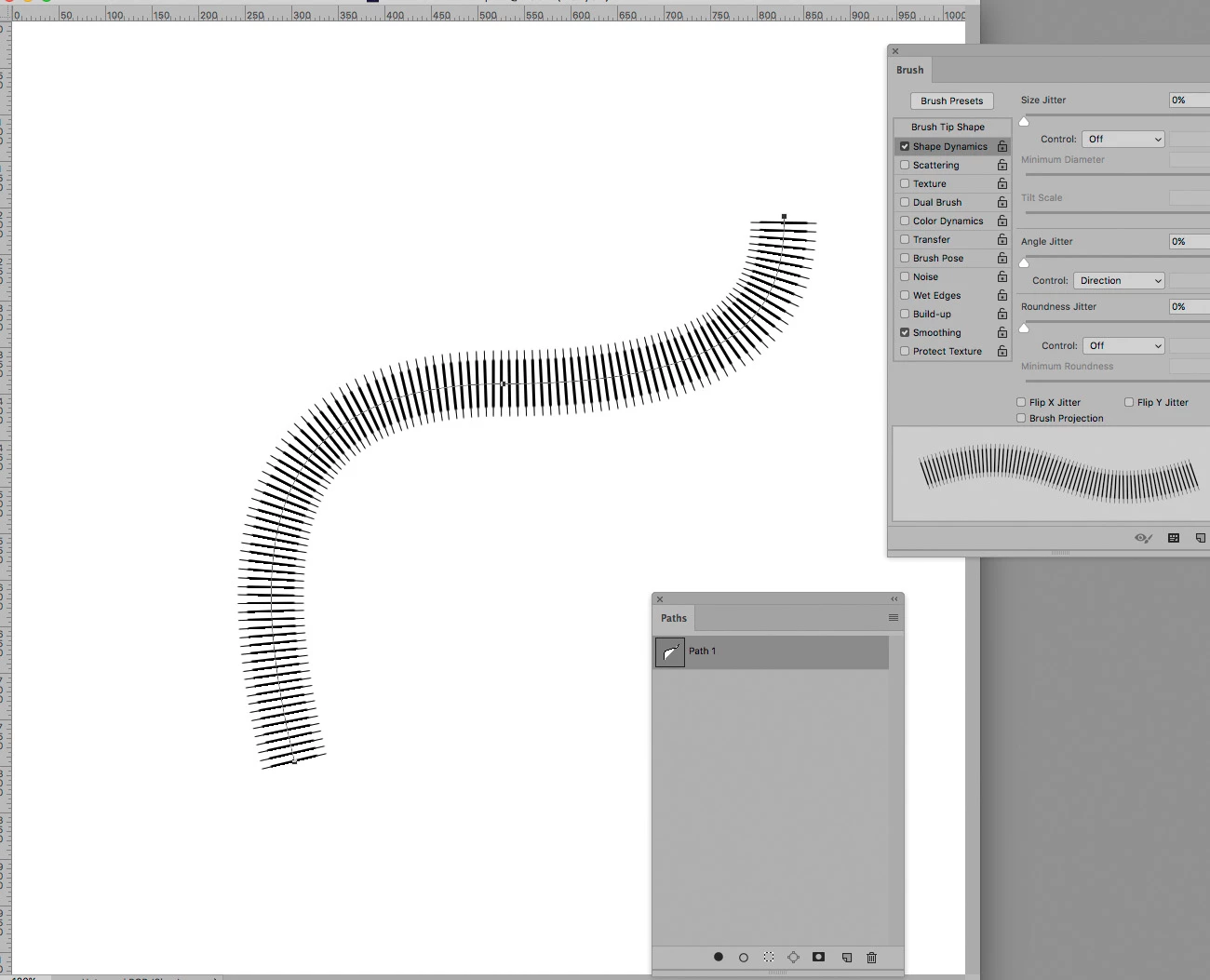
    Do you mean something like this?

    2 replies

    c.pfaffenbichler
    Community Expert
    Community Expert
    March 11, 2017

    Illustrator’s Scatter Brush would be another option.

    c.pfaffenbichler
    Community Expert
    c.pfaffenbichlerCommunity ExpertCorrect answer
    Community Expert
    March 11, 2017

    Do you mean something like this?

    gleng89199390
    Participant
    March 11, 2017

    YES! How do I do that? Glen

    c.pfaffenbichler
    Community Expert
    Community Expert
    March 11, 2017

    The Shape Dynamics settings are visible in the first screenshot, after you set those and the Brush Tip Shape (see second screenshot) you can select the Path in the Paths Panel and click the »Stroke path with brush-button«.

    Should you want a rectangular tip you may have to create a custom Brush tip.

    But have you considered using Illustrator?

    With that you may maintain better editability of the strokes.