Participant
April 29, 2025

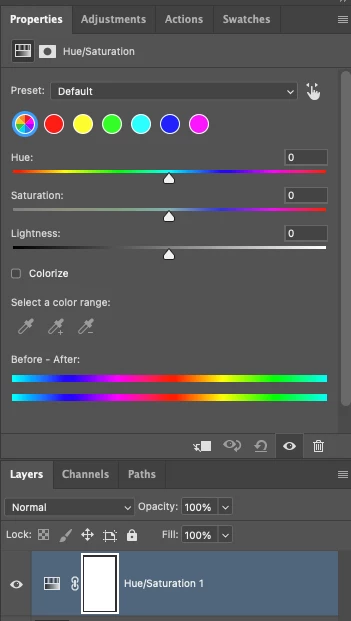
P: Adjusting layer properties doesn't work for Hue/Saturation/lum. HSL layers

  • April 29, 2025
  • 68 replies
  • 12364 views

The tab to click on and change the properties for an adjustment layer randomly disappears. Quitting and re-opening the app solves the issue, but it will happen again within minutes, usually when switching between different projects or different app on the computer. 

On Photoshop v26.6 - Mac Mini M4 pro, 32gb ram, 1tb ssd.


Any help would be appreciated!
ss

68 replies

Participating Frequently
October 6, 2025

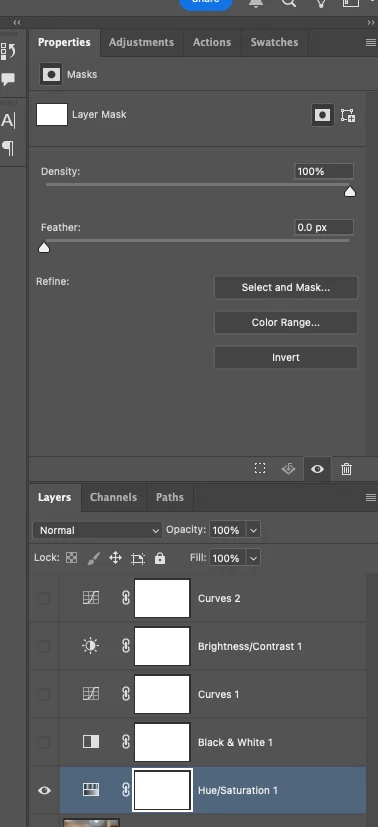
Just had this issue now. Using Photoshop 2025 (updated to version 26.11.0 a few days ago) on a Macbook Pro. Hue-adjustment layer not working/displaying properly (showing density/feather?). Even when I don't use an adjustment layer and just use hue/saturation still displays this way. I restarted several times, still not working. Is there a workaround? I  have a deadline today.

Participant
October 6, 2025

I've been having the same issue with Photoshop 2025 (current version 26.11.0). I'm on Mac Studio M1 Ultra. I need to close and re-open images to make the hue/sat adjustemtns about 90% of the time. If I click on the floating saturation bar, I get this error code:


Anshul_Saini
Community Manager
Community Manager
October 3, 2025

Hi everyone,


Thank you all for your continued patience and detailed reports on this issue. We completely understand how disruptive this has been, and we truly appreciate everyone who’s shared screenshots and feedback so far.


Our internal teams have been actively testing this across multiple environments, but it appears to be environment-specific.


To help us move this forward, we’re now arranging a live debug session with members of the Photoshop product and engineering teams early next week (Monday or Tuesday, between 10:00 AM and 3:00 PM PST.


If anyone here can reproduce this issue 100% of the time (not intermittently), please send me a direct message (DM) with the following details:

  • Your Adobe email ID (the one linked to your Creative Cloud account)

  • A phone number where we can reach you during that window


We’ll coordinate directly with you to set up a brief debugging session, allowing the team to capture the root cause in real-time.


Thank you again for your help in investigating this matter.


Best,

Anshul Saini

Participant
October 2, 2025

Totally agree that it is beyond comprehension that adobe has not fixed this issue. I was the member who first raised this issue here and still today, the only solution is to quit PS and restart to have HueSat layer funciton correctly. PS is currently a broken broken that exists only to fustrate its users.

October 2, 2025

It's ridiculous that Adobe hasn't been able to diagnose this bug for so long, offering solutions that don't work. This is how seriously you treat your users...

@Aleke  @CMass @Srishti Bali @Anshul_Saini 

yzeal
Participant
September 30, 2025

Same issue here: the properties panel only displays the masks option, can't select hue/saturation. It's only the hue/saturation adjustment layer, all the other adjustment layers work normally. Restarting Photoshop fixes the issue for a while.

This is on Windows 11 in Photoshop 26.11.0.

Participant
September 19, 2025

Apparently this is a common issue when using the Beta version. 

Participant
September 18, 2025

Same here in 2025, did anyone have a solution? 
Mine does't even show the sliders, just the mask options (grayed out because the mask isn't selected)

Any tips appreciated 🙂

Bojan Živković11378569
Community Expert
Community Expert
September 18, 2025

Please post a screenshot showing the Layers panel alongside the Properties panel.

Known Participant
September 6, 2025

Just got a new position, setting up new imac and photoshop and getting my workspace how i like it, and find the Hue/Saturation adjustment layer just...doesnt work. It has nothing to do with color values, just "Density" and "Feather". All other adjustment layers have their properties display correctly. I can use H/S as a destructive edit, but thats it.


I havent even gone into Preferences yet, so its not a "reset preferences" issue.

Trevor.Dennis
Community Expert
Community Expert
September 6, 2025

Can you show us a screen shot of your workspace with layers and properties panels?

So this is a new system, and Photoshop has been installed for the very first time?

Is this the release version of Photoshop?  Beta now has a new Color & Vibrance adjustment layer.

It sounds like you are able to select the Hue/Sat adjustment layer, but it is not showing what you expect in the Properties panel.


Anything you can tell or show us to clarify would help.  

Trevor.Dennis
Community Expert
Community Expert
September 6, 2025

Just realised whaty is going on.

You have the mask selected

Participant
September 4, 2025

Bonjour,

Depuis plusieurs mois maintenant quand j'utilise la fonction "teinte saturation" je n'ai pas accès aux propriétés. Parfois elles s'affichent et parfois non 

Est ce que vous pouvez m'aider

Merci

Catherine


Participant
September 4, 2025

Voici une capture d'écran 

Merci de votre aide