


Exit
  • Global community
    • Language:
      • Deutsch
      • English
      • Español
      • Français
      • Português
  • 日本語コミュニティ
  • 한국 커뮤니티
0

I want to get rid of the spectrum within the color palette

New Here ,
Jan 17, 2018 Jan 17, 2018

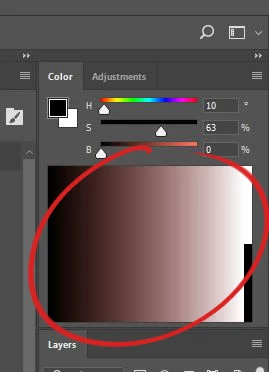
Refer to the circled part in the image.
2018-01-17 22_42_26-.jpg

It's a spectrum that shows up as part of the color window. The only options I see are to switch it to a different type of spectrum, such as Grayscale, CMYK, etc. But there's no option to completely get rid of it while still using the color sliders. I don't remember having this problem with earlier versions of PS, so it must have come with an update.

If there is a way to disable it, please let me know. Or perhaps someone can write me a mod or something. Because it's annoying how much space this takes up. I realize I can minimize it to only a thin bar, but I have to do that every time I switch to fullscreen mode, and I really wish I didn't.

632
Translate
Report
Community guidelines
Be kind and respectful, give credit to the original source of content, and search for duplicates before posting. Learn more
community guidelines
Adobe
Community Expert ,
Jan 18, 2018 Jan 18, 2018

The spectrum or color ramp is going to show but you can make it smaller by resizing the panel, push the bottom edge up.

Translate
Report
Community guidelines
Be kind and respectful, give credit to the original source of content, and search for duplicates before posting. Learn more
community guidelines
Community Expert ,
Jan 18, 2018 Jan 18, 2018

mrtwst009 , in which Photoshop version could you hide it or may you have been using a non-default Panel?

Translate
Report
Community guidelines
Be kind and respectful, give credit to the original source of content, and search for duplicates before posting. Learn more
community guidelines
New Here ,
Jan 18, 2018 Jan 18, 2018

I used cs6 before this. I didn't hide the spectrum, but I don't remember it ever expanding like it does in CC.

Translate
Report
Community guidelines
Be kind and respectful, give credit to the original source of content, and search for duplicates before posting. Learn more
community guidelines
New Here ,
Nov 26, 2021 Nov 26, 2021
LATEST

I know this is an old thread but this was driving me mad and I've figured out the solution. Click and drag the top of the panel so that the panel pops out of the window such that it is floating. Once it is floating, it will not expand the spectrum gradient box. Now, you can grab the panel and move it to the edge of the screen so that it snaps to the edge - just make sure it doesn't pop back into the photoshop window itself. Difficult to explain, but it will look almost identical as before but now your panels won't go crazy every time you open photoshop. Also, make sure you save the arrangement as a new workspace so you don't lose it.

Translate
Report
Community guidelines
Be kind and respectful, give credit to the original source of content, and search for duplicates before posting. Learn more
community guidelines