


New Participant
March 21, 2020
Answered

Image and Canvas resize

  • March 21, 2020
  • 2 replies
  • 1307 views

An error occurs when I open Image resize or Canvas resize. The dialog box shows either the pic size or the number of pixels to contain decimals and it won't allow the resize to cancel or other options to be selected without altering to whole numbers. If cancel is attempted more than once it locks photoshop and I have to force it closed through task manager. Anyone encounter a similar problem.
 

This topic has been closed for replies.
Correct answer davescm

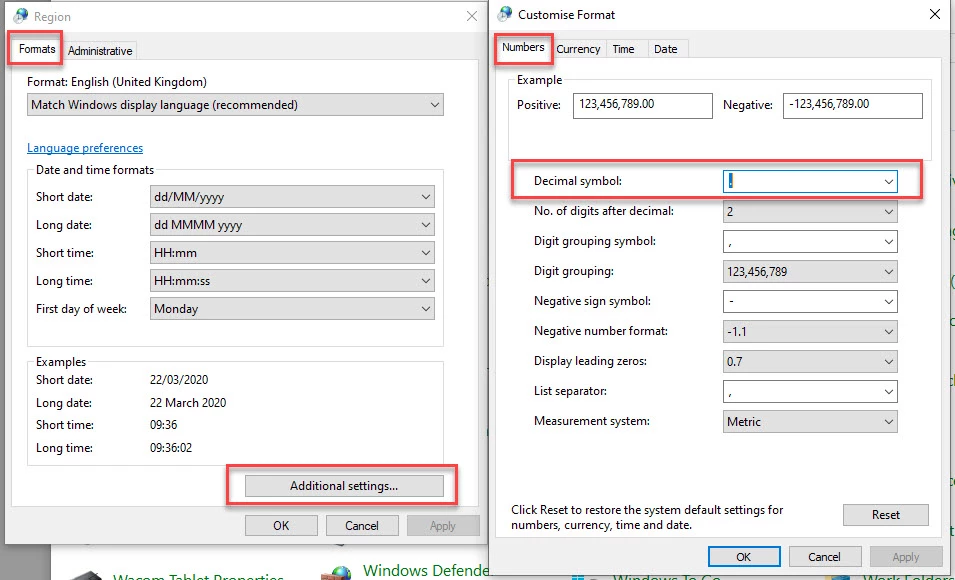
If you are having issues with numbers in Excel as well as Photoshop, this suggests an issue in your system not the individual applications.

In the winows search box type in Control panel

Within control panel, choose region and the dialogue box choose additional settings.

Take a look at your number settings

Dave

2 replies

davescm
davescmCorrect answer
Community Expert
March 22, 2020

If you are having issues with numbers in Excel as well as Photoshop, this suggests an issue in your system not the individual applications.

In the winows search box type in Control panel

Within control panel, choose region and the dialogue box choose additional settings.

Take a look at your number settings

Dave

johnd3754Author
New Participant
March 23, 2020

Thank you davescm that's fixed it. This has confounded me for so long. I have over the past year been speaking to engineers and techs at Microsoft, Adobe, and Dell Computers. None ever looked at or suggested your solution. The only suggestion made was that I have to replace the hard drive.

Again thank you, you're a life saver.

davescm
Community Expert
March 23, 2020

You're welcome. I'm glad to help  🙂

Dave

c.pfaffenbichler
Community Expert
March 21, 2020

Image dimensions can only be integers of pixels, so please illustrate what you are talking about with some screenshots. 

What have you done for trouble-shooting so far, like resetting Photoshop’s Preferences? 

johnd3754Author
New Participant
March 21, 2020

Nothing has been altered between these two pictures only dimensions viewed as inches instead of pixels. You will notice that width and height have assumed decimals. At this point, I'm unable to alter preferences back to pixels as Photoshop is locked up and has to be force released. I spent many years using photoshop in my position as a photo retoucher.

davescm
Community Expert
March 21, 2020

Hi

The inserted numbers look correct (apart from the missing decimal point) as 1890 px at 300 ppi = 6.3 inches and 1417 px at 300ppi = 4.723 inches

To prevent the error message and lock ups have you tried resetting preferences  (Preferences >General>Reset Preferences on Quit) ?

Dave