Known Participant
April 29, 2012
Answered

Image preview in Open dialog window (Photoshop CS6)

  • April 29, 2012
  • 13 replies
  • 92448 views

Hi

We had a possibility to see images preview in Open File dialog window of Photoshop CS5 but in new CS6 version there is not such possibility. Should I forget about that nice option and use Mini Bridge?

This topic has been closed for replies.
Correct answer Noel Carboni

Just for clarity:

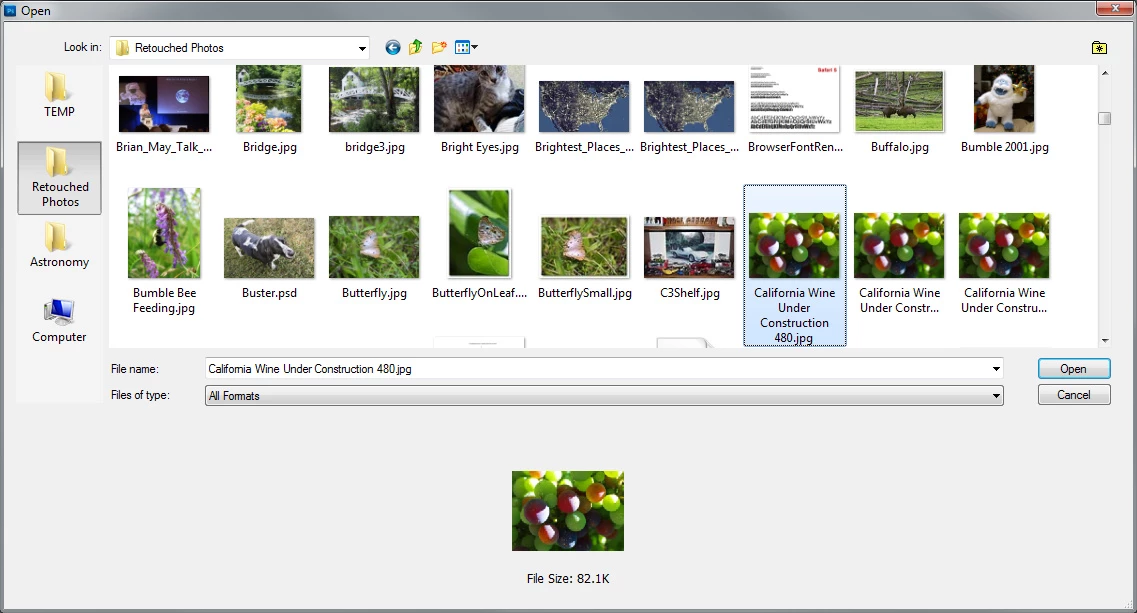
What we're talking about being missing from Photoshop CS6 is the preview near the bottom of the dialog that was there in Photoshop CS5 and earlier:
This is what you see now with Photoshop CS6:
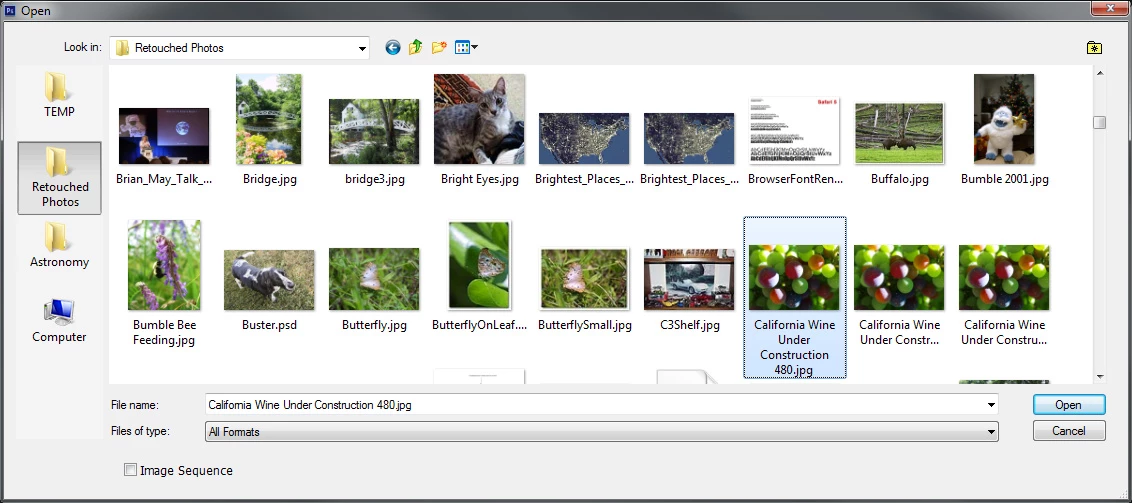
They're both Operating System dialogs.  It's just that Adobe has augmented the dialog to add additional preview functionality in the Photoshop CS5 and earlier dialogs and that has been removed for some unknown reason.  Note that they have NOT removed all augmentation - that little [  ] Image Sequence box is not provided by Windows.

-Noel

[MODERATOR] Marking this post as correct as it perfectly illustrates the issue. This topic is further discussed here: Photoshop: No image preview on Open dialog box in CS6

Message was edited by: Brett N

13 replies

Participating Frequently
May 22, 2012

Dude...seriously...why in the world would they remove that? I just noticed it myself today after upgrading a couple of days ago (using the full version). And Yahor is right for questioning Trevor regarding Windows 7 ability to see the preview of PSD files. You can only see JPEGs and similar web type files. PSD files just show as icons. And even so, I need my files in "List" type on Windows, as I have a lot of files in each folder, and it's a lot easier to visually find what I'm looking for in a large alphabetical list (rather than in large preview mode), and than click on it to preview if it's the file I'm looking for. I can't, for the life of me, figure out why they would remove something so fundamental as the preview in Photoshop. They work so hard to create "new" features that we all "need", but then take out something incredibly basic that we REALLY need. For some reason, though, they decided it was still necessary in Illustrator, because it's still there on it. Where do I email my feedback/complaint? I can already tell this feature, or lack thereof, is going to drive me up the wall.

Noel Carboni
Legend
May 23, 2012

Promofuse wrote:

You can only see JPEGs and similar web type files. PSD files just show as icons.

Promofuse, did you read this entire thread?  Did you look carefully at the picture I posted?  With an additional codec pack you can see thumbnails for all kinds of files.

But I do understand your desire to have your files displayed in List or Details view.  In that case the thumbnail preview at the bottom of the dialog would be very nice to have.  But it's not there, and I have a feeling it was taken out on purpose.

-Noel

Participating Frequently
May 23, 2012

I'm not so sure it was on purpose or not Noel. Especially since it's still there in Illustrator and Indesign. If it weren't for it being in those, I might think it was intentional. Then again, it could very well be Adobe trying really hard to push MiniBridge, which is almost utterly useless. I think they actually made the minibridge WORSE as well. The sizing issues of the thumbnails on that are a pain and minibridge is just plain cumbersome to run. Anyways, besides my many qualms with minibridge itself, and back on the open dialog box thing...I actually watched a youtube video pointing out the same codecs you're talking about and without the PSD functionality, it's pretty useless. I'm a graphic designer, so I don't really use PS for camera image editing and don't mess with those files that the codec helps with. Even if it did, that still isn't very helpful to me. Because at that point, you're pretty much just doing what Bridge/MIniBridge does. However, consider how I, and many other designers in the print field work: At any given point we might have something like 3 different versions of a file; a PSD (with layers to edit), a JPEG (to send to the customer for proofing), and a PDF (for printing). Now, within that customer folder I might have 50+ files of different jobs. Imagine trying to sift through all those thumbnails, scrolling across window upon window, and when you get to the file you're finally looking for, you click it open to just to see that you opened the jpeg instead of the PSD. Now, in LIST view, I can see many more files on one screen and each file type is represented by an icon. So I know the blue icons are Photoshop icons and it's very easy to skim through there and know exactly which file type I'm looking for without peering at extensions. Get what I'm saying? Not that I don't appreciate you trying to help. Just saying, unless any codec can bring back the preview screen....than I don't see a workaround until Adobe flat out FIXES IT. I'm one of those guys that loves to get the newest thing and give it time to work, but if they don't fix it, I might have to call up Adobe and demand a downgrade on my Photoshop to 5.5, cause it really slows my workflow when I have hundreds of files to keep up with, and any new feature in PS CS6 that might have sped up my work is offset by not being able to do such a remedial task as preview my files before opening them.

Participant
May 18, 2012

Yes, this is very disturbing while working and trying to find certain file..
what was the point of removing the file preview?!

Noel Carboni
Legend
May 18, 2012

Perhaps they're looking to standardize the dialog and avoid problems they have had by augmenting/hooking the OS dialog.

The right answer really is to get codecs and have the OS provide the thumbnail support at all its levels.

-Noel

Trevor.Dennis
Community Expert
Community Expert
April 29, 2012

Yahor, if I am understanding your point, it works fine for me with Windows 7.  The drop box is there in the Open dialogue box, and I can select the usual choices up to and including Extra Large icons.

Known Participant
April 29, 2012

Thanks for the image! but can you see .psd files preview in the window as it was in CS5?

Noel Carboni
Legend
April 30, 2012

Not without a codec for PSD.

I use the inexpensive FastPictureViewer Codec Pack myself.  This gives you not only thumbnails but previews in Windows Photo Viewer, and works for Photoshop Open/Save dialogs as well as Explorer.

I haven't checked it out yet, but I understand the recently released Microsoft Camera Codec Pack may have PSD and PSB codecs as well.

http://www.microsoft.com/en-us/download/details.aspx?id=26829

EDIT: After checking this, it appears I heard wrong.

-Noel

