


Known Participant
September 2, 2024
Answered

Image size in application frame

  • September 2, 2024
  • 3 replies
  • 646 views

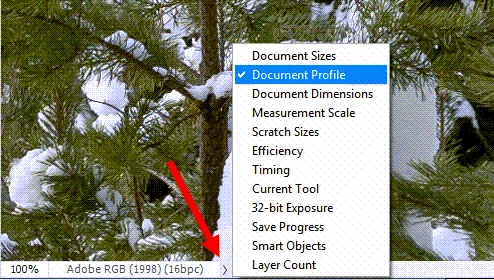
At the bottom of the application frame in Photoshop (25.11.0), is the image size.  In my case, it is given in inches and resolution (e.g. 8.5 in x 11 in (300 ppi).  Not too long ago, it used to be in megapixels.  How do I customize the information in the application frame?
 

This topic has been closed for replies.
Correct answer Per Berntsen

The unit used to display Document dimensions depends on what unit the rulers are set to.

If they are set to inches, dimensions are also displayed in inches. Change the ruler unit to pixels, and dimensions will also display pixels.


Click the little arrow to open a flyout menu to see what else you can display in this field..


3 replies

Stephen Marsh
Braniac
September 2, 2024

By the way, it was never shown in megapixels.


Known Participant
September 2, 2024

Oh, right!  Megabytes.

Per Berntsen
Per BerntsenCorrect answer
Braniac
September 2, 2024

The unit used to display Document dimensions depends on what unit the rulers are set to.

If they are set to inches, dimensions are also displayed in inches. Change the ruler unit to pixels, and dimensions will also display pixels.


Click the little arrow to open a flyout menu to see what else you can display in this field..


Jeff Arola
Braniac
September 2, 2024

Click on the little right turned arrow to the right of the file information for a list of choices:

https://helpx.adobe.com/photoshop/using/image-information.html


Known Participant
September 2, 2024

I figured it was something obvious that I missed.  Thanks for the quick reply.