


Participant
May 11, 2023
Answered

Images won't load

  • May 11, 2023
  • 2 replies
  • 330 views

I have removed then re-installed Photoshop on a Windows PC. This has always worked fine but for some reason recently everytime I try to load an image to edit the display area just flashes black/white and i am unable to view or edit any image. Fortunatly I don't have epilepsy as the dispaly would certainly set that off!
This topic has been closed for replies.
Correct answer Ged_Traynor

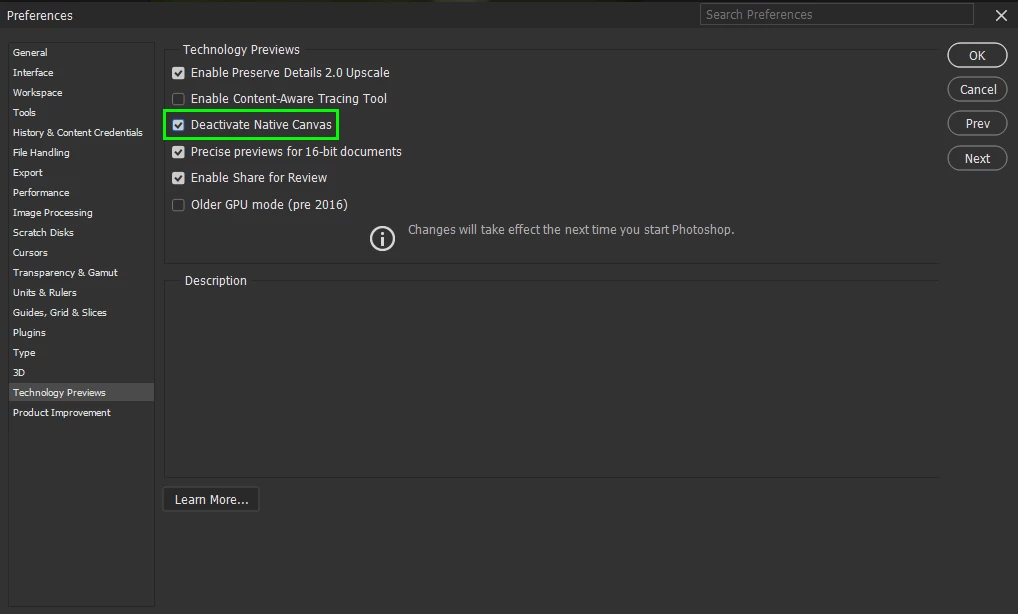
@QuadLeisure go to Edit > Preferences > Technology Previews and enable this option, then restart Photoshop

2 replies

Participant
May 11, 2023

Cushty - it worked a treat, Thanks!

Ged_Traynor
Community Expert
Community Expert
May 11, 2023

@QuadLeisure you're welcome

Ged_Traynor
Community Expert
Ged_TraynorCommunity ExpertCorrect answer
Community Expert
May 11, 2023

@QuadLeisure go to Edit > Preferences > Technology Previews and enable this option, then restart Photoshop