

New Participant
May 29, 2023
Answered

Improved Gradients Not Exporting Properly

  • May 29, 2023
  • 24 replies
  • 20959 views

I'm running into an issue with the Improved Gradients when exporting a jpg through the export panel when using multiple gradients and artboards.
The preview and the exported image is not reflective of the gradient in the actual photoshop file.

Correct answer jane-e


@brettparton wrote:

Are there any suggested work arounds or a way to set the gradient into a legacy mode in the meantime?


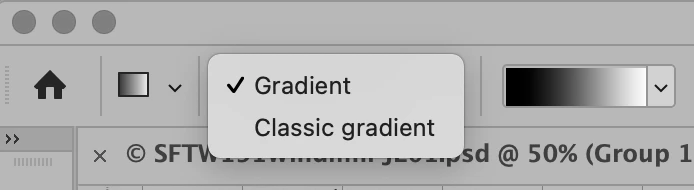
Yes, you can set the Gradient tool to legacy mode in the options bar. Select "Classic Gradient" instead of "Gradient".


Jane


24 replies

jane-e
Community Expert
July 18, 2023

You're welcome @brettparton , I'm glad it's sorted for you now 😊


Jane


New Participant
July 18, 2023

Thanks @jane-e! this solves the issue for now and allows my multiple artboard workflow to continue.
I won't be using the improved gradient till a patch is issued.

New Participant
July 14, 2023

My current workaround to this is to create a copy of the PSD, and then rasterize the gradient layers. That way if I want to go back and edit them I can in the original file, but after rasterizing they seem to work fine with any export.

SPL72
Participating Frequently
August 18, 2023

Thats what I did...rasterize the gradient fill layer...   Then it woiuld export as a jpg..   weird thatgradient fill layers are not exporting...

cormack73273594
New Participant
October 13, 2023

Rasterizing worked even saved as a png

New Participant
July 14, 2023

Had a very similar issue. My workaround was to stretch my gradient further than how I actually wanted it. That was the only way I could get the gradient to work properly.

jane-e
jane-eCorrect answer
Community Expert
July 14, 2023


@brettparton wrote:

Are there any suggested work arounds or a way to set the gradient into a legacy mode in the meantime?


Yes, you can set the Gradient tool to legacy mode in the options bar. Select "Classic Gradient" instead of "Gradient".


Jane


TechnoTim
New Participant
July 14, 2023

I've found that Save for Web (legacy) preserves the new gradients.

Known Participant
December 20, 2023

But only if you duplicate the artboard into a new file. I have terrible problems with my grey to light yellow gradient. grrrrr. I see that this has been a problem for a long while. I thought I was doing something wrong. 

New Participant
July 11, 2023

I've got the same issue. Any gradient that has been exported as a PNG or JPEG has come out drastically different!

New Participant
June 28, 2023

I've been frustrated by the same issue. If you right click the gradient + layers beneath and convert to smart object, mine seems to come out better – maybe because the files are pre-rendered inside photoshop 🙂

New Participant
June 20, 2023

Yeah I got the same issue... and I'm freaking out! 

New Participant
June 19, 2023

@Mihaela Psthanks for letting us know!
Are there any suggested work arounds or a way to set the gradient into a legacy mode in the meantime?

We've found that if we popped our gradient artwork into a smart layer it stays put on export and has been our work around for now so we can continue using gradients in our client work.

New Participant
October 7, 2023

Thank you for the work around!!
