


Known Participant
January 23, 2024
Question

Improved Gradients Not Exporting Properly

  • January 23, 2024
  • 22 replies
  • 2609 views

I'm running into an issue with the improved Gradients when exporting a jpg through the export panel when using multiple gradients and artboards.
The preview and the exported image is not reflective of the gradient in the actual photoshop file.

I haven't been able to pinpoint the problem yet, but it seems that the gradient handles align themselves with the edges of all artboards, rather than just the artboard they are placed on.
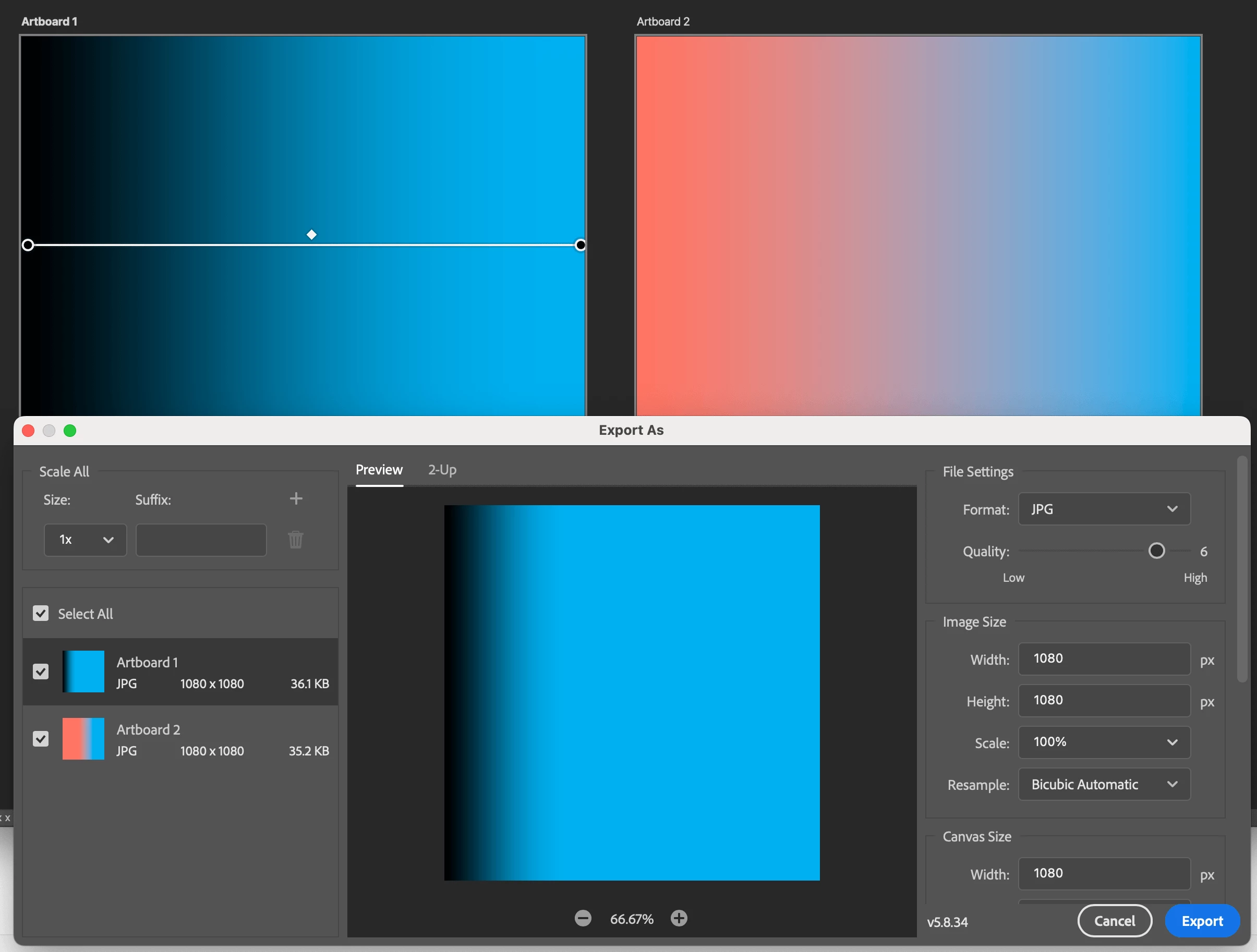


Since another bug report was marked as "solved" despite there not being a solution, I am opening this new report to keep the communication channels open.

Currently tested version: PS 25.3.1 as of Jan 23, 2024. This has been the case since the introduction of the improved Gradients in 2023.

Reproduction steps: At least 2 artboards, at least 1 improved gradient, export as jpg or PNG.

22 replies

rubenarthe
Known Participant
April 20, 2024

Dear Adobe employers, do the following: Select your new Gradient Tool, then right click, and DELETE IT!! Please, leave things as they where working. As Carlos Sainz says: "Stop Inventing".

Known Participant
April 5, 2024

Yes, rasterizing the gradient does indeed work around the export issue.


However, since this bug only surfaced with the introduction of the "new gradients", and the primary feature of these "new gradients" is that you can keep editing them, this workaround completely negates the "new gradients" feature. It's been our only option for the last year, unfortunately.

Participant
April 5, 2024

well this worked. but it shouldn't be like this as how it's supposed to work. can be a tmeporary fix though

Participant
March 17, 2024

Can confirm that rasterizing the gradient layer resolves this export issue

Participant
May 15, 2024

This worked for me as well!!

Participant
March 7, 2024

Seems that there is a workaround that I've found in a different post, if you flatten your image in the layers panel and then export it it should work, just posting this here so if people find this they can at least have a workaround until they fix it

Participant
March 6, 2024

It is March 5, 2024 and I too am having this issue.

patrickt10422309
Participant
February 22, 2024

I'm having the same problems as well. The only thing that's changed for me in the past 24 hours is I've rebooted my computer. That's when the problem started.

Participant
February 16, 2024

Same here!

Participant
February 14, 2024

same issue here! when will this be fixed? it's been like this for a really long time now. 

Participating Frequently
January 29, 2024

Also I am on PC, so looks like the issue is cross OS.