


Participant
February 19, 2018
Question

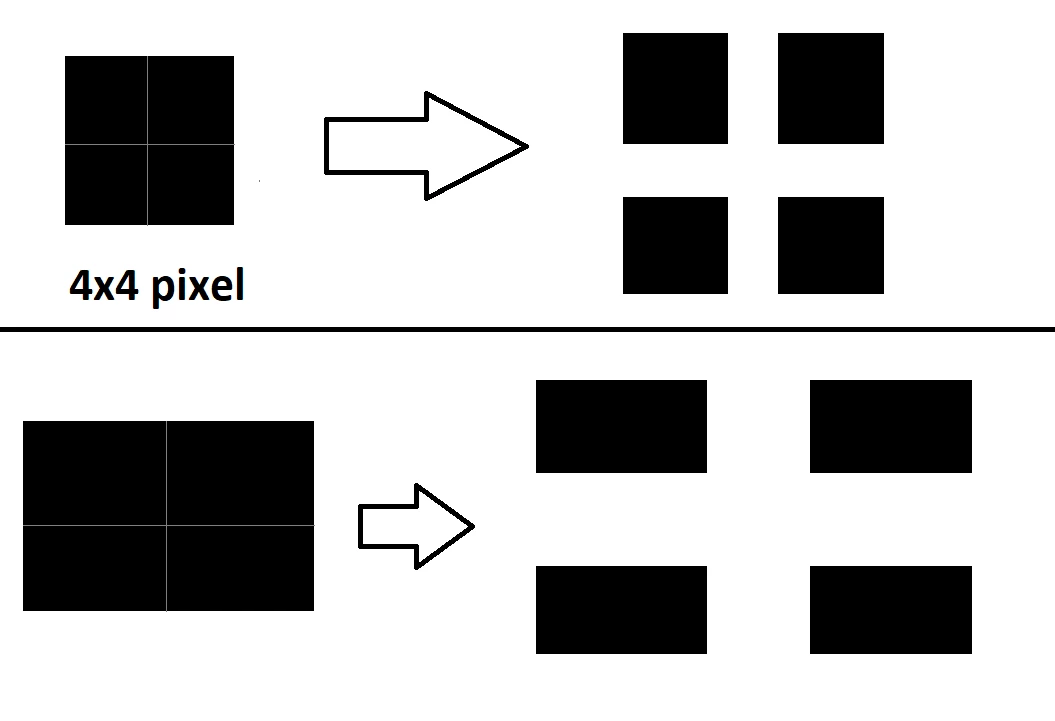
Increase image size but not pixel -> add space between pixels?

  • February 19, 2018
  • 5 replies
  • 1580 views

Is there a way to increase the image size and leave the pixels in their original size? So that you add space/gap between each pixel.

Basically like increasing the space between each letter in a text.
This topic has been closed for replies.

5 replies

sharp_hands16B8
Community Expert
Community Expert
February 19, 2018

Lots of great info the others have given on resolution. I suspect though that you are trying to create a visual effect and not do something related to image resolution. What you are asking for is somewhat similar to line screen (lpi) for printers that manage halftone patterns.

Do you want the image to look fragmented and chopped/separated apart or are you ok with what appears to be an overlaid grid on the image which separates the "pixels". Do you have a sample of what you ar etrying to accomplish?

D Fosse
Community Expert
Community Expert
February 19, 2018

A pixel is just a data point, a sample point. It has no inherent physical size.

The faux mosaic approach, putting empty pixels between the live ones, would in fact work like a halftone screen. It would also increase the image size x4.

Trevor.Dennis
Community Expert
Community Expert
February 19, 2018

Yes.  Each pixel needs to be on its own layer though, so not practical if you are talking about actual pixels, but possibly doable if you are talking more in terms of a sort of mosaic.  So below I have built such a mosaic, and have given each square a red border to show the outline.

If I now double the Canvas size

Move the outer layers and use the align tool as below

We eventually get to this.  Doing something like this on a one pixel per layer though...  Not something I'd want to have to do.

bakingAuthor
Participant
February 19, 2018

thats what i meant but you cant do that with a picture

gener7
Community Expert
Community Expert
February 19, 2018

The nature of a digital image is that the pixels are always next to each other, there is no spacing or any way to do so. Even the white spaces are pixels.

If it is a text layer, you can try this trick: http://www.bittbox.com/photoshop/how-to-get-vector-text-in-photoshop-cs2

Edit: That's now called "Convert to Smart Object". From there you can use Ctrl/Cmd T (Free Transform) to scale the type layer.

JJMack
Community Expert
Community Expert
February 19, 2018

Pixels have no actual size just a print resolution you use for a print.  You can change that before you print.  Image size unchek resample and set the print size you want. Photoshop will set the resolution. The size the pixels should be printed.   Displays have a fixed size pixels  you want the image a different size on a display you have to scale the insge to have fewer or more pixels  Scaling can also be done by interpolation and sometime with vector graphic.   Text is best scaled using vector graphic.  Raster text does not scale well  text quality suffers.

You could say Print resolution is Pixel size.

JJMack