


Is it possible to make a script that creates a PDF out of images in a folder?
Hey, I have learned that Photoshop has a very annoying bug in its "File > Automate > PDF Presentation" tool.
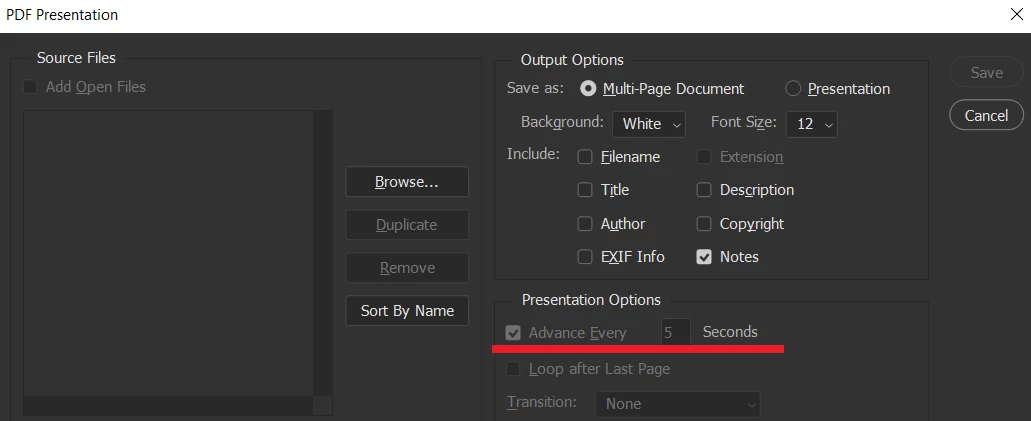
By default, PDF presentation comes with "Advance Every 5 seconds" ON even though you're on the Multi-Page Document part and it's unclickable as it is. This means if you create a PDF without turning it off when you open the PDF in fullscreen mode it will advance every 5 seconds, which causes me problems.
So in order to turn it off you need to Change it to Presentation, uncheck the "Advance Every 5 seconds" and then change back to the Multi-Page Document, if you don't go back then the file will be a presentation and will give out an automatic message on Adobe Acrobat asking to go fullscreen, which also causes problems.
This choice doesn't stick, so every time I have to make a new PDF I always have to click on it again, it has been annoying to keep checking it every time. I was wondering if it's possible to create a script that automatizes the creation of PDFs avoiding this bug.
A script that would ask for the user to select a folder and then it would take all the images inside the folder and turn them into a Multi-Page PDF without the advance every 5 seconds option. Then save the PDF in the same folder that was selected that contained the images. There are also some Compression presets on the PDF section, I usually use "Image Quality" as "Medium", would it be possible to control this through the script?
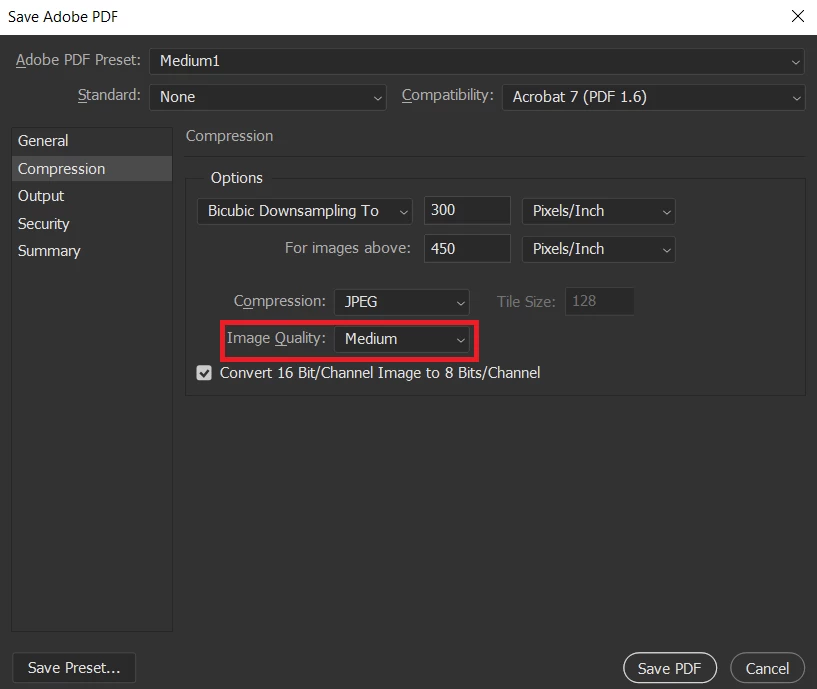
Is a script like this possible? If it is it would save me a bunch of time having to manually go through this whole process every time and it would also be a workaround to the "bug".
 AdChoices