Inspiring
January 18, 2022
Question

Is it possible to reset 'Export As' setting not 'Preferences Setting'?

  • January 18, 2022
  • 3 replies
  • 342 views

I have tried couple of times of how to reset 'Export As' setting, not Preferences Setting.

Here are my export setting that always error and error everytime i want to export :
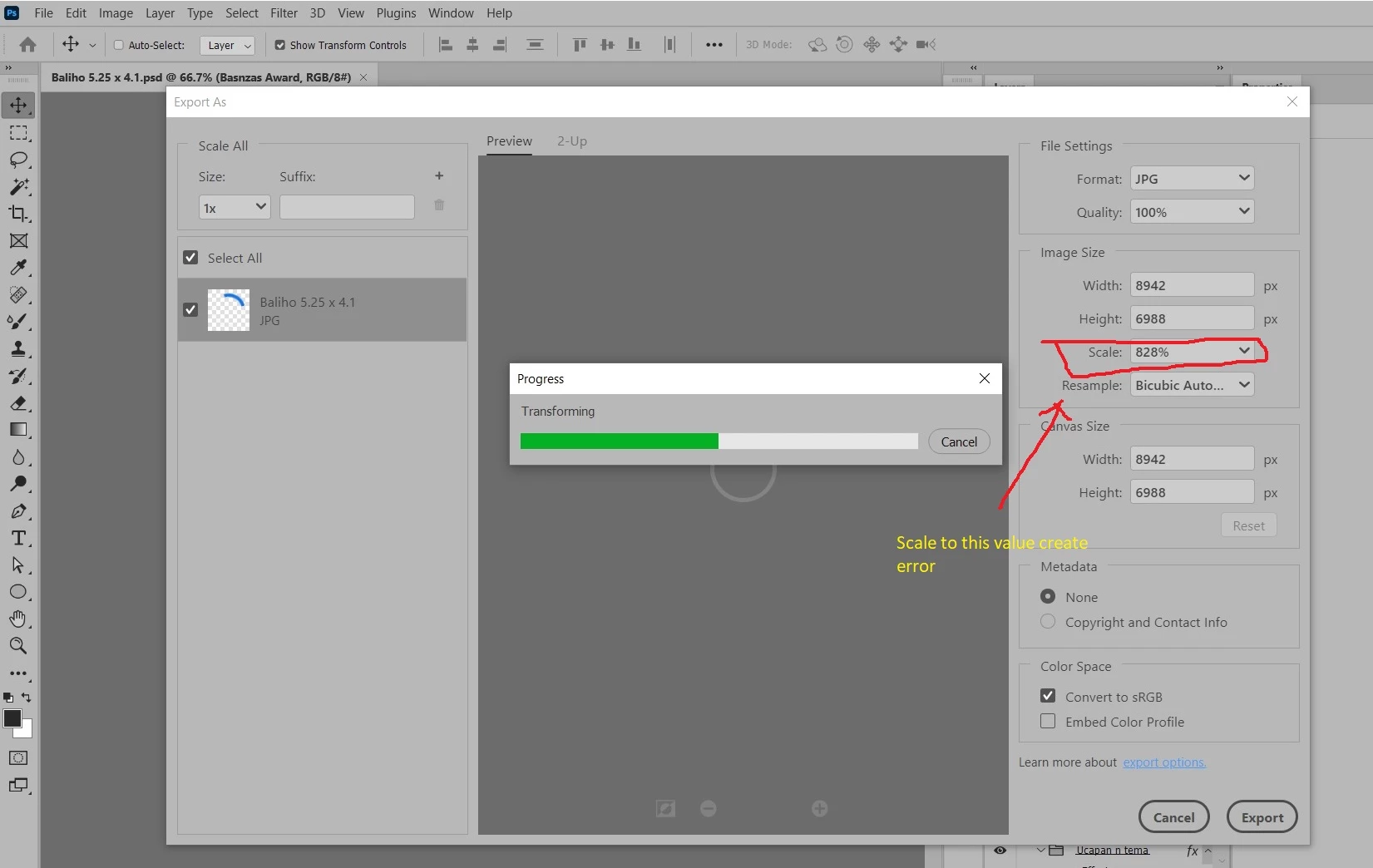
i want to try to change to 100%. But i can not do it, everytime i click "export as", it display process and then error like above. and always like that.

So for now, i'm using Save for web (legacy) to export my project.

help. thanks.

This topic has been closed for replies.

3 replies

Stephen Marsh
Community Expert
Community Expert
January 19, 2022

@J453 


Can you please provide some comment on this topic?

Inspiring
January 19, 2022

Anyone here has experienced about this? Is there any way to reset 800% scale to 100% so i can use 'export as' feature?

For now, for temporary solution i can used 'Save for web (legacy)".

Thanks.

######Raizen 7, 40Gb Ram, RTX 3060, Win 11 -- All of Software in the world are just tools. Buy it if it works for you :)
Stephen Marsh
Community Expert
Community Expert
January 18, 2022

Have you tried resetting Photoshop preferences to see if this resets the value? This worked for me.


I’m not sure if this is the correct file or not, but take a look at the .json file in the following path:


Mac path:

/Users/username/Library/Preferences/Adobe Photoshop 2022 Settings/export-as-settings.json


Win path:

C:\Users\username\AppData\Roaming\Adobe\Adobe Photoshop 2022\Adobe Photoshop 2022 Settings\export-as-settings.json
 
Note change the username to the user account name, change the year in the Photoshop version, the AppData directory on Windows is most likely a hidden directory.
 
The following script code would open the directory and the .json file on either Mac or Win:
app.preferencesFolder.execute();
var prefFile = File(app.preferencesFolder + "/export-as-settings.json");
prefFile.execute();


https://prepression.blogspot.com/2017/11/downloading-and-installing-adobe-scripts.html


Inspiring
January 18, 2022

hi @Stephen Marsh , i have look at that json file :

But unfortunately nothing special there.

######Raizen 7, 40Gb Ram, RTX 3060, Win 11 -- All of Software in the world are just tools. Buy it if it works for you :)
Stephen Marsh
Community Expert
Community Expert
January 18, 2022

I set mine to 22% and it repeated for the next export. After resetting general prefs, the next time I exported it was back to 100%.