



namodayab94056659
Known Participant
November 16, 2017
Question

Is there any way to create editable table in a JSX dialog box?

  • November 16, 2017
  • 2 replies
  • 1252 views

I have created a table in JSX dialog box using multiple column list as follows.

var dlg = new Window("dialog", "Animation List");

dlg.frameLocation = [100,100]; // position

dlg.size = [750, 250];

//table initailize

var w0=150, w1=150 ;


table = dlg.add ("listbox", {x:20, y:20, width:300, height:150}, undefined, { numberOfColumns:6, showHeaders:true,

columnWidths: [w0,w1],

columnTitles:["First Name", "Last Name"] });

table.add("item", "Namodaya");

table.items[0].subItems[0].text = "Balaarachchi";


dlg.show();

Output table:
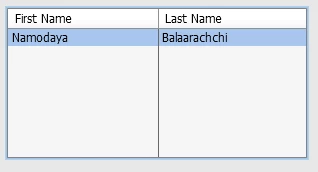
But I want to edit the cells in the table. Is there any way to achieve this?

This topic has been closed for replies.

2 replies

Legend
November 16, 2017

As a way, define the function

table.onDoubleClick = function ()
{
// here place the form call to edit the current table element
}
namodayab94056659
Known Participant
November 17, 2017

Thank you for your quick response.

I tried to fix this issue with your solution. But still I couldn't understand how to edit current cell when a user clicks the cell.

Also, there has a problem how to get the current position of the cell when the table is scrollable as below.

var dlg = new Window("dialog", "Animation List"); 

dlg.frameLocation = [100,100]; // position 

dlg.size = [750, 250]; 


//table initailize  

var w0=150, w1=150 ; 


table = dlg.add ("listbox", {x:20, y:20, width:300, height:150}, undefined, { numberOfColumns:6, showHeaders:true,  

columnWidths: [w0,w1],  

columnTitles:["First Name", "Last Name"] }); 


for( var i = 0; i < 20 ; i++ )

{

    table.add("item", "Namodaya");  

    table.items.subItems[0].text = "Balaarachchi"; 

}

table.onDoubleClick = function () 

    // here place the form call to edit the current table element 

dlg.show(); 

Could you please explain?

SuperMerlin
Inspiring
November 17, 2017

I think this is what r-bin​ meant.

var dlg = new Window("dialog", "Animation List"); 

dlg.frameLocation = [100,100]; // position 

dlg.size = [750, 250];  

//table initailize  

var w0=150, w1=150 ;      

table = dlg.add ("listbox", {x:20, y:20, width:700, height:150}, undefined, { numberOfColumns:6, showHeaders:true,  

columnWidths: [w0,w1],  

columnTitles:["First Name", "Last Name","Field 3","Field 4","Field 5","Field 6"] }); 

table.add("item", "Namodaya");  

table.add("item", "Fred");

table.items[0].subItems[0].text = "Balaarachchi"; 

table.items[0].subItems[1].text = "asdfghjkl";

table.items[1].subItems[0].text = "Bloggs"; 

table.onDoubleClick = function(){

     var w = new Window("dialog", "Edit Text");

     //Add fields to suit

     w.et1 = w.add("edittext");

     w.et1.preferredSize=[200,20];

     w.et1.text= table.selection.text;

     w.et2 = w.add("edittext");

     w.et2.preferredSize=[200,20];

     w.et2.text = table.selection.subItems[0];

    w.p = w.add("button",undefined,"Update");

    w.add("button",undefined,"Cancel");

    w.p.onClick=function(){

        table.selection.text=w.et1.text;

        table.selection.subItems[0].text = w.et2.text;

        w.close(0);

        }

    w.show();

     }

dlg.show();

Trevor.Dennis
Community Expert
Community Expert
November 16, 2017

There is a Scripting forum.  It only gets a half dozen posts a day, and it is not unlikely the people who follow the scripting forum also follow this one, but you'd still get a better chance of a useful reply over there.

Photoshop Scripting

We can move this thread to that forum if you like, or you can copy your post to a new thread over there?

namodayab94056659
Known Participant
November 16, 2017

Ok. I will move it photoshop scripting discussion.

Thank you very much.

Ten A
Community Expert
Community Expert
November 16, 2017

Your discussion moved to Photoshop Scripting.