


Participant
May 19, 2023
Answered

Issue with Page Formatting and Canvas Size

  • May 19, 2023
  • 1 reply
  • 378 views

Hi! My name is Alex and I am currently very confused.

I am illustrating a book and we are now working with the publisher to get it the right size. Im currently facing an issue where, in Photoshop, even though I created all the work in an 11 x 8.5 in canvas, the program we are uploading to tells us it is 11 x 8.333 inches. We believe this must have had something to do with making the content in the first place. How can I make sure my canvas is the right size?


Thank you so much. I am happy to answer and follow-up questions as well.
 

This topic has been closed for replies.
Correct answer Kevin Stohlmeyer

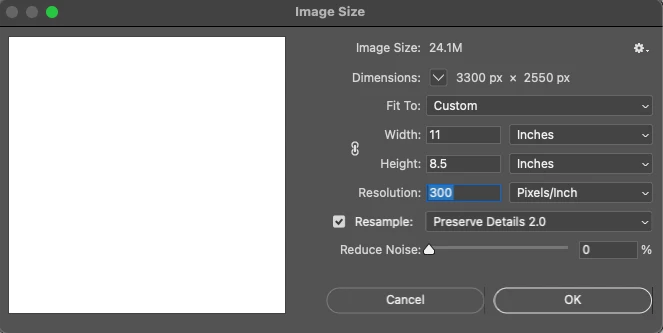
So your screen on Image Size looks like this?

What format are you saving as and what program are you loading the images/pages into?

1 reply

Kevin Stohlmeyer
Community Expert
Community Expert
May 19, 2023

Hi Alex - what resolution is your document? Photoshop measures in pixels so if the size w&h in inches x resolution is not a whole number it wont calculate out properly.

Participant
May 19, 2023

Hi Kevin!

Right now, the resolution is 3300 x 2550 pixels. This is what photoshop converts from 11in x 8.5in when I put it in pixels. I am using 300dpi and all the normal settings. 

Thank you for the quick response,

Alex

Kevin Stohlmeyer
Community Expert
Kevin StohlmeyerCommunity ExpertCorrect answer
Community Expert
May 19, 2023

So your screen on Image Size looks like this?

What format are you saving as and what program are you loading the images/pages into?