


Participating Frequently
November 5, 2020
Answered

Keyboard shortcuts problem

  • November 5, 2020
  • 1 reply
  • 491 views

I have a strange problem with keyboard shortcuts   

Shift F5” activates a dialogue box The command grow is not currently available" instead of Fill.

Shift F6 activates a dialogue box Flip is not currently available instead of feather.


The keyboard shortcuts are set correctly. I reset them to default.         

I tried trashing the preferences, restarted PS and it still has the problem. 

I havn't checked for any other keyboard shortcut problems.


Is there any way to resolve this problem?


This is in CC 2019.      

Installed CC 2020 today and it has the same problem


(Don't have the OS or iMac details. I'm not working on my machine)


This topic has been closed for replies.
Correct answer Jeff Arola

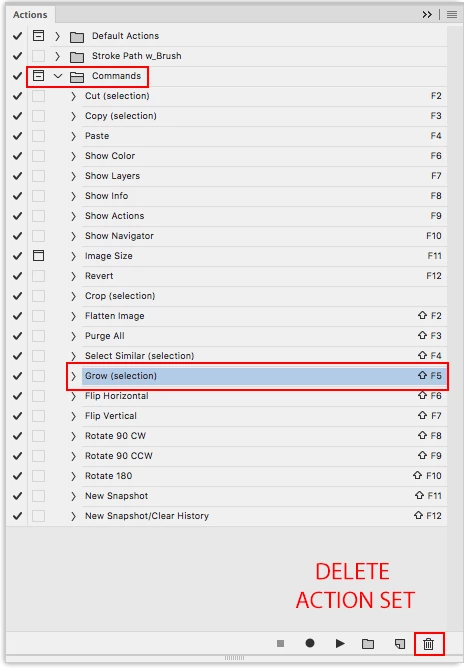
Sounds like you have the Commands action set loaded which has Shift-F5 assigned to Select>Grow and

supersedes other keyboard shortcuts.


Go to Window>Actions and check for the Commands action set.


If Commands are loaded you can delete the set by clicking on the word Commands and then dragging to the Trash Can   icon at the bottom of the actions panel. This just deletes the actions from the actions panel, not your hard drive.


1 reply

Jeff Arola
Community Expert
Jeff ArolaCommunity ExpertCorrect answer
Community Expert
November 5, 2020

Sounds like you have the Commands action set loaded which has Shift-F5 assigned to Select>Grow and

supersedes other keyboard shortcuts.


Go to Window>Actions and check for the Commands action set.


If Commands are loaded you can delete the set by clicking on the word Commands and then dragging to the Trash Can   icon at the bottom of the actions panel. This just deletes the actions from the actions panel, not your hard drive.


Participating Frequently
November 5, 2020

That worked.   

Thank you very much.    

I never new about that.