


jasonb39645490
Participating Frequently
September 19, 2017
Question

Layer and layer mask selection using cmd shortcut

  • September 19, 2017
  • 4 replies
  • 1944 views

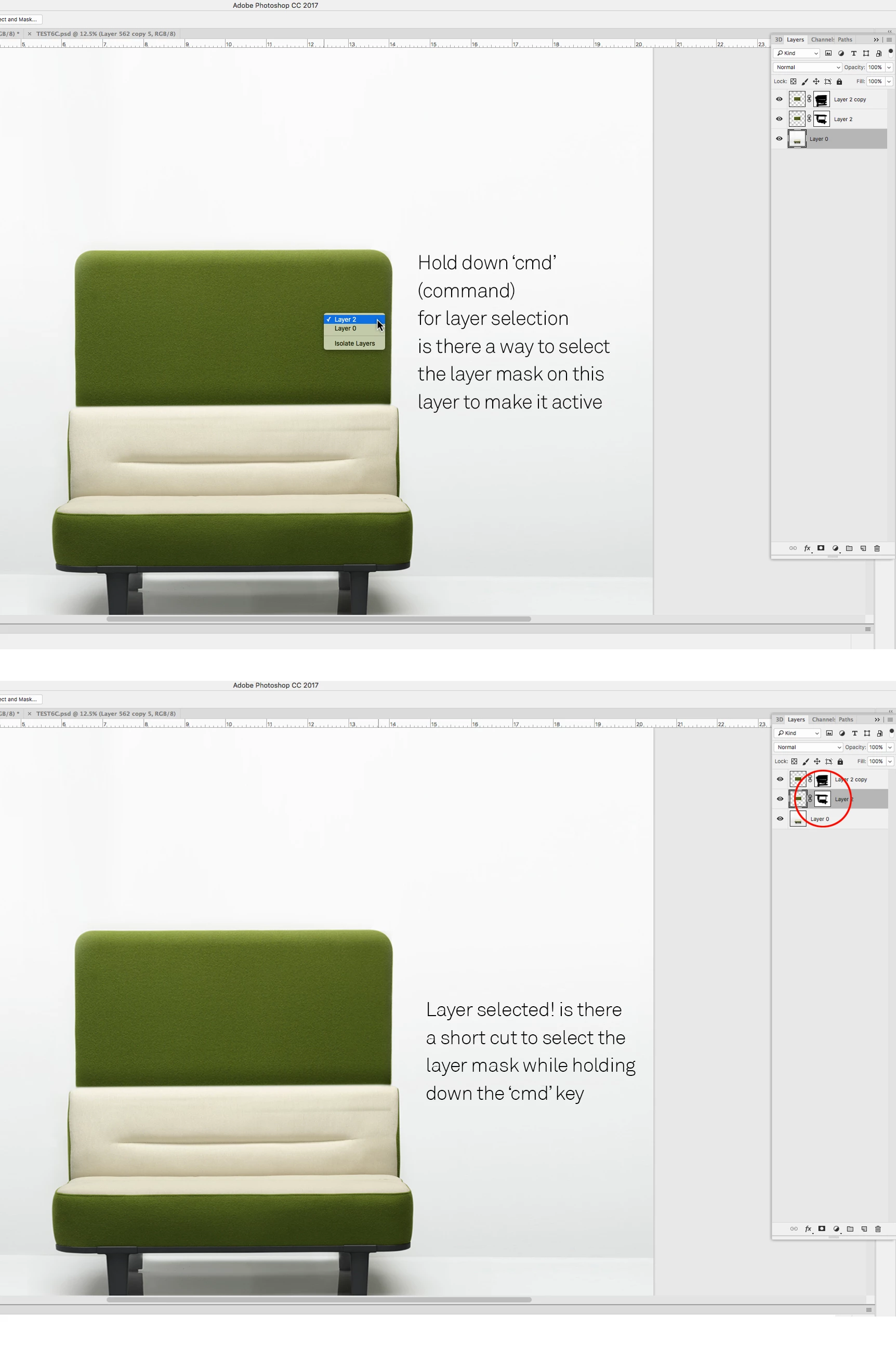
I can select the layer by using the cmd shortcut. All good, but what if I have a mask on the layer being selected. Is there a way or a short cut to select the layer then the mask layer thumbnail to make it active see image.

For example

I'm working on layer 1

I hold down cmd to switch and select layer 2 but on layer 2 I have a mask. Can I directly select the layer mask thumbnail with a shortcut when layer switching?

Hope that makes sense

Regards

Jason
    This topic has been closed for replies.

    4 replies

    jasonb39645490
    Participating Frequently
    September 25, 2017

    How beautiful would that be to have cltrl click for layer selection then target the mask directly, all in on action. Have a fly out or drop down

    Jeff Arola
    Community Expert
    September 19, 2017

    After selecting the layer you can press Command + \ (Mac) | Control + \ (Win) to target the layer mask

    To switch back to the layer press Command + 2 (Mac) | Control + 2 (Win)

    jasonb39645490
    Participating Frequently
    March 22, 2018

    Thanks Jeff, appreciate the reply. I'm using the cmd \ and cmd 2 until we get a list panel as shown in my last image when the layer is targeted using the cmd and mouse click.

    Regards

    Jason

    Jeff Arola
    Community Expert
    March 22, 2018

    You could make a feature request over here:

    https://feedback.photoshop.com/photoshop_family

    Michael J. Hoffman
    Community Expert
    September 19, 2017

    Hi Jason,

    You can command-click the layer mask itself to load the mask as a selection.

    Mike

    JJMack
    Community Expert
    September 19, 2017

    As far as I know the amswer is no. Also a layer could have two layer mask a Vector layer mask and a raster layer mask If a smat layer ther cpuld alsi ne a filter mask 

    JJMack
    jasonb39645490
    Participating Frequently
    September 25, 2017

    How beautiful would that be to have cltrl click for layer selection then target the mask directly, all in on action. Have a fly out or drop down