


New Participant
October 7, 2020
Answered

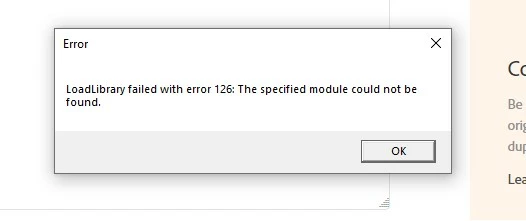
LoadLibrary failed with error 126: the specified module could not be found.

  • October 7, 2020
  • 21 replies
  • 53845 views

I keep getting this error window each time i start any of my Adobe Apps: Photoshop, Illustrator, InDesign. Can't figure out how it's affecting my work yet, 

any thoughts on how to fix this?


Thank you kindly

Andrea
 

Correct answer AbhishekJ

This issue generally found on the systems in which AMD Graphic card is installed.
For Windows 10: Follow the below steps to be double sure if the issue is with AMD.

Please open Run command (Windows key + R key), type devmgmt.msc in the box and press enter -> expand display adapter tab -> right click on graphic card -> update drivers -> click on browse from my computer -> click on the blue option for let me pick from a list.

From there you need to click on Microsoft Basic display adapters and click on next to install them.

For Mac Operating System, contact AMD to reinstall GPU from scratch.

21 replies

New Participant
December 10, 2020

Having the same issue, and it seems that we're not getting any answer on how to fix this. At least glad to see that I'm not the only one having issues.

New Participant
December 10, 2020
I contacted Adobe and they troubleshooted it for me. It ended up having to do with my dual monitors. We updated new drivers etc and it works perfect. I highly suggest using the chat feature and they logged into my computer and fixed it! Super easy!
Emmy-B
Participating Frequently
December 16, 2020

Are the drivers for your monitors? for Adobe products? for Windows?  

New Participant
December 9, 2020

Any news on this??? Im having the same problem. PS is pretty much unsuable right now.

New Participant
December 1, 2020

I tried the command prompt and it didn't work. I decided to go back and reinstall version 21.2.4 and although the error prompt does come up, it doesn't freeze PS. I guess that'll be my temporary fix until Adobe can get their ish together.

PCCArts
New Participant
November 28, 2020

Still no patch or update from Adobe on how to get through this? Photoshop crashes as soon as I select pixels in a program. Staff suggested fixes don't work.

New Participant
November 27, 2020

I am getting the same error in Photoshop - also only after installing version 2021. Photoshop is now useless to me.
Please Adobe - can you assist?

New Participant
December 18, 2020

I fixed it by correcting the ports that my monitors were plugged into. Unfortunately it took painful unnecessary hours of research and Adobe tech support wasn't very helpful via phone or chat. They did a remote session and simply said "your monitors aren't supported by Photoshop". Yeah, PS worked fine all this time and suddenly stopped working, and my $2,000 monitors are the problem. My I.T. guy found the problem. 

blyboi
New Participant
November 25, 2020

I resolved my issue by changing my main monitor. 

linda.norland
New Participant
July 9, 2021

This worked for me! I've got a new laptop with a dock that I just set up and I had one of my external monitors as the main screen. I switched it back to the laptop screen and this is working now. Thank the heavens!

New Participant
November 10, 2020

I have tried every solution on utube; the adobe employee's solution given here, I have contacted Windows, Intel (for GPU) with no luck.  the only thing I can find is a .5 difference in the new photoshop version's requirements of MHz. Required 2.0 and I have 1.5.  I am using Dell so I am now in phone line to talk with Dell.  If anyone with this problem has a GPU of 2.0 and is having the error 126 still please let us know. 

New Participant
November 26, 2020

Error 126 always appears when I load any of the latest updates to photoshop, bridge, RAW; The program will load but freezes almost immediately.  This does not occur when I load 2019 version until I get into complex photoshop tools and then I get the error message.  Same with version 2020.  This error did not occur until Adobe downloaded version 2021 and I have had it ever since.  Have worked with customer service at Adobe, Microsoft windows and Intel and they cannot find a problem or in Adobe's case, no working solution. I have not tried changing my monitor.

New Participant
March 17, 2021

I am in the same boat as you. Did you ever find a fix?

New Participant
November 5, 2020

C:\Windows\System32\ copy atio6axx.dll .dl can't be found in windows explorere.

New Participant
October 16, 2020

I am having the same error message. However Akash, when I right click on the photoshop icon and navigate to 'more' and onto 'run it as administrator', photoshop launches ...and I'm not seeing the 'select command prompt window' open. What should I see once I follow the steps outlined under #1. below?

New Participant
October 8, 2020

Hello Akash,


thank you for your help.

I am using version 21.2.3

I have been facing the issue for a couple weeks now.

I would like to point out that the app does load and operate, despite the error message.


When following your instructions,

this is the message that i get:


Akash Sharma
Brainiac
October 9, 2020

Sorry about the issue. Please use this command: C:\Windows\System32\ copy atio6axx.dll .dll


Thanks,

Akash


New Participant
November 27, 2020

I'm also having the same issue since the new update to PS.  I'm getting the same error as above when I input your command suggested.  Does Photoshop plan on releasing a fix?  For people who are paying for the service and can't use the funtions, it's annoying!  🙂