


Exit
  • Global community
    • Language:
      • Deutsch
      • English
      • Español
      • Français
      • Português
  • 日本語コミュニティ
  • 한국 커뮤니티
0

LoadLibrary failed with error 126: The specified module could not be found

New Here ,
Nov 12, 2020 Nov 12, 2020

Every time I try to open PhotoshopCC 2017 I get "LoadLibrary failed with error 126: The specified module could not be found."

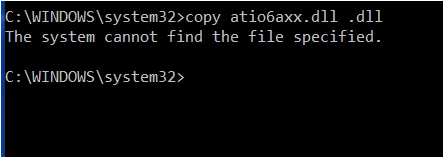
Photoshop then opens but I cannot do anything. I have tried running an elevated command prompt and running "copy atio6axx.dll .dll" but it returns the message that "The system cannot find the file specified."
 

defaultibbhswhqwa96_0-1605215981018.png


1.2K
Translate
Report
Community guidelines
Be kind and respectful, give credit to the original source of content, and search for duplicates before posting. Learn more
community guidelines
Adobe
Community Expert ,
Nov 12, 2020 Nov 12, 2020
LATEST

Moved from Using the Community (which is about the forums) to the Photoshop forum
To find a forum for your program please start at https://community.adobe.com/


That MAY be a Microsoft problem... Go to the Search bar at the top of http://www.microsoft.com/en-us/default.aspx to find and re-install the C runtime, or for ALL Windows help
-or direct to https://support.microsoft.com/en-us/help/2977003/the-latest-supported-visual-c-downloads

Translate
Report
Community guidelines
Be kind and respectful, give credit to the original source of content, and search for duplicates before posting. Learn more
community guidelines