


Exit
  • Global community
    • Language:
      • Deutsch
      • English
      • Español
      • Français
      • Português
  • 日本語コミュニティ
  • 한국 커뮤니티
0

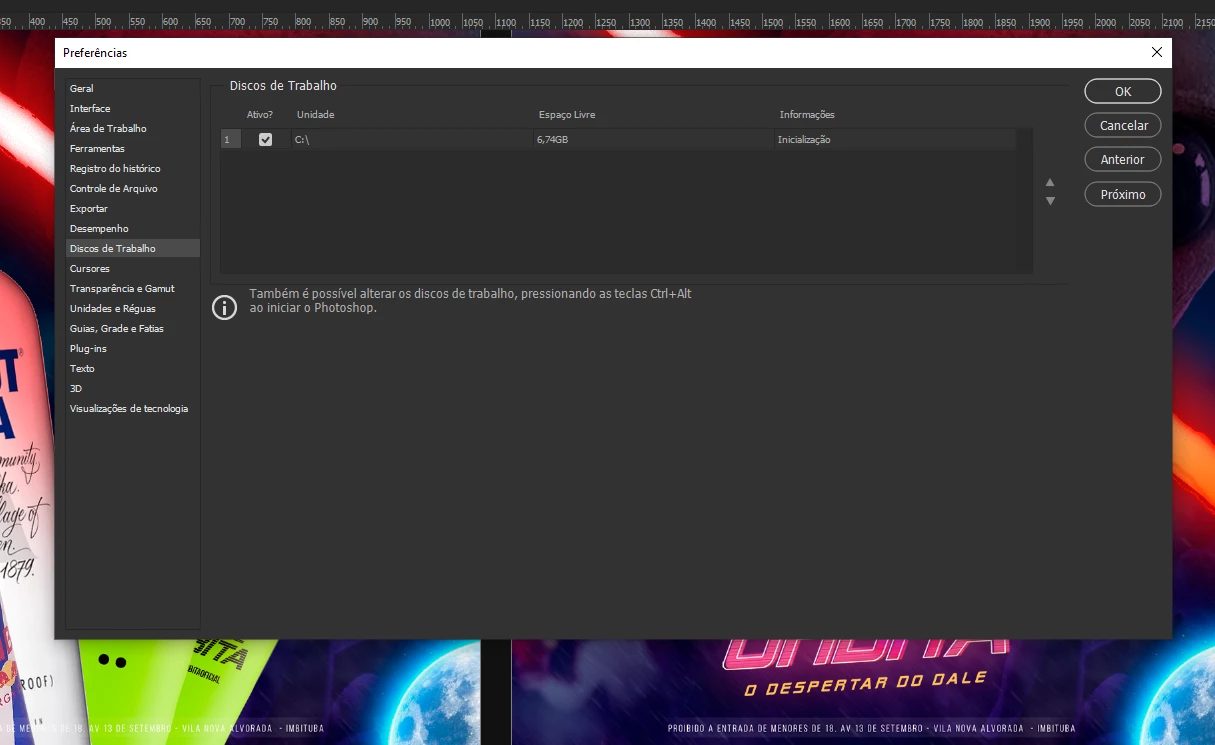
Local disk full but no option

New Here ,
Dec 03, 2019 Dec 03, 2019

Hi! I have full disk problem in adobe packages. After they upgraded to 2020 this problem started to appear. However, if I go to Photoshop Preferences and go to Local Disk, only one option will appear for me. But I use an SDD on the notebook and an external hard drive for work. But the option to use the HD does not appear. How can I solve?Screenshot_4.png
236
Translate
Report
Community guidelines
Be kind and respectful, give credit to the original source of content, and search for duplicates before posting. Learn more
community guidelines
Adobe
Community Expert ,
Dec 03, 2019 Dec 03, 2019

With only 6GB free on your C : drive you could soon have bigger problems than Photoshop running out of scratch space. You need to clear some free space.


As far as the external drive, see these threads for potential soloutions :

 https://community.adobe.com/t5/photoshop/cannot-change-my-scratch-disk-to-external-hd-photoshop-cc-2...

https://feedback.photoshop.com/photoshop_family/topics/photoshop-cc2014-cant-see-all-available-disks...


Dave

Translate
Report
Community guidelines
Be kind and respectful, give credit to the original source of content, and search for duplicates before posting. Learn more
community guidelines
New Here ,
Dec 04, 2019 Dec 04, 2019
LATEST

Hey Dave! 


Even formatting the external disk to FAT32 as suggested, still Photoshop does not recognize! : /

Translate
Report
Community guidelines
Be kind and respectful, give credit to the original source of content, and search for duplicates before posting. Learn more
community guidelines